User’s Manual
149
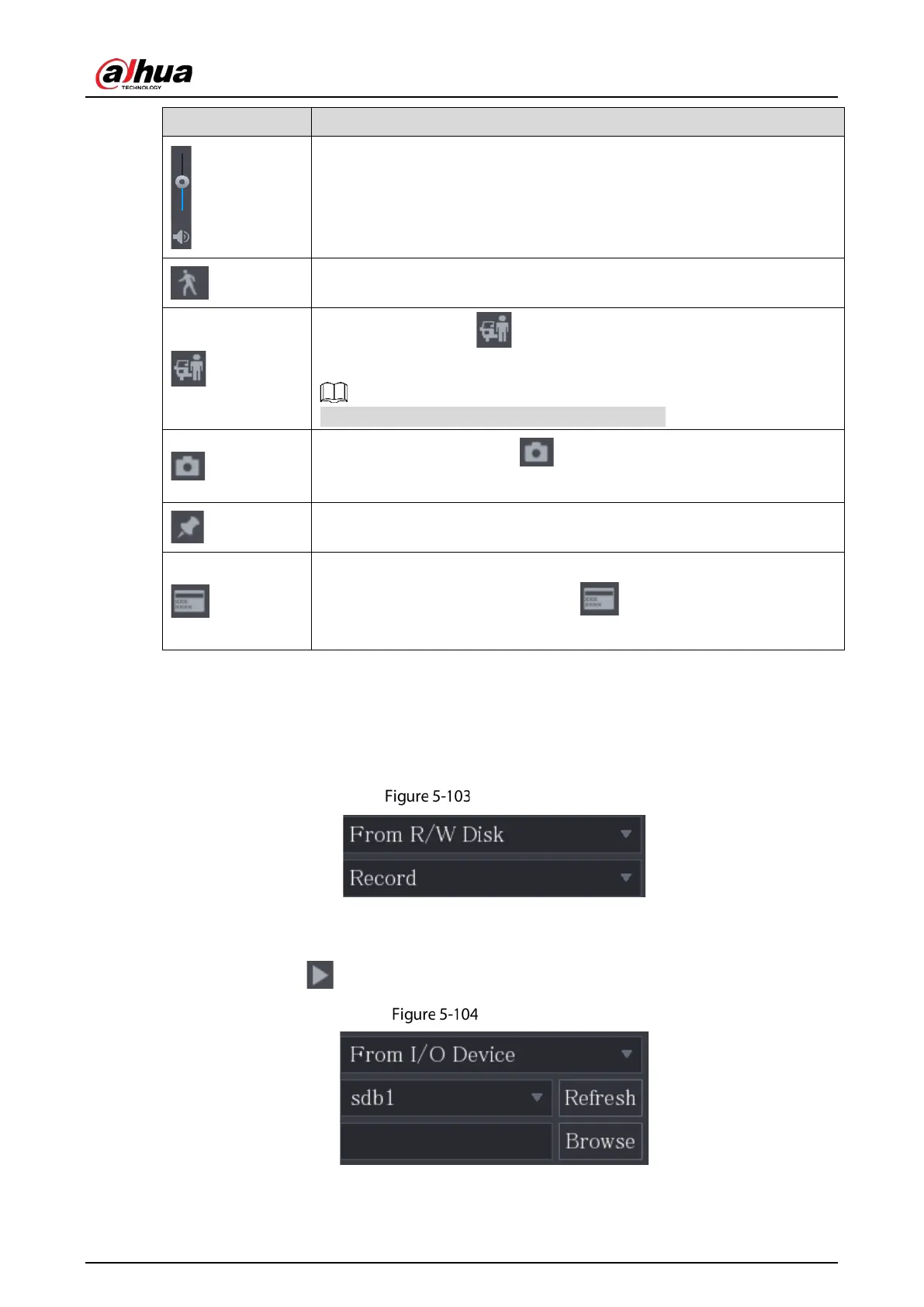
Adjust volume of playback.
Smart Search. For details about using the smart search, see "5.9.4 Smart
Search."
Smart detection. Click to select person or vehicle. The system plays
the detected person or vehicle videos.
Person and vehicle can be selected simultaneously.
In the full screen mode, click to take a snapshot and save into the
USB storage device or mobile HDD.
Add Mark for the recorded view. For details about adding mark, see "5.9.5
Marking and Playing Back Video."
Hide POS Hide.
During single-channel playback, click to display or hide POS
information on the screen.
5.9.3.2 Selecting Search Type
You can search the recorded videos, splice, or snapshots from HDD or external storage device.
From R/W Disk: Recorded videos or snapshots playback from HDD of the Device.
R/W HDD
From I/O Device: Recorded videos playback from external storage device.
Click
Browse, select the save path of recorded video file that you want to play. Double-click the
video file or click to start playing.
Browse


 To Next Page
 Loading...