User’s Manual
4
2.2.1 DH-XVR42xxAN-I/DH-XVR42xxAN-I(V2.0)/DH-XVR52xxA-I2/DH-
XVR52xxA-I3/DH-XVR52xxA-4KL-I2/DH-XVR52xxA-4KL-I3/DH-
XVR52xxAN-I2/DH-XVR52xxAN-I3/DH-XVR52xxAN-4KL-I2/DH-
XVR52xxAN-4KL-I3/DH-XVR72xxA-4K-I2/DH-XVR72xxA-4KL-I/DH-
XVR7216AN-4K-I2/DH-XVR82xxA-4K-I/DH-XVR82xxA-4KL-I
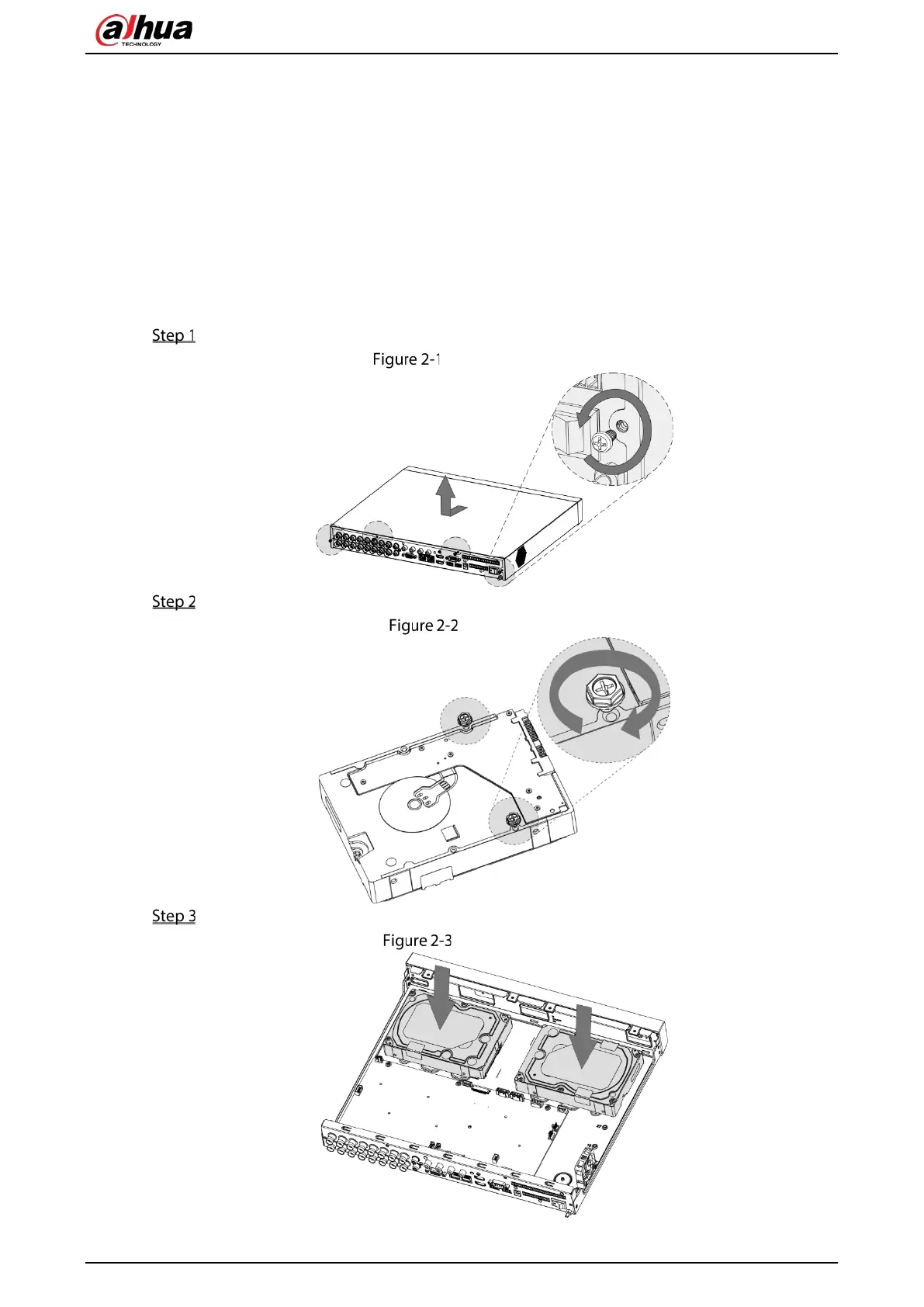
Remove the screws to take off the cover.
Remove screws
Put two screws on the HDD and twist one turn.
Put screws
Align the two screws with the holes on the device.
Align screws


 To Next Page
 Loading...