User’s Manual
154
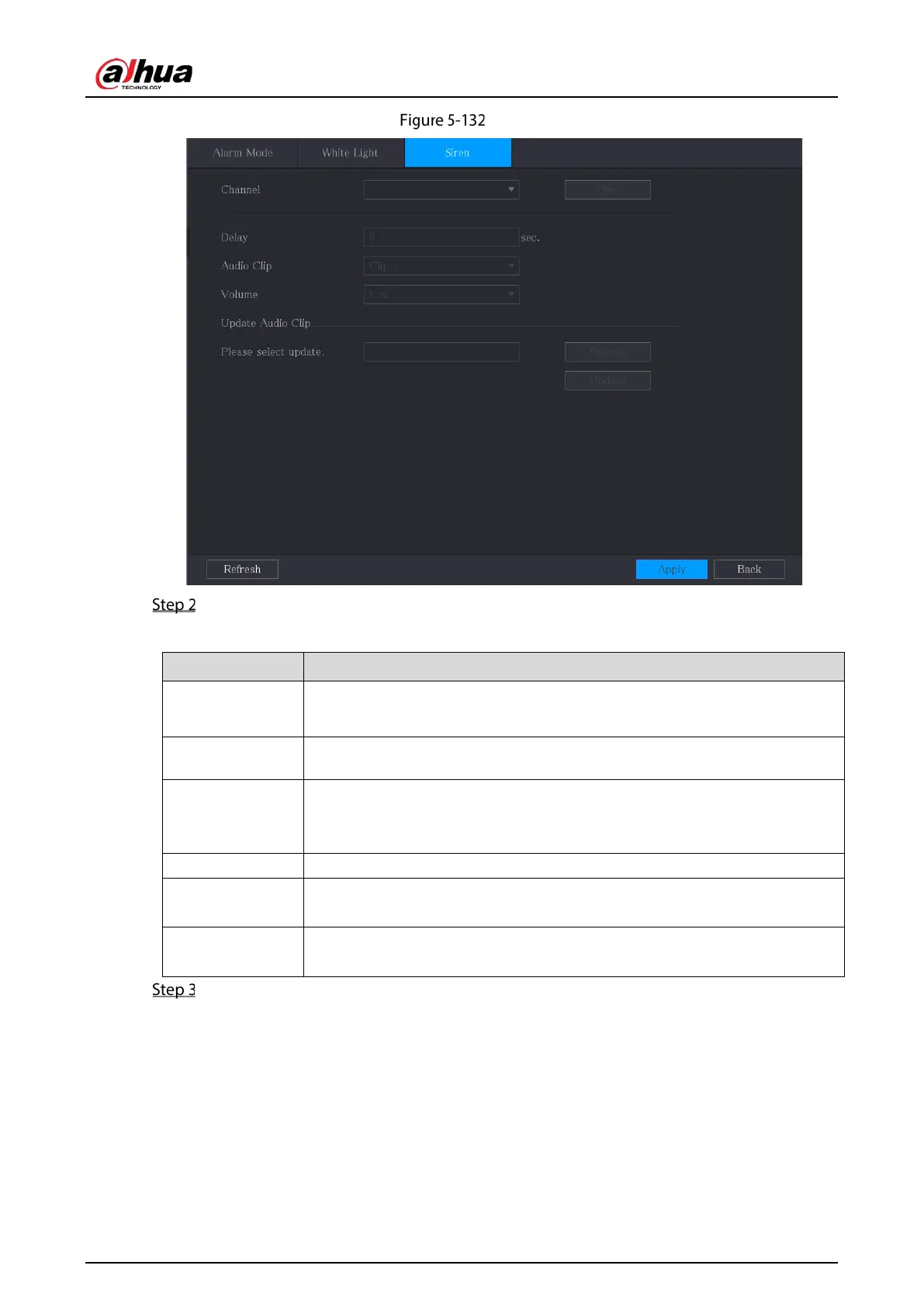
Siren
Configure the settings for the siren parameters.
Table 5-30 Siren parameters
Channel
In the
list, select a channel that is connected to a camera that
supports audio function.
Play Click
to manually trigger the IP camera to play audio file.
Delay
Set a length of time for the Device to delay turning off alarm after the alarm is
cancelled. The value ranges from 5 seconds to 30 seconds, and the default
value is 5 seconds.
Audio Clip Select the audio clip for the siren sound. The default setting is
.
Volume
Select the volume for the audio clip. You can select the flash frequency from
,
, and
.
Update Audio Clip
Import the upgrade audio file (.bin or .wav) to upgrade the alarm audio file of
the camera.
Click Apply to complete the settings.
Related Operations
You can update the audio files of the camera on the local interface.
1. Prepare a USB device or other external storage device and plug it into the Device.
2. Click
Browse.
3. Select the upgrade audio file (.bin or .wav).
4. Click
OK to return to the Siren page.


 To Next Page
 Loading...