EasyManua.ls Logo

Daikin 3MKD58DVM - Removal of PCBs; Main PCB and Service Monitor PCB Removal

Daikin 3MKD58DVM
23 pages
Print Icon
To Next Page IconTo Next Page
To Previous Page IconTo Previous Page
Loading...
Si12-793 Removal of PCBs
Removal Procedure 7
3. Removal of PCBs
Procedure Warning Be sure to wait for 10 minutes or more after turning off all power
supplies before disassembling work.
Step
Procedure Points
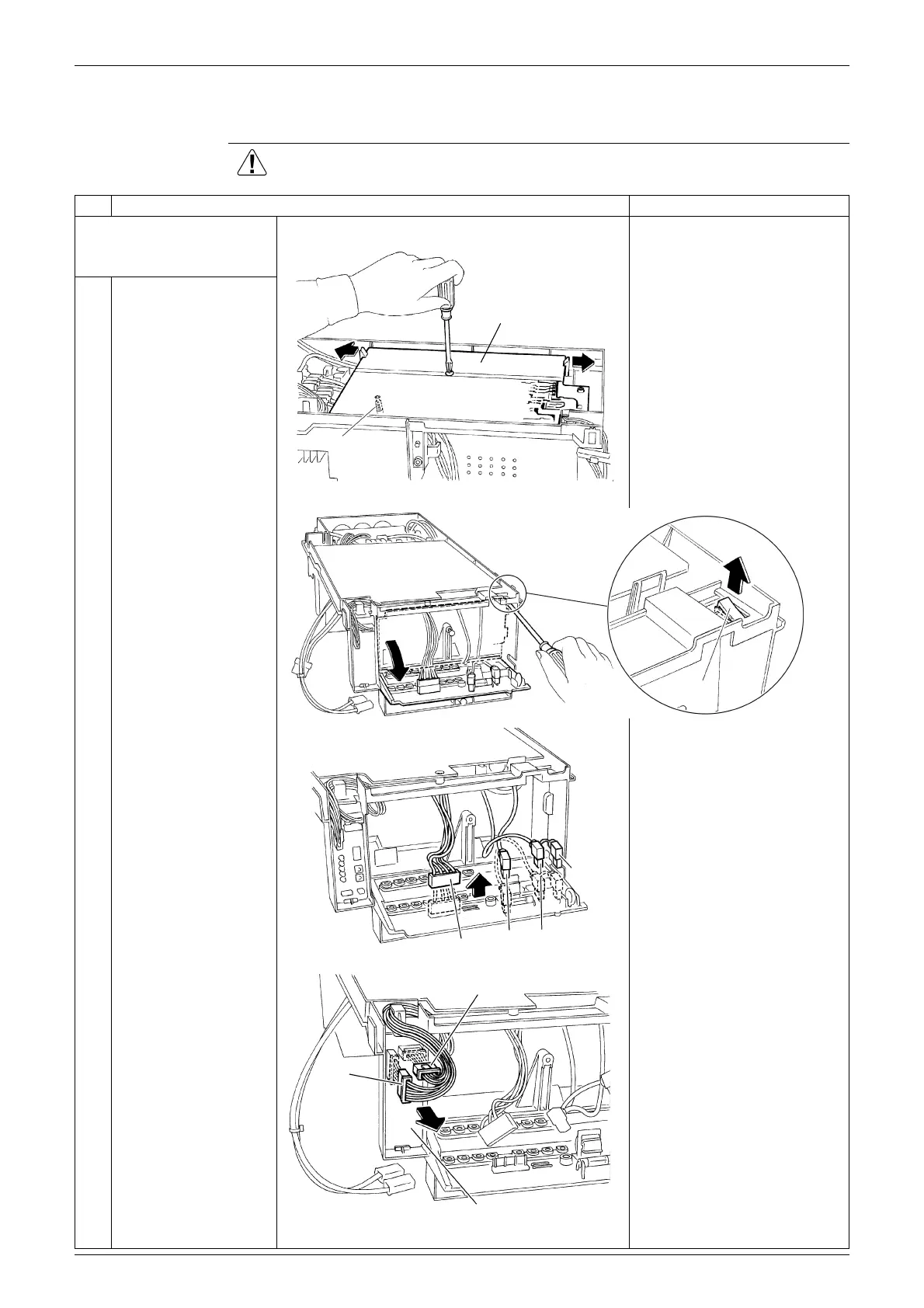
1. Remove the service
monitor PCB and the
main PCB.
When reassembling, insert
the base bar into the hole of
the main PCB.
1
Remove the screw of
the main PCB, and
unfasten the 2 hooks.
2
Unfasten the hook of
the terminal board, and
open the terminal
board.
3
Disconnect each
connector [S11] [HE]
[HL] [HN] on the back of
the terminal board.
4
Disconnect the
connectors [S52]
[S102] from the service
monitor PCB.
Main PCB
(R2177)
Base bar
(R2178)
Hook
[S11]
[HL] [HN]
(R17403)
[HE]
(R17347)
[S102]
[S52]
Service monitor PCB

Related product manuals