3 Operation
Operation manual
5
EJHA04AAV3
Daikin Altherma hybrid monobloc – Heat pump module
4P531174-1B – 2018.10
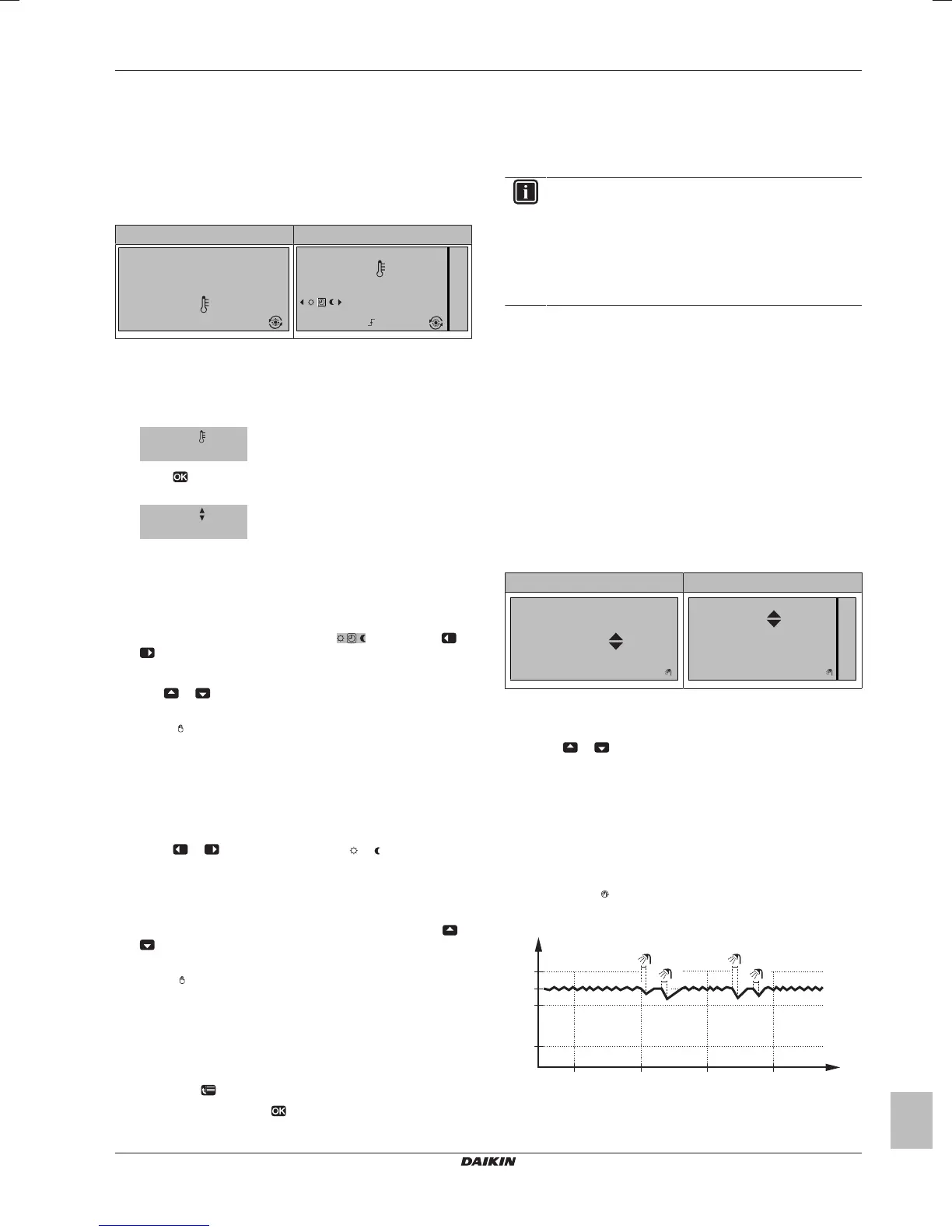
3.3.2 Room thermostat control - Using the
room temperature home page
Typical room temperature home pages
Depending on the user profile, the user interface gives you either a
basic or a detailed home page. To set the user profile, refer to
Configuring user profile and home pages in the user reference
guide.
User profile = Basic User profile = Detailed
15:20
20.0°C
Mon
Room
Actual temperature
15:20
20.0°C
17:30
Actual temperature
Room
Scheduled
Mon
Tue
To read out the actual and desired room
temperature
1 Go to the room temperature home page (Room).
Result: You can read out the actual temperature.
2 Press .
Result: You can read out the desired temperature.
22.0°C
Desired temperature
To temporarily overrule the room temperature
schedule
1 Go to the room temperature home page (Room).
2 In the detailed home page (user profile = Detailed), select the
scheduled room temperature mode (
) by pressing or
.
Result: The room temperature follows the scheduled value.
3 Use
or to adjust the temperature.
Result: The room temperature follows the manually adjusted
value (
), but will return to the scheduled value at the next
scheduled action.
To change the mode from scheduled to preset
value
Prerequisite: User profile = Detailed.
1 Go to the room temperature home page (Room).
2 Press
or to select a preset value ( or ).
Result: The room temperature follows the preset value
(Comfort or Eco), but will return to the scheduled value after the
overrule period (= Temperature lock: 2/4/6/8 hours or
permanent).
3 If necessary, you can overrule the preset value by using
or
to adjust the temperature.
Result: The room temperature follows the manually adjusted
value (
), but will return to the scheduled value after the
overrule period (= Temperature lock: 2/4/6/8 hours or
permanent).
To set the overrule period
Prerequisite: You switched the permission level to Advanced end
user.
1 Go to [7.2]:
> User settings > Temperature lock.
2 Select a value and press
:
▪ Permanent
▪ hours (2, 4, 6, 8)
3.3.3 Room thermostat control - Using the
leaving water temperature home pages
INFORMATION
The leaving water is the water that is sent to the heat
emitters. The desired leaving water temperature is set by
your installer in accordance with the heat emitter type.
Example: Underfloor heating is designed for lower leaving
water temperature than radiators and heat pump
convectors and/or fan coil units. You only have to adjust
leaving water temperature settings in case of problems.
For more information about the leaving water temperature, see the
user reference guide.
3.4 Domestic hot water control
3.4.1 Instant DHW (no tank installed)
Not applicable for Switzerland
When there is a demand for hot water tapping, the boiler provides
DHW instantly.
Using the instant DHW home page
Not applicable for Switzerland
Depending on the user profile, the user interface gives you either a
basic or a detailed home page.
User profile = Basic User profile = Detailed
44°C
01:03
Tue
DHW
Desired temperature
01:03
44°C
Tue
DHW
Desired temperature
To adjust the instant DHW temperature
1 Go to the instant DHW home page.
2 Press
or to adjust the instant DHW temperature (DHW).
The instant DHW set point temperature may NOT be below 40°C.
3.4.2 Tank
The following modes are only applicable if a tank is installed and are
set by the installer.
Reheat mode
In reheat mode (
),the DHW tank continuously heats up to the
temperature shown on the DHW tank temperature home page
(example: 50°C).
t
60°C
00:00 07:00
50°C
15°C
40°C
14:00 21:00
1
2
3
4
T
t
T
t
DHWtank temperature
t Time




 To Next Page