3 Operation
Operation manual
6
EJHA04AAV3
Daikin Altherma hybrid monobloc – Heat pump module
4P531174-1B – 2018.10
INFORMATION
There is a risk of space heating capacity shortage/comfort
problem (in case of frequent domestic hot water operation,
frequent and long space heating interruption will happen)
when selecting [6‑0D]=0 ([A.4.1] Domestic hot water
Type=Reheat only).
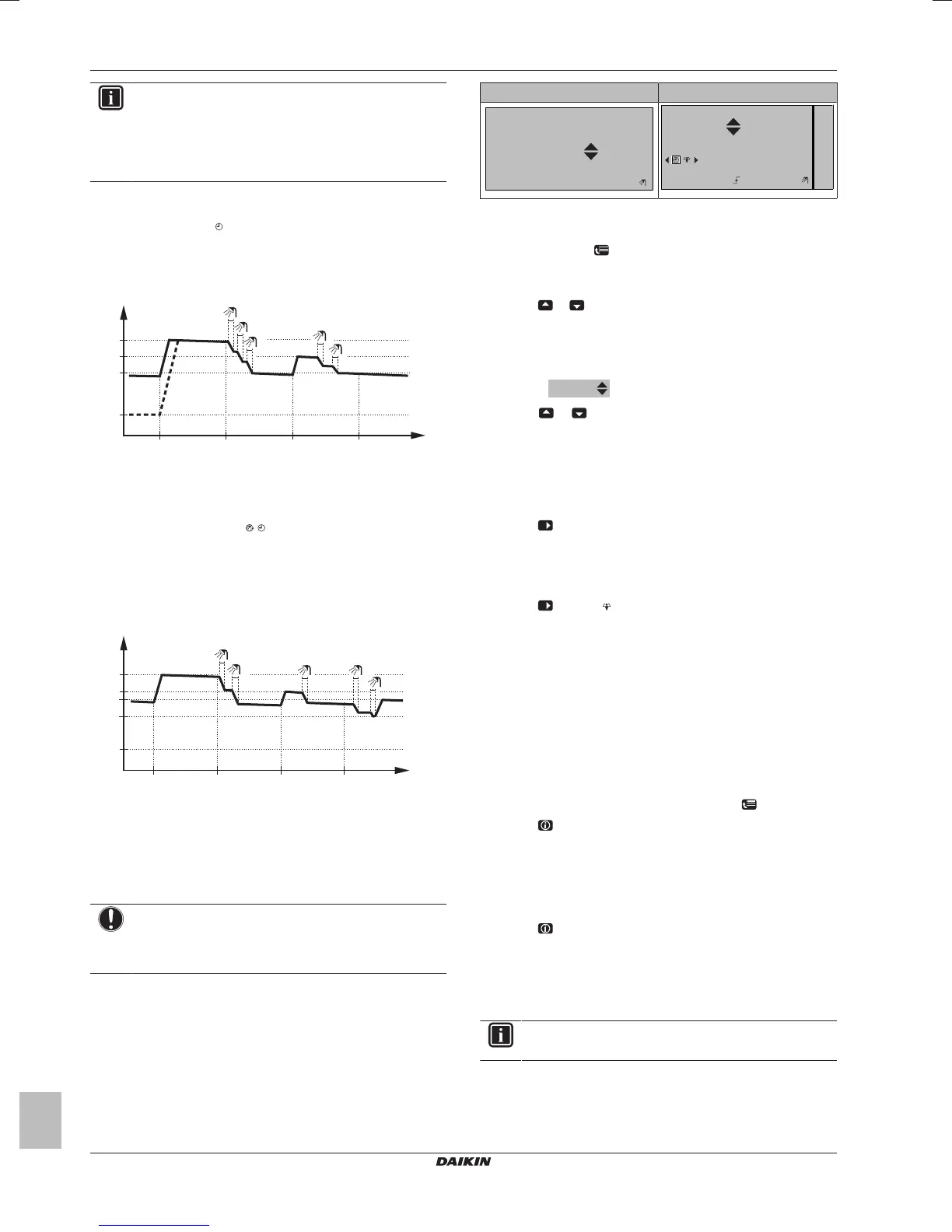
Scheduled mode
In scheduled mode (
), the DHW tank produces hot water
corresponding to a schedule. The best time to allow the tank to
produce hot water is at night, because the space heating demand is
lower.
Example:
t
60°C
00:00 07:00
50°C
15°C
40°C
14:00 21:00
1
2
3
4
5
T
t
T
t
DHWtank temperature
t Time
Scheduled + reheat mode
In scheduled + reheat mode (
), the domestic hot water control is
the same as in scheduled mode. However, when the DHW tank
temperature drops below a preset value (=reheat tank temperature –
hysteresis value; example: 35°C), the DHW tank heats up until it
reaches the reheat set point (example: 45°C). This ensures that a
minimum amount of hot water is available at all times.
Example:
t
T
t
60°C
00:00 07:00
50°C
45°C
15°C
14:00 21:00
35°C
1
2
4
5
3
T
t
DHWtank temperature
t Time
60°C Storage comfort
50°C Storage eco
45°C Reheat
35°C Reheat tank temperature–hysteresis value
Using the DHWtank temperature home page
NOTICE
Disinfection mode. Even if you turn OFF domestic hot
water operation via the DHWtank temperature home page
(Tank), disinfection mode will remain active.
Typical DHWtank temperature home pages
Depending on the user profile, the user interface gives you either a
basic or a detailed home page. The examples in the illustrations
below are in DHWtank mode = Scheduled.
User profile = Basic User profile = Detailed
15:20
60°C
Storage comfort
Tank
Mon
15:20
60°C
00:00
Mon
Tue
Tank
Storage comfort
To read out and adjust the desired reheat temperature (in
scheduled and reheat mode)
1 Go to [7.4.3.3]:
> User settings > Preset values > Tank
temperature > Reheat.
Result: You can read out the desired reheat temperature.
2 Press
or to adjust.
To read out and overrule the active or next scheduled desired
temperature (in scheduled mode or scheduled + reheat mode)
1 Go to the DHWtank temperature home page (Tank).
Result:
is displayed.
2 Press
or to overrule. Note: If the desired temperature is
weather dependent, you cannot change it on the home page.
Using the DHWtank booster mode
To activate the DHWtank booster mode (user profile = Basic)
1 Go to the DHWtank temperature home page (Tank).
2 Press
for more than 5seconds.
To activate the DHWtank booster mode (user profile =
Detailed)
1 Go to the DHWtank temperature home page (Tank).
2 Press
to select .
3.5 Advanced usage
3.5.1 About changing the user permission level
The amount of information you can read out in the menu structure
depends on your user permission level:
▪ End user (= default)
▪ Adv. end user: You can read out more information.
To set the user permission level to Advanced end user
1 Go to the main menu or any of its submenus:
.
2 Press
for more than 4seconds.
Result: The user permission level switches to Adv. end user.
Additional information is displayed and "+" is added to the menu title.
The user permission level will stay in Adv. end user until set
otherwise.
To set the user permission level to End user
1 Press
for more than 4 seconds.
Result: The user permission level switches to End user. The user
interface will return to the default home screen.
3.6 Schedules: Example
INFORMATION
The procedures to program other schedules are similar.
In this example:
▪ Room temperature schedule in heating mode
▪ Monday = Tuesday = Wednesday = Thursday = Friday
▪ Saturday = Sunday




 To Next Page