EasyManua.ls Logo

Daikin ARM09MV2S - Page 11

Daikin ARM09MV2S
18 pages
Print Icon
To Next Page IconTo Next Page
To Previous Page IconTo Previous Page
Loading...
Si011356EA Electrical Components
Removal Procedure 9
10
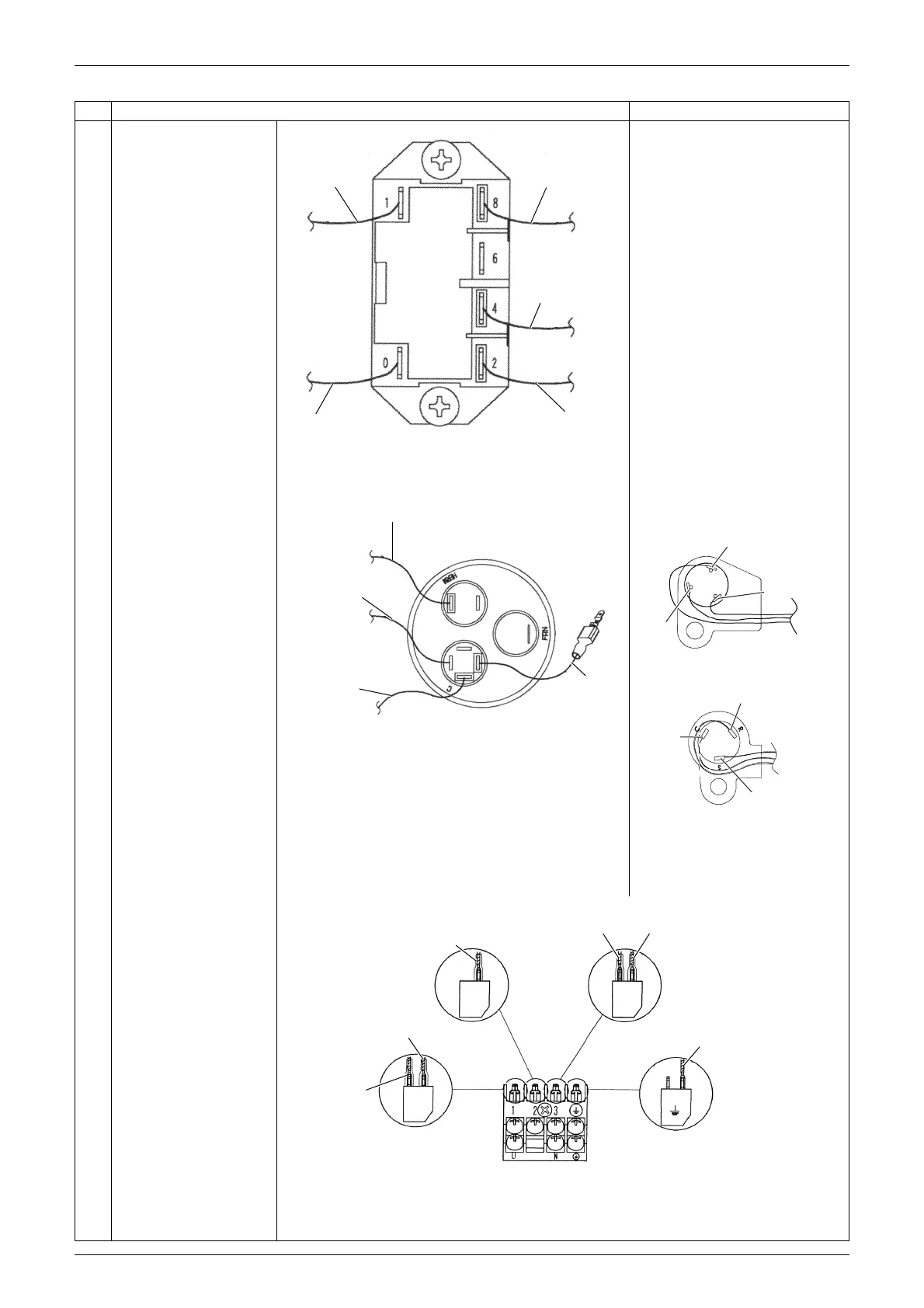
11
Pull out the terminals
from the magnetic
contactor (K1M).
Remove the 2 screws
and remove the
magnetic contactor
(K1M).
12
13
Pull out the terminals
from the compressor
capacitor (C1R).
Remove the 2 screws
to loosen the capacitor
fixing band and remove
the compressor
capacitor (C1R).
Compressor lead wire
For R-410A models
For R-32 models
S (W): yellow
C (U): blue
R (V): red
14
Pull out the harnesses
from the terminal board
(X1M).
Step Procedure Points
to X1M (3)
: white
to X1M (1)
: red (fuse)
to X1M (1)
: red
to compressor
(C terminal)
: blue
to X1M (2)
: white
K1M
(R20772)
to compressor (S terminal)
: yellow
to compressor
(R terminal)
: red
to X1M (3)
: black
C1R
red
(R20746)
(R15375)
C (U)
R (V)
S (W)
C
(
U
)
R
(
V
)
S
(
W
)
(
R20742
)
to earth / ground wire
: green / yellow
to K1M (1): white
to K1M (0): white
to K1M (4): red
to K1M (8)
: red (fuse)
to C1R: black
(R20741)
X1M
(2)
X1M
(1)
X1M
(3)
X1M

Related product manuals