Control Devices EDUS39-605
30 Controls
2.4.6 Instructions for Initial Setting
Group No. Setting for Central Control Equipment
Group No. should be set for each group by the remote controller for indoor unit when you operate the system with central
remote controller and unified ON/OFF controller. For the same control group, set only one of the units.
Remote controller for indoor unit
1. Turn ON the power of the indoor unit and central remote
controller. No settings can be made without the power
ON.
(
Check that the installation and electrical wiring are correct
before turning the power supply ON.
When the power supply is turned ON, all LCD appear
once and the unit may not accept the operation for about
one minute with the display of [88].
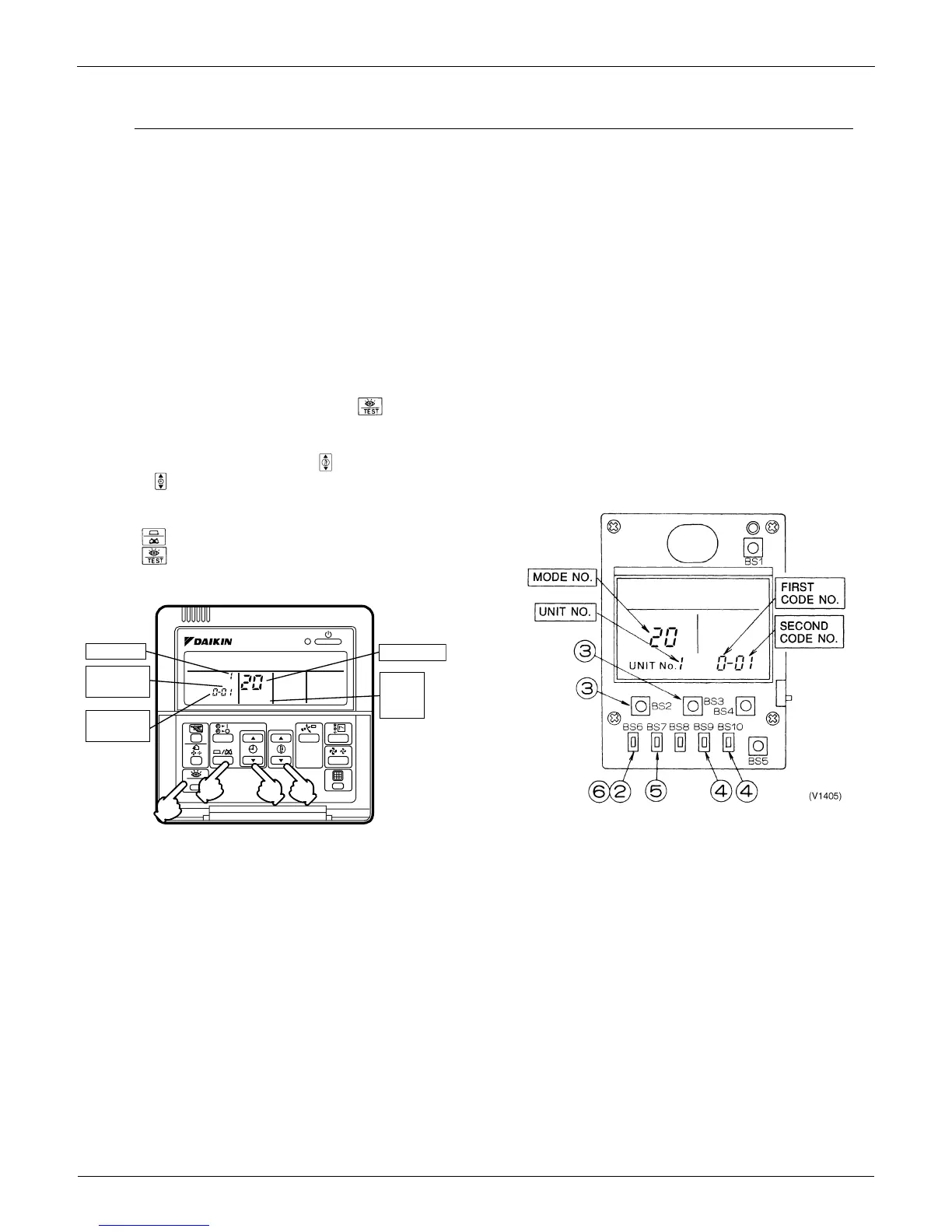
2. While in the normal mode, hold down the button for
a minimum of 4 seconds.
The remote controller will enter the FIELD SET MODE.
3. Select the MODE No. [00] with the button.
4. Use the button to select the group No. for each group.
(Group numbers increase in the order of 1-00, 1-01, ... 1-
15, 2-00, ... 4-15.)
5. Press to set the selected group No.
6. Press to return to the NORMAL MODE.
Simplified remote controller
Group No. setting by simplified remote controller.
1. Remove the cover of remote controller.
2. While in normal mode, press the [BS6] BUTTON (field
set) to enter the FIELD SET MODE.
3. Select the mode No. [00] with [BS2] BUTTON
(temperature setting ) and [BS3] BUTTON (temperature
setting ).
4. Select the group No. with [BS9] BUTTON (set A) and
[BS10] BUTTON (set B). (Group Numbers increase in the
order of 1-00, 1-01......1-15, 2-00,.....4-15. However, the
unified ON/OFF controller displays only group No. set
within the range of control.)
5. Press [BS7] BUTTON (set/cancel) to set group No.
6. Press [BS6] BUTTON (field set) to return to the NORMAL
MODE.
TEST
SETTIING
Unit NO.
3
4
5
2·6
UNIT NO.
SECOND
CODE NO.
MODE NO.
FIELD
SET
MODE
FIRST
CODE NO.
(V1910)


 To Next Page