Control Devices EDUS39-605
36 Controls
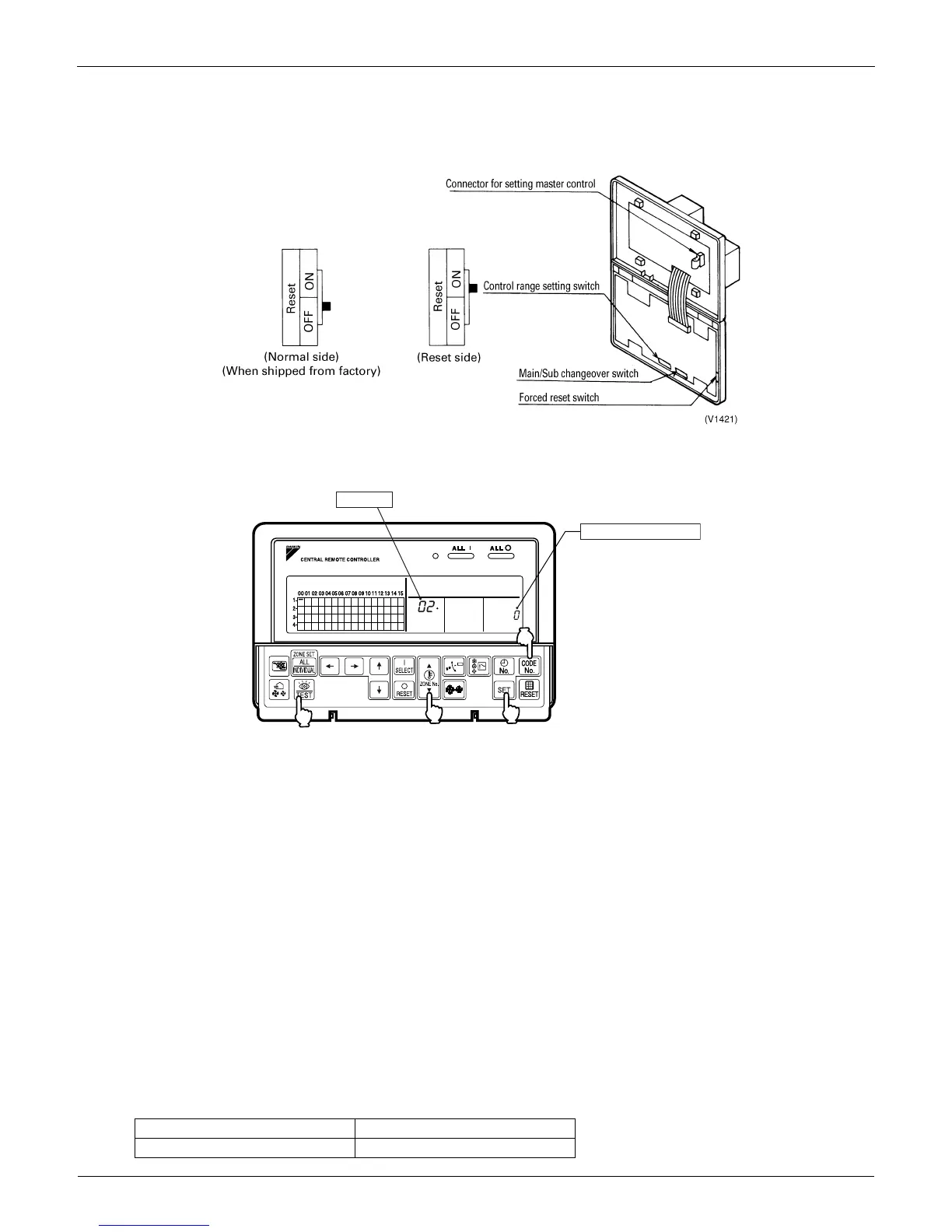
4. Forced reset switch
When changing the setting of the connector for the main controller, you can reset simply by setting it to the reset side
once and returning to the normal side, without turning the power OFF.
For normal operation, set the switch to the normal OFF side.
5. Special Function Settings
Special functions on the central control system can be changed while in FIELD SETTING mode.
Setting Procedure
1.=Press and hold the TEST button for four seconds or more to set the system to FIELD SETTING mode.
2.=Use the ZONE No. button to select a desired temperature.
Press
to increase the Mode No. Press to decrease the Mode No.
3.=Press the CODE No. button for control mode to select a Switch Setting No.
4.=Press the SET button to determine the content of the changed setting. The blinking display then reads Switch
Setting No.
5.=Press the TEST button to return the system to NORMAL mode. In this case, you do not need to turn cycle the power
again.
Example: If no restricted items from the sub-central remote controller while in double-central control, set Mode No. to
[02] and the Switch Setting No. to [0].
6. Refreshed operation
Refreshed operation is the default setting from the factory and enables setting of TEMPERATURE CONTROL and
TEMPERATURE SETTING automatically when turning on the unit from DCS302C71.
7. Factory default setting
OUTDOOR SYSTEMS INDOOR UNITS
Cooling Mode Cooling 82°F


 To Next Page