32 English
Menu Options
6
Setting
Save the settings?
Schedule
Yes No
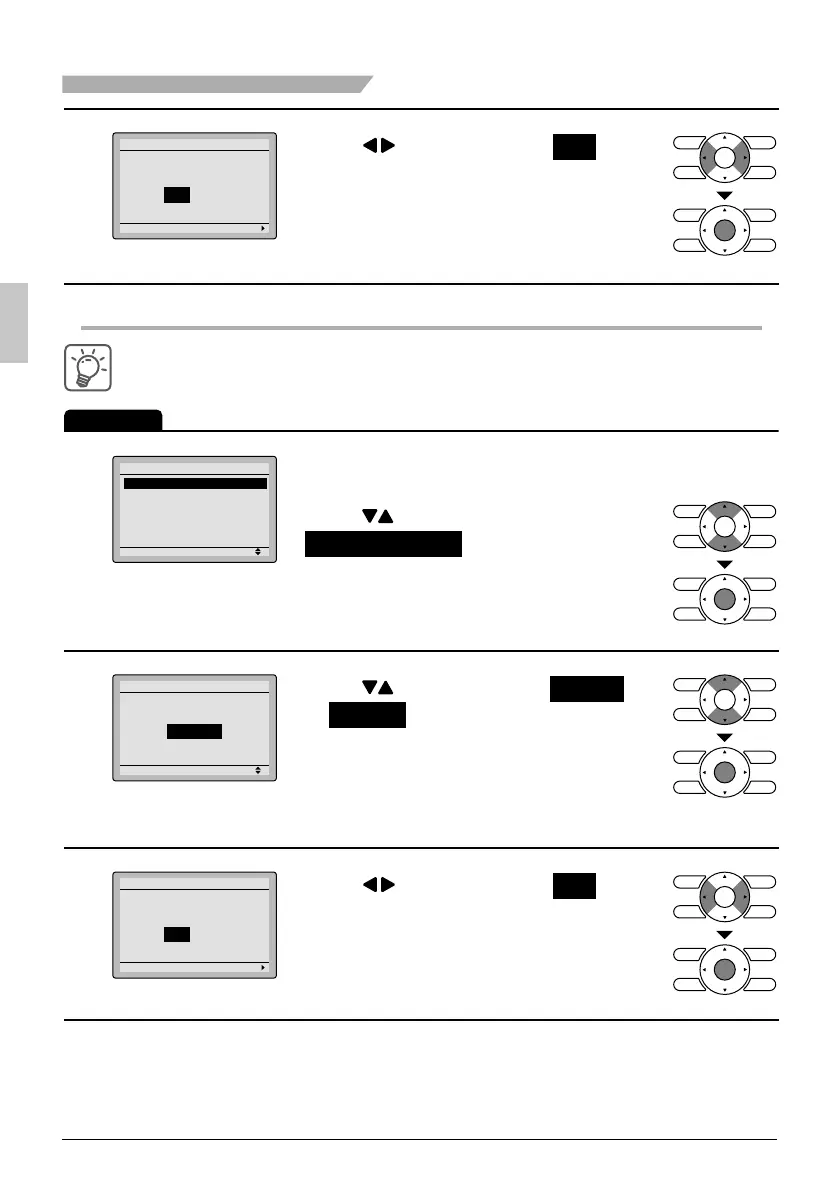
Press ● buttons to select Yes on the
confi rmation screen.
Pressing the Menu/OK button confi rms
the settings for each day and takes you
back to the basic screen.
Enabling or disabling the schedule
Operation
1
Setting
Schedule
Enable/Disable
Daily Patterns
Settings
Display the schedule screen. ●
(See page 28.)
Press ● buttons to select
Enable / Disable on the schedule
screen.
Press Menu/OK button to display the
enable/disable screen.
2
Setting
Enable/Disable
Schedule
Disable
Press ● buttons to select Enable
or Disable on the enable/disable
screen.
Press Menu/OK button after selecting
the item. The confi rmation screen is
displayed.
3
Setting
Save the settings?
Schedule
Yes No
Press ● buttons to select Yes on the
confi rmation screen.
Pressing Menu/OK button confi rms the
enable/disable setting for the schedule
and takes you back to the basic screen.
01_EN_3P243520-3E.indd 3201_EN_3P243520-3E.indd 32 9/11/2012 4:13:02 PM9/11/2012 4:13:02 PM



 To Next Page