46 English
Maintenance
2
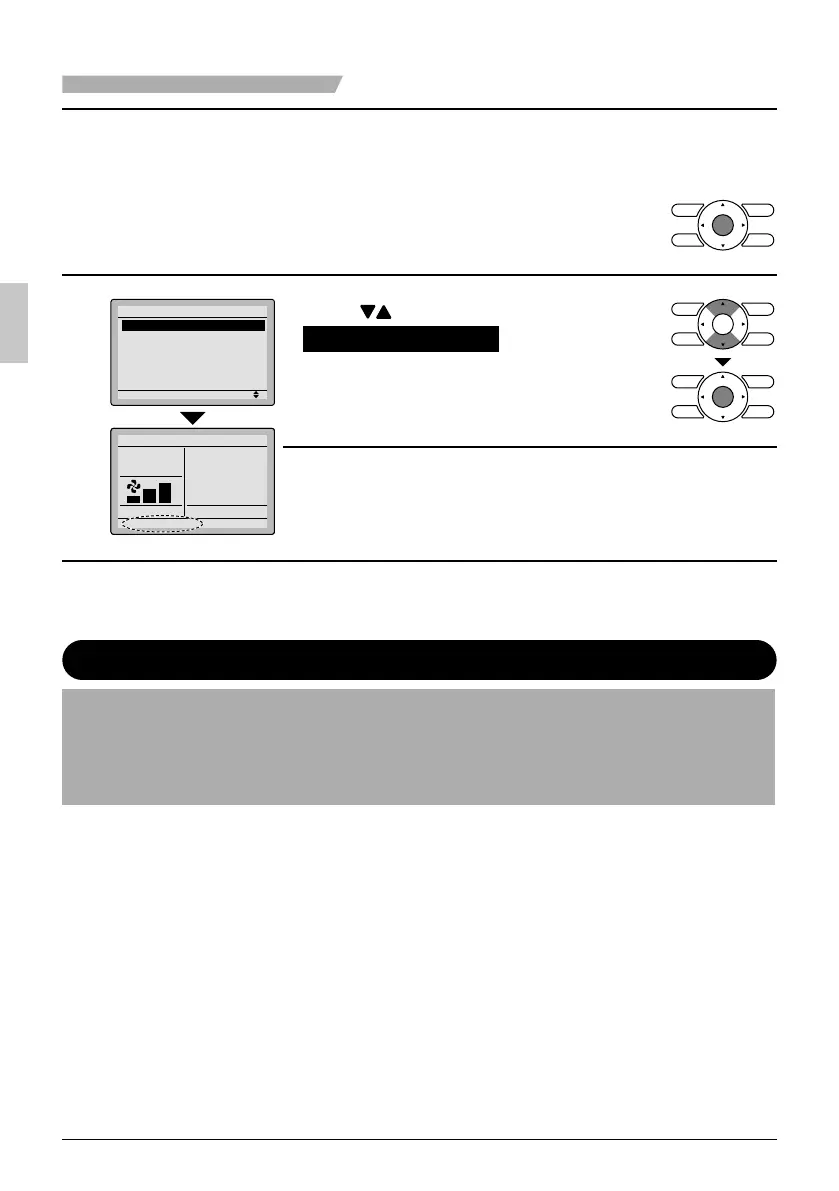
Reset the fi lter indicator when the fi lter or
●
element is cleaned or replaced.
Press ● Menu/OK button.
The main menu screen will be
displayed.
3
Setting
Main Menu
Reset Filter Indicator
Airflow Direction
Ventilation
Schedule
Off Timer
Celsius / Fahrenheit
1/2
Cool
Set to
74F
Press ● buttons to select
Reset Filter Indicator on the main
menu screen and press Menu/OK
button.
The display shown in illustration 1 is no ●
longer displayed from the basic screen
when the fi lter sign is reset.
Maintaining the Unit and LCD Display
Wipe the LCD and surface of the remote controller with a dry cloth when they become dirty. ●
If the dirt on the surface cannot be removed, soak the cloth in neutral detergent diluted with ●
water, squeeze the cloth tightly, and clean the surface. Wipe the surface with a dry cloth.
Note
Do not use any paint thinner, organic solvent, or strong acid. ●
01_EN_3P243520-3E.indd 4601_EN_3P243520-3E.indd 46 9/11/2012 4:13:16 PM9/11/2012 4:13:16 PM



 To Next Page