English 45
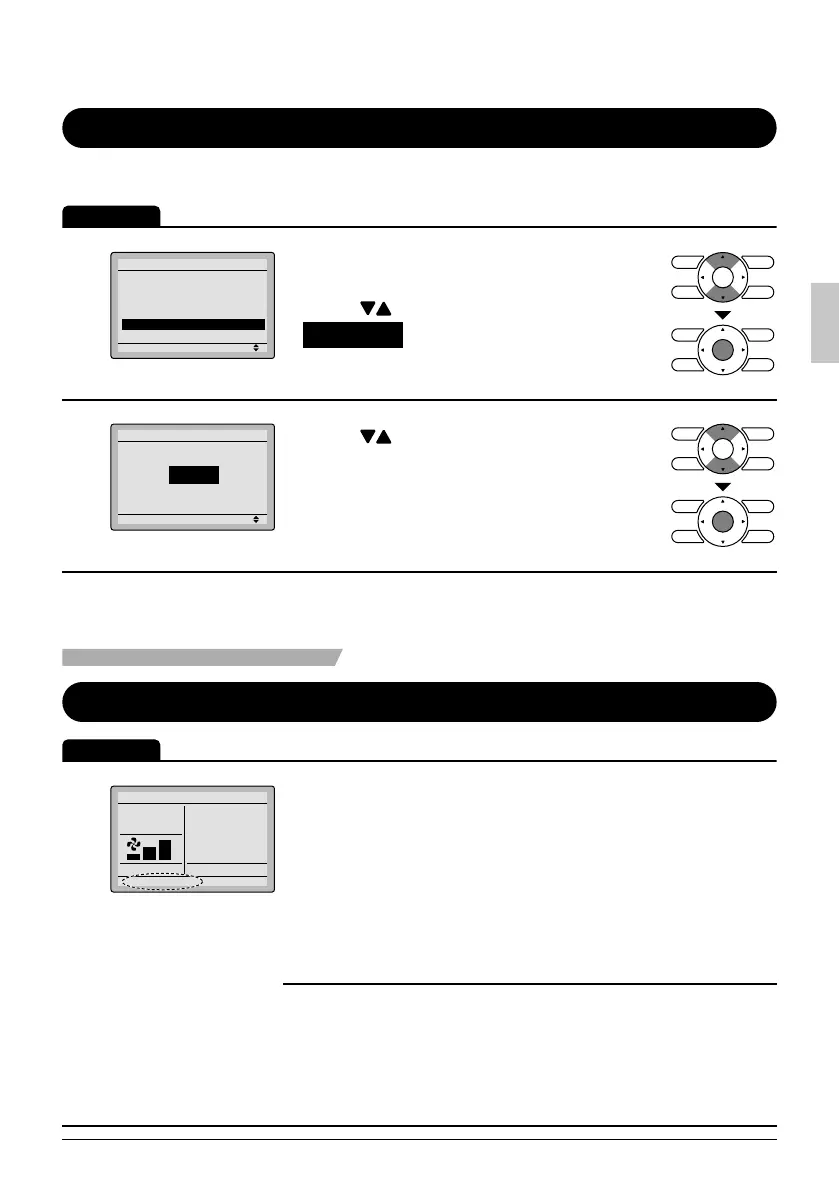
Language
Selectable Languages
Operation
1
Setting
Main Menu
Configuration
Current Settings
Clock & Calendar
Daylight Saving Time
Language
2/2
Display the main menu screen. ●
(See page 22.)
Press ● buttons to select
Language on the main menu screen
and press the Menu/OK button.
2
Setting
Language
English
Press ● buttons to select the preferred
language on the language screen.
English/Français/Español are available.
Press ● Menu/OK button to confi rm the
settings and return to the basic screen.
Maintenance
Reset Filter Indicator
Operation
1
Cool
Time to clean filter
Set to
74F
When it is time to clean or replace the fi lter, one of ●
the following messages will be displayed on the
bottom of the basic screen.
Time to clean fi lter
Time to clean fi lter & element
Time to clean element
This is not displayed when simple display is set.*
Wash, clean, or replace the fi lter or ●
element.
For details, refer to the operation
manual supplied with the indoor unit.
01_EN_3P243520-3E.indd 4501_EN_3P243520-3E.indd 45 9/11/2012 4:13:16 PM9/11/2012 4:13:16 PM



 To Next Page