36 English
Menu Options
Confi guration
Contrast Adjustment
Operation
1
Setting
Main Menu
Configuration
Current Settings
Clock & Calendar
Daylight Saving Time
Language
2/2
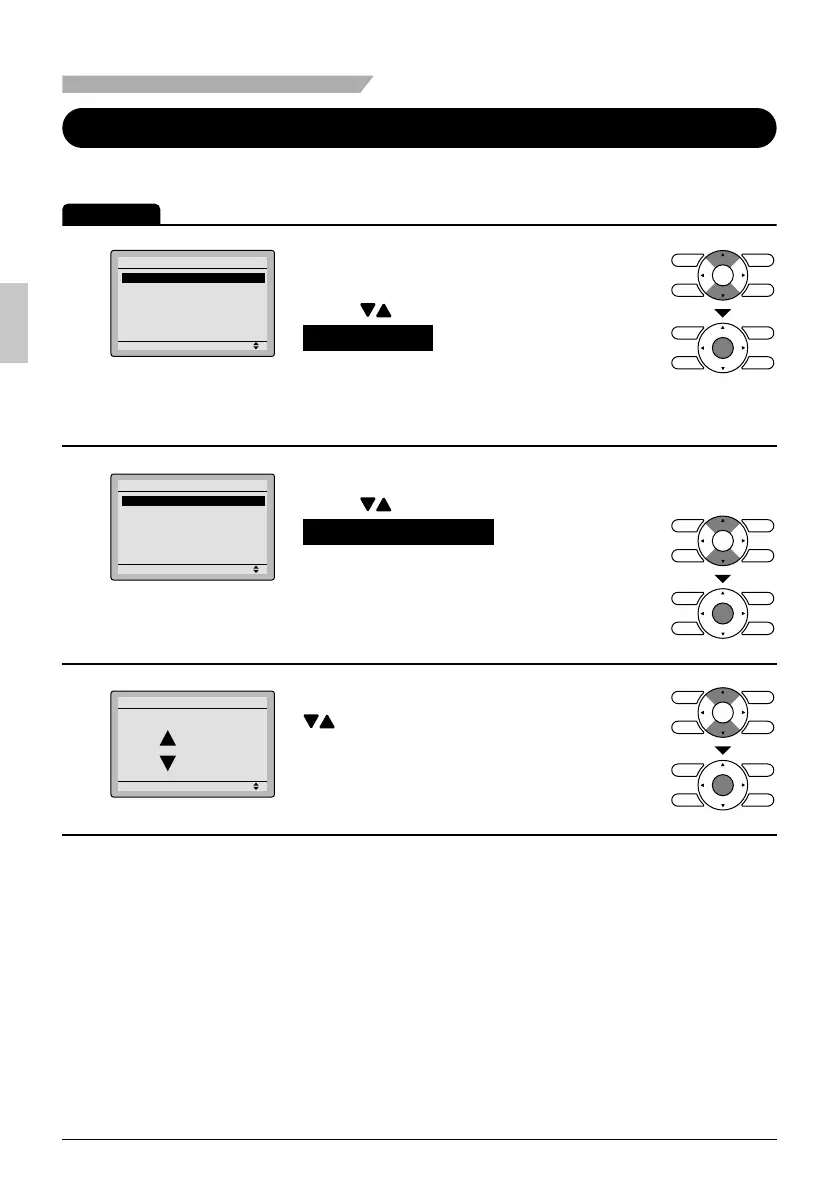
Display the main menu screen. ●
(See page 22.)
Press ● buttons to select
Confi guration on the main menu
screen.
Press Menu/OK button to display the
confi guration screen.
2
Setting
Configuration
Contrast Adjustment
Display
Navigate to the confi guration screen. ●
Press ● buttons to select
Contrast Adjustment on the
confi guration screen.
Press Menu/OK button to display the
contrast adjustment screen.
3
Setting
Dark
Light
Contrast Adjustment
On the contrast adjustment screen press ●
buttons until you reach the desired
contrast.
After setting, press Menu/OK button and
return to the basic screen.
01_EN_3P243520-3E.indd 3601_EN_3P243520-3E.indd 36 9/11/2012 4:13:06 PM9/11/2012 4:13:06 PM



 To Next Page