40 English
Menu Options
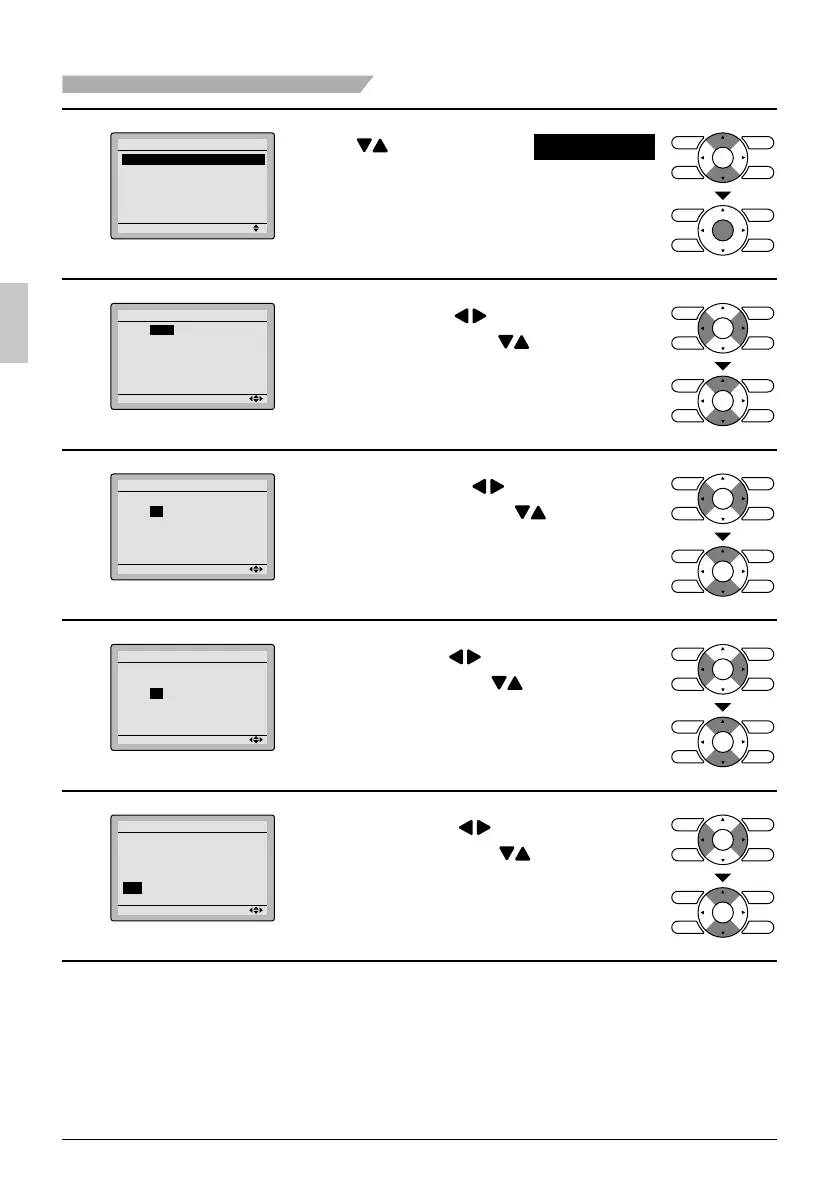
2
Setting
Clock & Calendar
Date & Time
12H/24H Clock
Press
●
buttons to select
Date & Time
on the clock & calendar screen.
Press Menu/OK button to display the
date & time screen.
3
Setting
Date & Time
Year 2012
Month 1
Day 1
Sunday
12:00A
Select ● Year with buttons.
Change the year with buttons.
Holding down the button causes the
number to change continuously.
4
Setting
Date & Time
Year 2013
Month 10
Day 1
Tuesday
12:00A
Select ● Month with buttons.
Change the month with buttons.
Holding down the button causes the
number to change continuously.
5
Setting
Date & Time
Year 2013
Month 10
Day 7
Monday
12:00A
Select ● Day with buttons.
Change the day with buttons.
Holding down the button causes the
number to change continuously.
Days of the week change automatically.
6
Setting
Date & Time
Year 2013
Month 10
Day 7
Monday
12:00A
Select ● Hour with buttons.
Change the hour with buttons.
Holding down the button causes the
number to change continuously.
01_EN_3P243520-3E.indd 4001_EN_3P243520-3E.indd 40 9/11/2012 4:13:10 PM9/11/2012 4:13:10 PM



 To Next Page