4 Before operation
Operation manual
5
FTXP20~35M5V1B/B9
R32 Split series
3P520336-6T – 2021.12
NOTICE
▪ Do NOT drop the wireless remote control.
▪ Do NOT let the wireless remote control get wet.
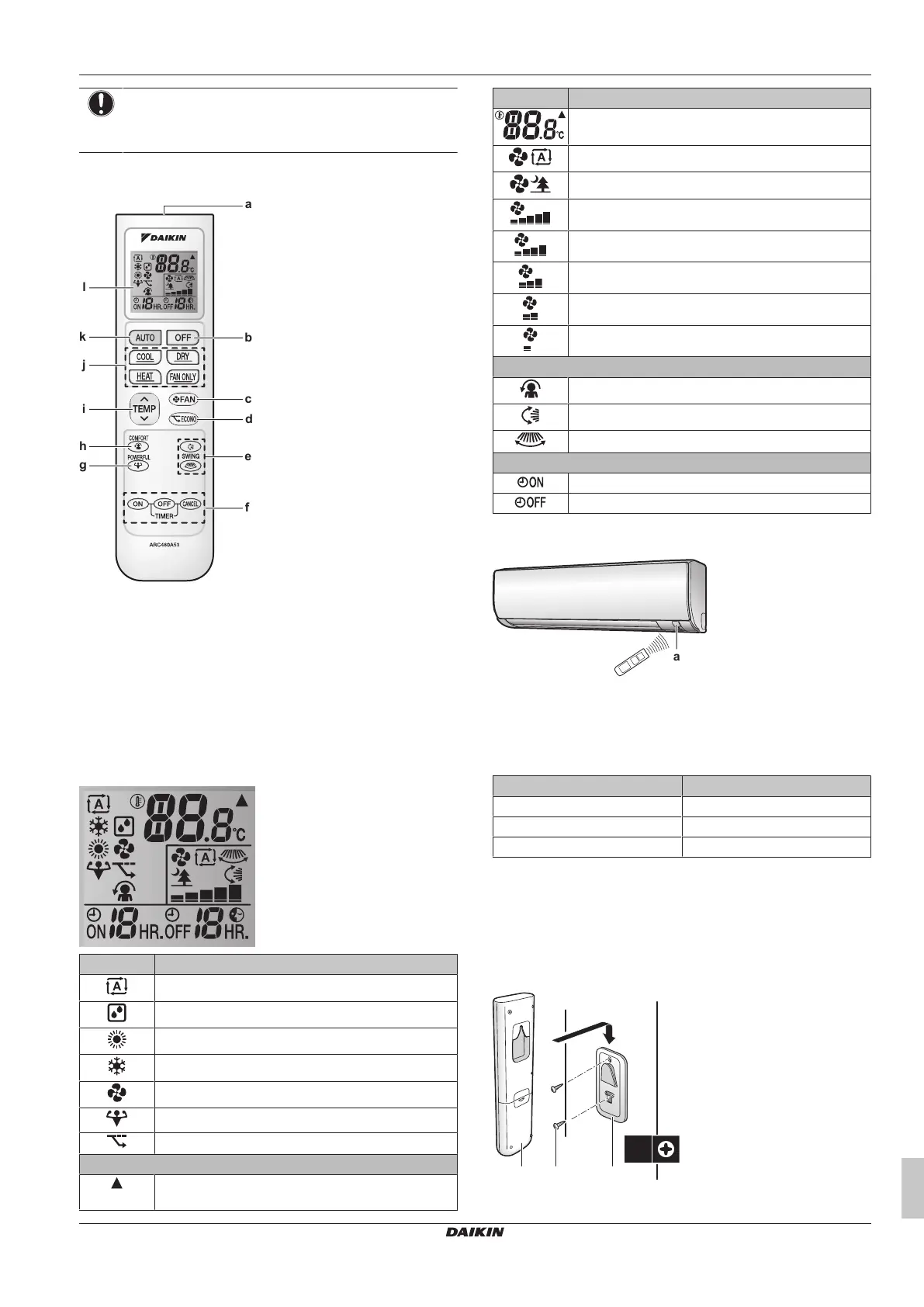
3.2.1 Components: Wireless remote control
a Signal receiver
b OFF button
c Fan setting button
d Econo operation button
e Swing buttons
f Timer setting buttons (ON, OFF, cancel)
g Powerful operation button
h Comfort operation button
i Temperature adjustment button
j Operation mode buttons
k Automatic operation mode button
l LCD display
3.2.2 Status: Wireless remote control LCD
Icon Description
Operation mode = Automatic
Operation mode = Drying
Operation mode = Heating
Operation mode = Cooling
Operation mode = Fan only
Powerful operation is active
Econo operation is active
The indoor unit receives a signal from the user
interface
Icon Description
Current temperature setting
Airflow rate = Automatic
Airflow rate = Indoor unit quiet
Airflow rate = High
Airflow rate = Medium high
Airflow rate = Medium
Airflow rate = Medium low
Airflow rate = Low
Comfort operation is active
Automatic vertical swing is active
Automatic horizontal swing is active
ON timer is active
OFF timer is active
3.2.3 To operate the wireless remote control
a Infrared signal receiver
1 Aim the signal transmitter at the infrared signal receiver on the
indoor unit (maximum distance for communication is 7m).
Result: When the indoor unit receives a signal from the wireless
remote control, you will hear a sound:
Sound Description
Beep-beep Operation starts.
Beep Setting changes.
Long beep Operation stops.
4 Before operation
4.1 To mount the wireless remote
control holder
a Wireless remote control



 To Next Page