5 Operation
Operation manual
7
FTXP20~35M5V1B/B9
R32 Split series
3P520336-6T – 2021.12
▪ Defrost operation. During heating operation, frost might occur on
the outdoor unit and decrease the heating capacity. In that case,
the system automatically switches to defrosting operation to
remove the frost. During defrosting operation, hot air is NOT
blown from the indoor unit.
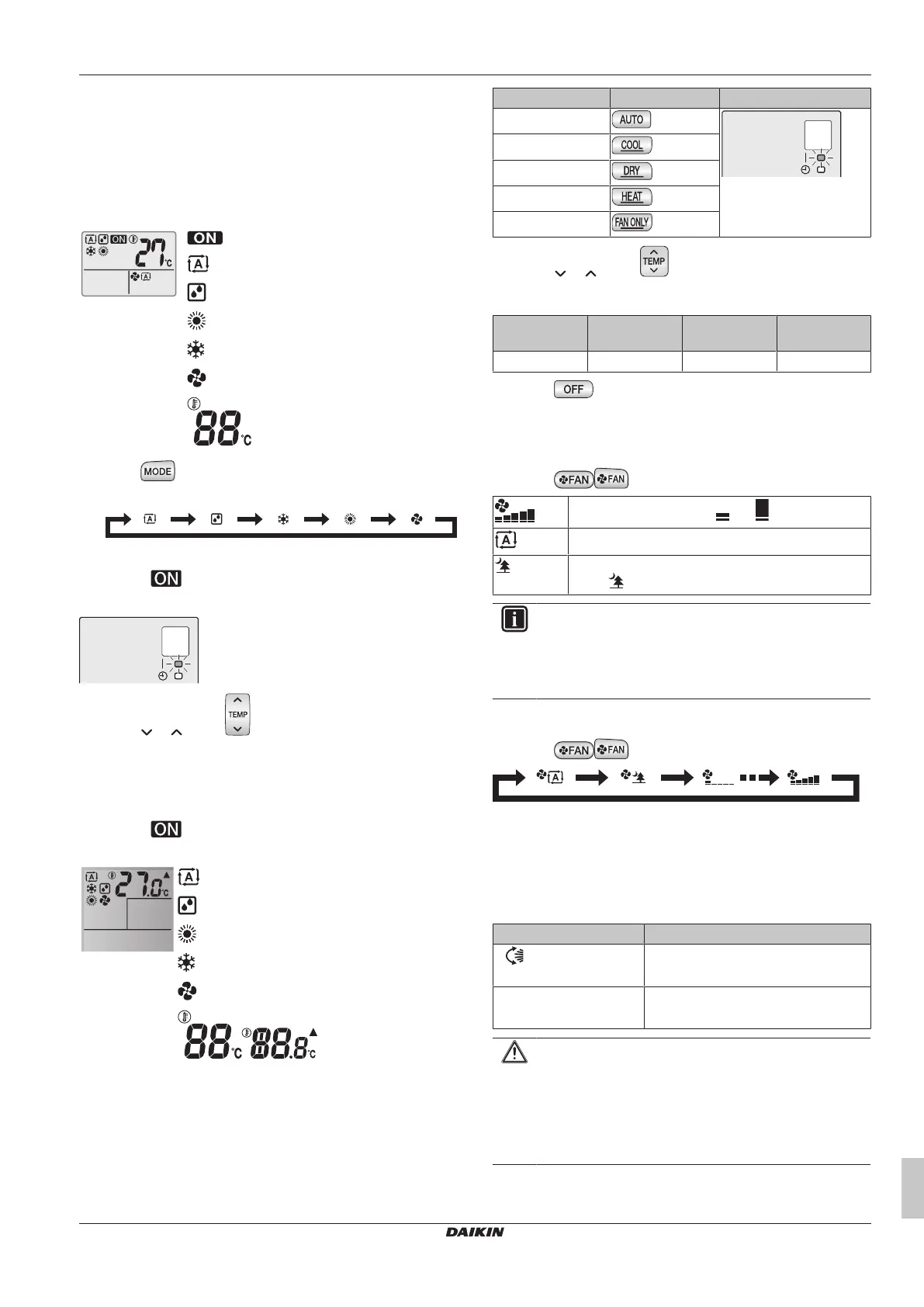
5.3.1 To start/stop operation mode and to set
the temperature
: Unit is operating.
: Operation mode = Automatic
: Operation mode = Drying
: Operation mode = Heating
: Operation mode = Cooling
: Operation mode = Fan only
: Shows the set temperature.
1 Press one or more times to select the operation mode.
Result: The mode will be set in the following sequence:
2 Press to start operation.
Result: is displayed on the LCD.
Result: The operation lamp lights up.
3 Press or on the button one or more times to lower or
raise the temperature.
Note: When using drying or fan only mode, you cannot adjust the
temperature.
4 Press to stop operation.
Result: disappears from the LCD.
Result: The operation lamp goes off.
: Operation mode = Automatic
: Operation mode = Drying
: Operation mode = Heating
: Operation mode = Cooling
: Operation mode = Fan only
: Shows the set
temperature.
5 Start operation by pressing one of the following buttons.
Mode Press Result
Automatic operation
The operation lamp lights
up.
Cooling operation
Drying operation
Heating operation
Fan only operation
6 Press or on the button one or more times to set the
temperature. You CANNOT adjust the temperature in drying or
fan only operation mode.
Cooling
operation
Heating
operation
Automatic
operation
Drying or fan
only operation
18~32°C 10~30°C 18~30°C —
7 Press to stop operation.
Result: The operation lamp goes off.
5.3.2 Airflow rate
1 Press to choose:
5 airflow rate levels, from " " to " "
Automatic airflow rate operation
Indoor unit quiet operation. When the airflow rate is
set to " ", the noise from the unit will be reduced.
INFORMATION
▪ If the unit reaches the temperature setpoint in cooling
or heating mode, the fan will stop operating.
▪ When using drying operation mode, you CANNOT
adjust the airflow rate setting.
To adjust the airflow rate
1 Press to change the airflow setting as follows:
5.3.3 Airflow direction
When. Adjust the airflow direction as desired.
What. The system directs the airflow differently, depending on the
user selection (swinging or fixed position). It does so by moving the
vertical blades.
Setting Airflow direction
Vertical auto swing
Moves up and down.
[—] Stays in a fixed position.
CAUTION
▪ ALWAYS use a user interface (e.g. wireless remote
control) to adjust the angle of the flap. When the flap is
swinging and you move it forcibly by hand, the
mechanism will break.
▪ Be careful when adjusting the louvers. Inside the air
outlet, a fan is rotating at high speed.



 To Next Page