5 Operation
Operation manual
6
FTXP20~35M5V1B/B9
R32 Split series
3P520336-6T – 2021.12
b Screws (field supply)
c Wireless remote control holder
1 Choose a place where the signals reach the unit.
2 Attach the holder with screws to the wall or a similar location.
3 Hang the wireless remote control on the holder.
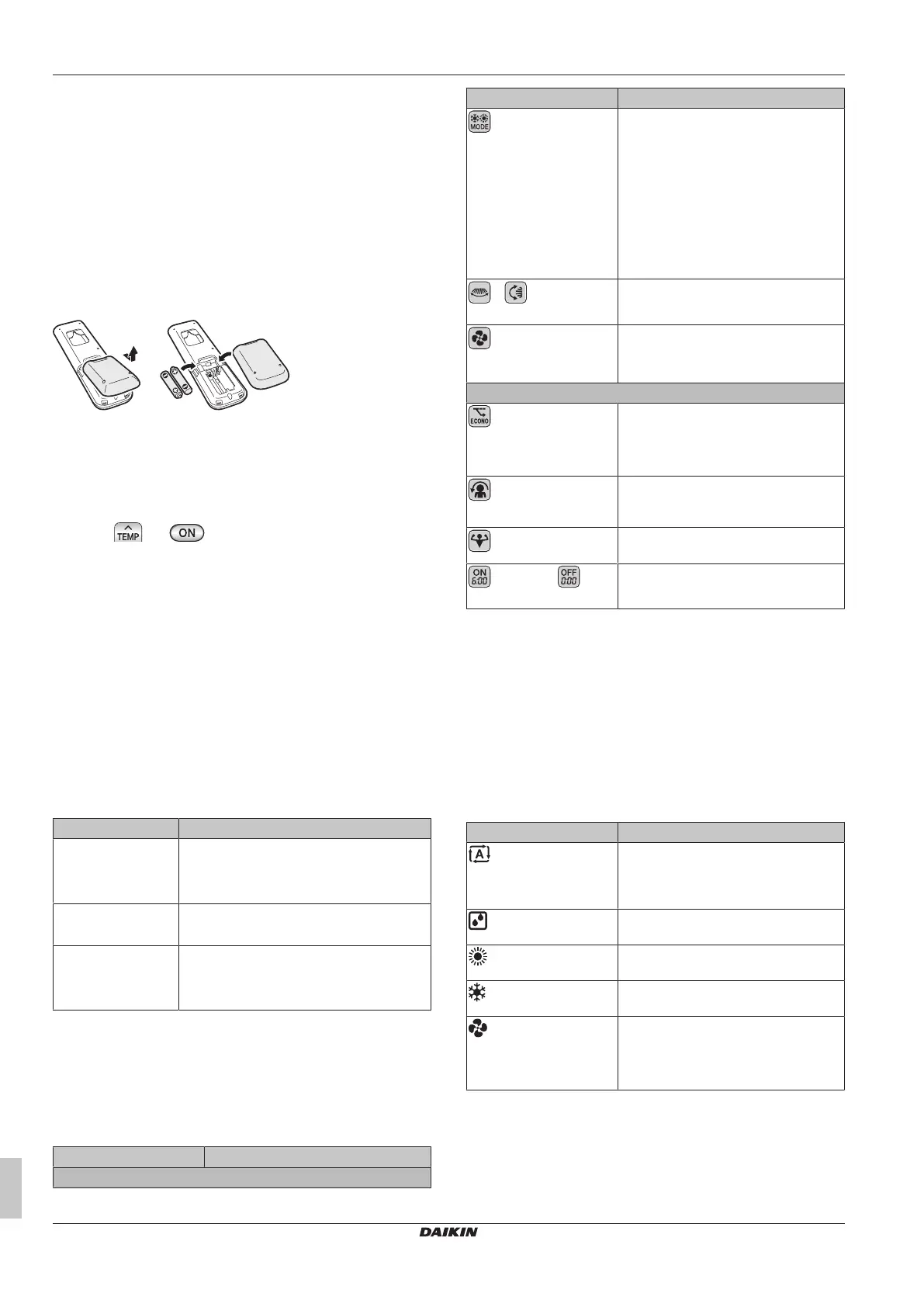
4.2 To insert the batteries
The batteries will last for about 1 year.
1 Remove the back cover.
2 Insert both batteries at once.
3 Put the cover back.
4.3 To switch between Fahrenheit and
Celsius
Prerequisite: Change this setting only when the temperature is
displayed.
1 Press and simultaneously for about 5seconds.
Result: The setting changes.
4.4 To turn on the power supply
1 Turn the circuit breaker on.
Result: The flap of the indoor unit will open and close to set the
reference position.
5 Operation
5.1 Operation range
Use the system in the following temperature and humidity ranges for
safe and effective operation.
Operation mode Operation range
Cooling
(a)(b)
▪ Outdoor temperature: –10~48°C DB
▪ Indoor temperature: 18~32°C DB
▪ Indoor humidity: ≤80%
Heating
(a)
▪ Outdoor temperature: –15~24°C DB
▪ Indoor temperature: 10~30°C DB
Drying
(a)
▪ Outdoor temperature: –10~48°C DB
▪ Indoor temperature: 18~32°C DB
▪ Indoor humidity: ≤80%
(a)
A safety device might stop the operation of the system if the unit
runs outside its operation range.
(b)
Condensation and water dripping might occur if the unit runs
outside its operation range.
5.2 When to use which feature
You can use the following table to determine which features to use:
Feature Tasks
Basic features
Feature Tasks
Operation modes and
temperature
To start/stop the system and to set the
temperature:
▪ Heat up or cool down a room.
▪ Blow air in a room without heating or
cooling.
▪ Decrease the humidity in a room.
▪ In Automatic mode, automatically
select an appropriate temperature
and operation mode.
+ Airflow
direction
To adjust the airflow direction (swing or
fixed position).
Airflow rate
To adjust the amount of air blown into
the room.
To run more quietly.
Advanced features
Econo
To use the system when you are also
using other power-consuming
appliances.
To save energy.
Comfort
To provide a comfortable airflow that
does NOT come in direct contact with
people.
Powerful
To cool down or heat up the room
quickly.
ON timer + OFF
timer
To automatically turn ON or OFF the
system.
5.3 Operation mode and temperature
setpoint
When. Adjust the system operation mode and set the temperature
when you want to:
▪ Heat up or cool down a room
▪ Blow air in a room without heating or cooling
▪ Decrease the humidity in a room
What. The system operates differently, depending on the user
selection.
Setting Description
Automatic
The system cools down or heats up a
room to the temperature setpoint. It
automatically switches between cooling
and heating if necessary.
Drying
The system decreases the humidity in a
room.
Heating
The system heats up a room to the
temperature setpoint.
Cooling
The system cools down a room to the
temperature setpoint.
Fan
The system only controls the airflow
(airflow rate and airflow direction).
The system does NOT control the
temperature.
Additional info:
▪ Outside temperature. The system's cooling or heating effect
decreases when the outside temperature is too high or too low.



 To Next Page