5 Operation
Operation manual
10
FTXTA30C2V1B(W)(B)
Daikin room air conditioner
3P728539-2D – 2023.09
INFORMATION
▪ Powerful and Outdoor unit quiet operation CANNOT be
used at the same time. The last selected function takes
priority.
▪ This function is only available in Automatic, Cooling,
and Heating operation.
▪ Outdoor unit quiet operation limits the rotation speed of
the compressor. If the rotation speed of compressor is
already low, Outdoor unit quiet operation will NOT
further reduce the compressor rotation speed.
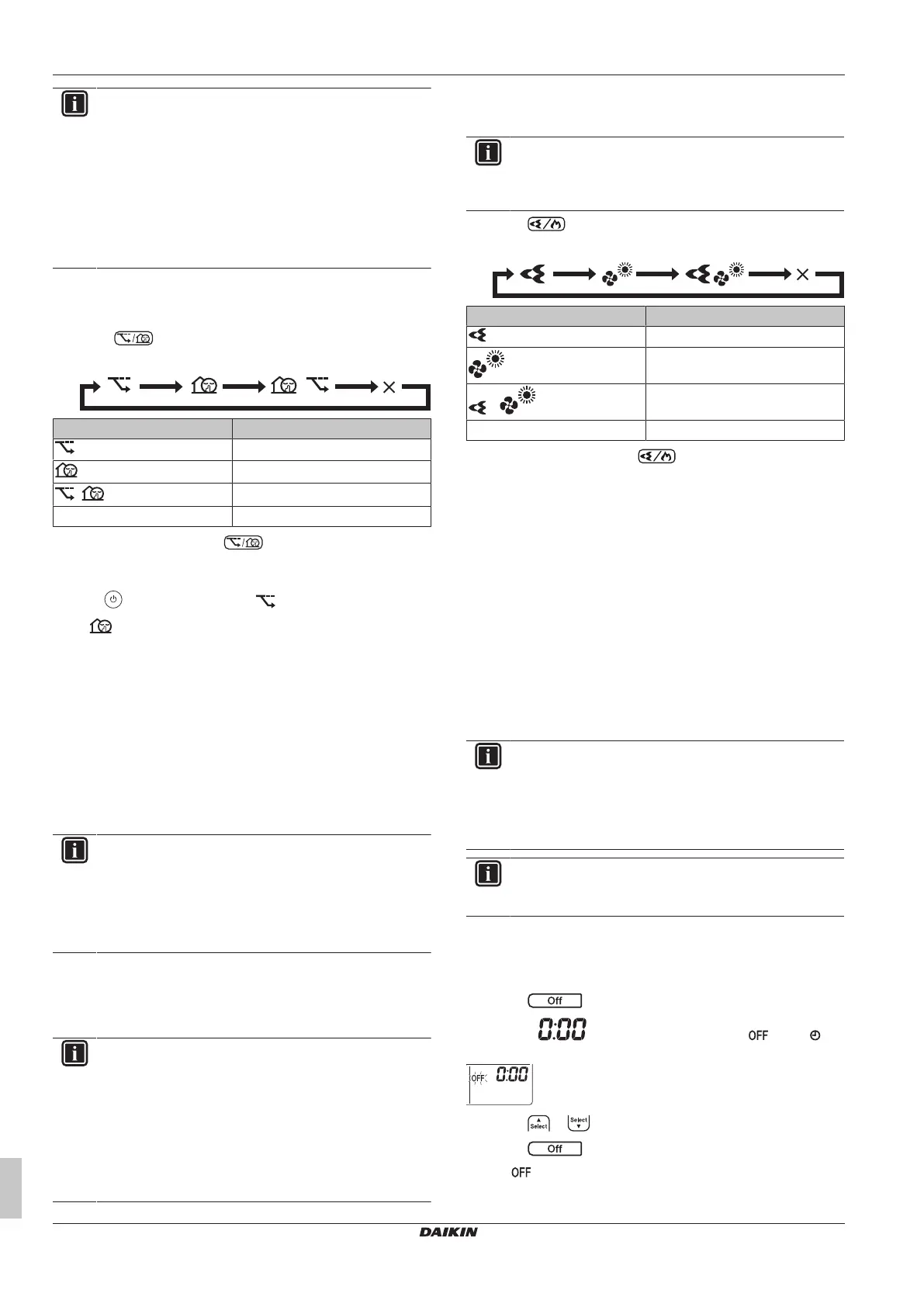
5.7.3 To start/stop Econo and Outdoor unit
quiet operation
1 Press one or more times.
Result: The setting will change as follows.
Display Operation
Econo
Outdoor unit quiet
+
Econo and Outdoor unit quiet
— Both deactivated
2 To stop operation, press until both symbols disappear
from the LCD.
Note: Econo operation can be only set when the unit is running.
Pressing cancels the setting and disappears from the LCD.
Note: remains on the LCD, even if you turn off the unit using
the wireless remote control or indoor unit ON/OFF switch.
5.8 Flash Streamer and Fireplace logic
operation
5.8.1 Flash Streamer (air cleaning) operation
Streamer generates a high-speed electron stream with a high
oxidizing power, reducing bad odours. Together with the titanium
apatite deodorising filter and the air filters, this function cleans the air
in the room.
INFORMATION
▪ The high-speed electrons are generated and go away
inside the unit to ensure safe operation.
▪ The Streamer discharge may generate a fizzing sound.
▪ If the airflow becomes weak, the Streamer discharge
may stop temporarily to prevent ozone smell.
5.8.2 Fireplace logic operation
Use Fireplace logic operation to equally distribute the hot air from an
external heat source (e.g. fireplace) across the room.
INFORMATION
▪ If the set temperature is reached in heating mode, the
operation Fireplace logic will start automatically.
▪ During Fireplace logic operation the indoor unit fan
distributes the hot air from the external source across
the room.
▪ The airflow rate depends on difference between set
temperature and temperature in the room (higher
temperature difference = higher airflow rate).
5.8.3 To start/stop Flash Streamer and
Fireplace logic operation
INFORMATION
Fireplace logic operation can be activated only in heating
operation mode (see "5.2.1 To start/stop operation mode
and to set the temperature"[47])
1 Press one or more times.
Result: The setting will change as follows.
Display Operation
Flash Streamer (air cleaning)
Fireplace logic
+
Flash Streamer and Fireplace logic
— Both deactivated
2 To stop operation, press until both symbols disappear
from the LCD.
5.9 OFF/ON timer operation
Timer functions are useful for automatically switching the air
conditioner off/on at night or in the morning. You can also use OFF
timer and ON timer in combination.
There are two types of OFF/ON timer setting:
▪ 24 hour clock OFF/ON timer (default). The unit will stop/start
operating at the set time. Example: The ON timer is set to 13:30,
the unit will start operating at 13:30.
▪ 12 hour countdown OFF/ON timer. The unit will stop/start
operating after the set number of hours. Example: The ON timer
is set at 10:30 to 3 hours, the unit will start operating at 13:30.
Note: It is possible to combine both timer setting types.
INFORMATION
Program the timer again in case of:
▪ A breaker has turned the unit off.
▪ A power failure.
▪ After replacing batteries in the wireless remote control.
INFORMATION
The clock MUST be set correctly before using any timer
functions. Refer to "4.3To set the clock"[46].
5.9.1 24 hour clock OFF/ON timer setting
To start/stop OFF timer operation
1 Press to start.
Result: is displayed on the LCD and blinks. and
the day of the week disappear from the LCD.
2 Press or to change the time setting.
3 Press again.
Result: and the set time are displayed on the LCD.
Result: The timer lamp lights up.















 To Next Page