4 Before operation
Operation manual
5
FTXTA30C2V1B(W)(B)
Daikin room air conditioner
3P728539-2D – 2023.09
3.2 About the user interface
Wireless remote control
INFORMATION
The indoor unit is delivered with the wireless remote
control as the user interface. This manual describes only
operation with this user interface. If another user interface
is connected, refer to the operation manual of the
connected user interface.
▪ Direct sunlight. Do NOT expose the wireless remote control to
direct sunlight.
▪ Dust. Dust on the signal transmitter or receiver will reduce
sensitivity. Wipe off dust with a soft cloth.
▪ Fluorescent lights. Signal communication might be disabled if
fluorescent lamps are in the room. In that case, contact your
installer.
▪ Other appliances. If the wireless remote control signals operate
other appliances, move the other appliances, or contact your
installer.
▪ Curtains. Make sure that curtains or other objects do NOT block
the signal between the unit and the wireless remote control.
NOTICE
▪ Do NOT drop the wireless remote control.
▪ Do NOT let the wireless remote control get wet.
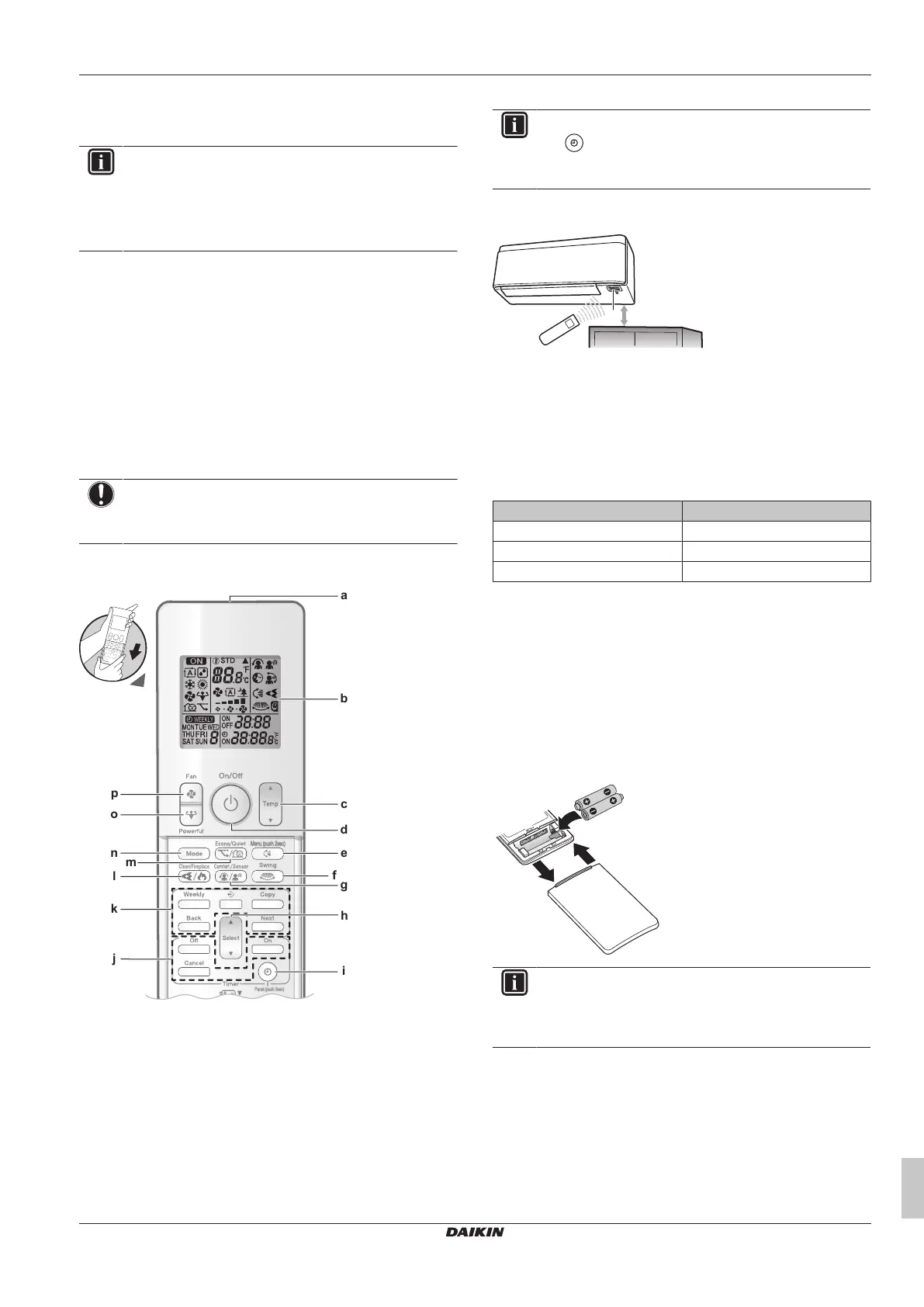
3.2.1 Components: Wireless remote control
Menu (push 2sec)
Panel (push 2sec)
d
a
g
m
h
c
b
n
l
f
e
i
j
k
p
o
a Signal transmitter
b LCD display
c Temperature adjustment button
d ON/OFF button
e Vertical swing and menu (push 2 seconds) button
f Horizontal swing button
g Comfort airflow and Intelligent eye operation button
h Select button
i Clock and open panel (push 2 seconds) button
j OFF/ON timer operation buttons
k Weekly timer operation buttons
l Flash Streamer and Fireplace logic operation button
m Econo and Outdoor unit quiet operation button
n Mode button
o Powerful button
p Fan button
INFORMATION
Use (hold for 2seconds) to open the front panel when
you clean the air filters. See "7.4 To open the front
panel"[416].
3.2.2 To operate the wireless remote control
a Infrared signal receiver
Note: Make sure that there are no obstacles within 500mm under
the infrared signal receiver. They may influence reception
performance of the wireless remote control.
1 Aim the signal transmitter at the infrared signal receiver on the
indoor unit (maximum distance for communication is 7m).
Result: When the indoor unit receives a signal from the wireless
remote control, you will hear a sound:
Sound Description
Beep-beep Operation starts.
Beep Setting changes.
Long beep Operation stops.
4 Before operation
4.1 To insert the batteries
The batteries will last for about 1 year.
1 Remove the front cover.
2 Insert both batteries at once.
3 Put back the front cover.
INFORMATION
▪ Low energy of battery is indicated by flashing of LCD
display.
▪ ALWAYS replace both batteries at once.















 To Next Page