1.
Select
Zone/Group
at Screen 2(A) on
page 63.
2.
Screen 1 Zone/Group, which is shown
on the left, appears.
3.
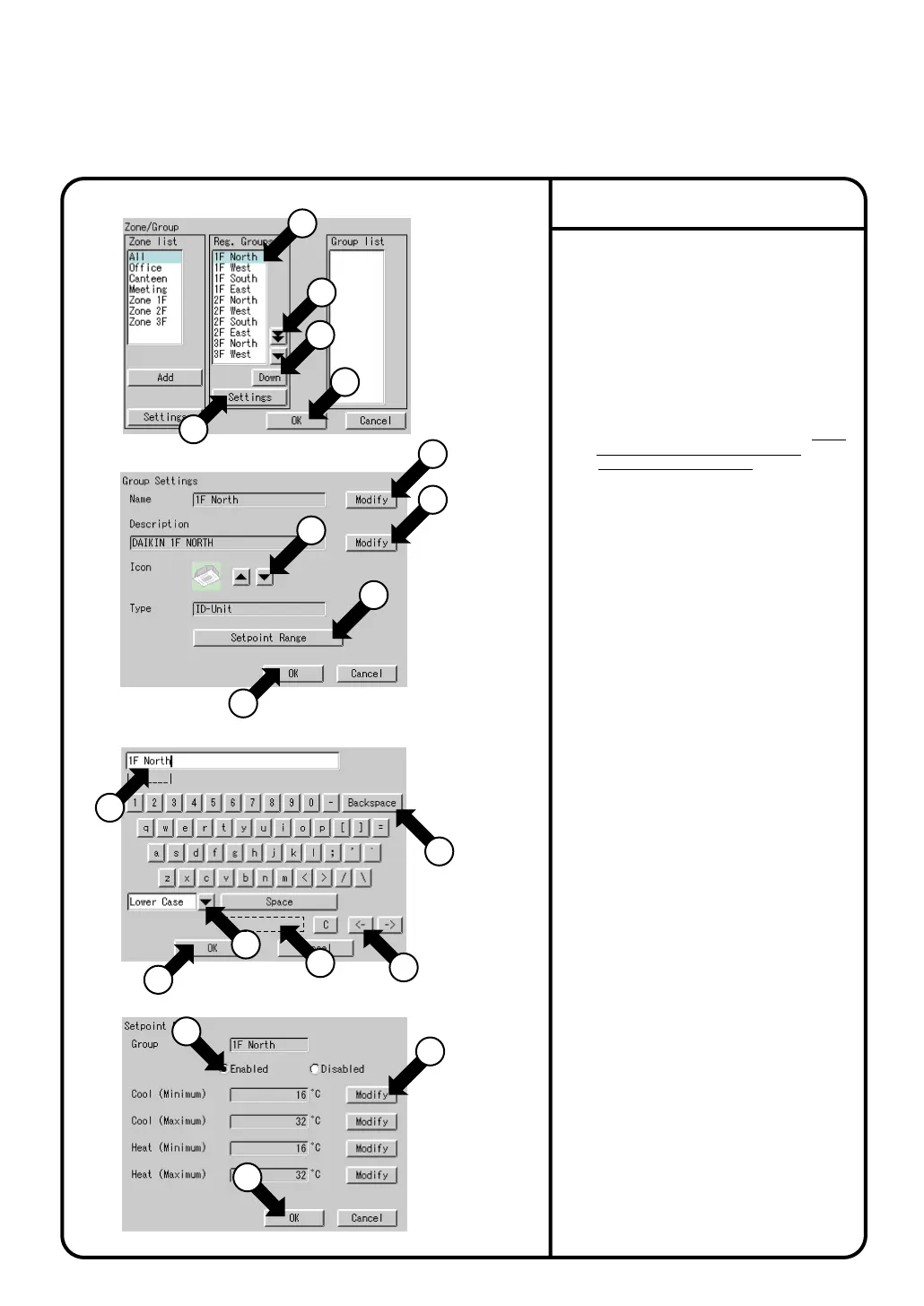
Select the group to be set with q.
Press the [Settings] button w.
Group Settings in Screen 2 is displayed.
4.
Press the [Modify] button e.
Screen 2 Enter Group Name appears.
Use the keyboard on the panel to enter
the name in such a way that it is
contained in the area r.
If it is not contained in the area, reduce
the number of characters and reenter.
5.
Press the [Modify] button !0 and enter
the name as shown in step 4 above.
7.
Press the [Setpoint Range] button !2.
Screen 4 Setpoint Range appears.
Select
Enbled
or
Dlsabled
!3 for Limits
Setup for the group currently selected.
If you select Yes, set the limits by
press the [OK] button !5. Press the
[Modify] button !4 and set the
restriction range.
Screen 2 Group Settings reappears.
8.
Select the position with the [Down] or
[Up] button !7 for showing the group
currently selected within the zone.
9.
6.
Press the [▲] or [▼] button !1 to select
an icon.
The selection of icon does not affect the
operation of the group.
Group Settings
System Settings Menu Operation
Screen 1 Zone/Group
Screen 2 Group Settings
Screen 3 Enter Group Name
Screen 4 Setpoint Range
1
3
10
14
11
12
1
17
18
2
16
4
5
13
15
7
6
9
8
y : Button to select between
uppercase and lowercase.
u : Button to correct wrong entries
made.
Pressing one time deletes one
character leftward starting at the
cursor.
i : Button to move the cursor.
o : (For Korean and Chinese language
only)Candidates for input are
displayed.
Words presumed to be input for
Name has already been involed.
When all entries have been made,
press the [OK] button t.
To cancel, press the [Cancel] button.
Screen 2 Group Settings reappears.
Press the [OK] button !8.
To cancel the setting, press the
[Cancel] button.
[How to use the keyboard]
67



 To Next Page