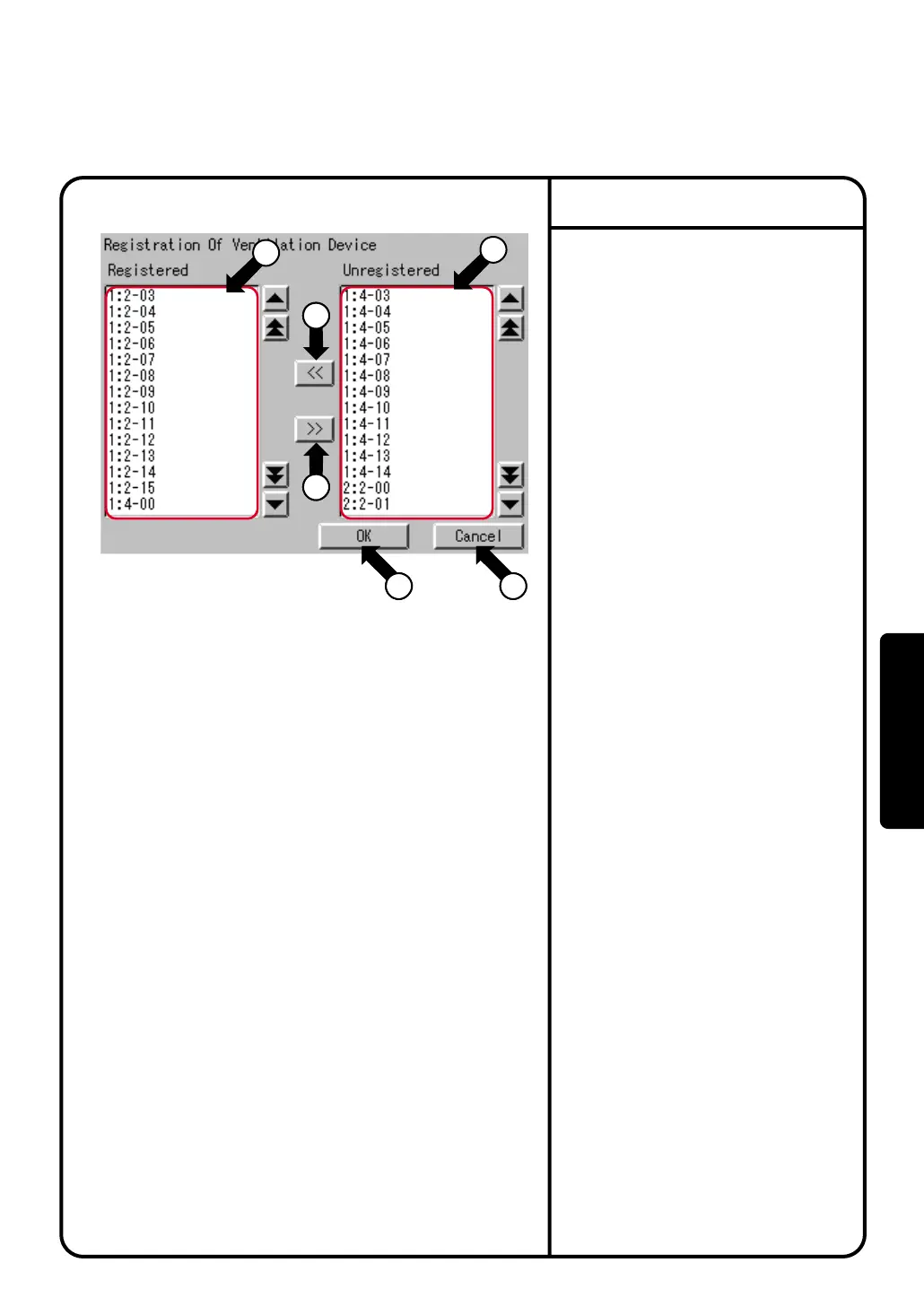
1.
Ventilation Device registered in a control
group are shown in the
Registered
list q.
Ventilation Device not shown in the
Registered
list
q
are shown in the
Unregistered
list
w
.
2.
When adding a Ventilation Device to a control
group, select a Ventilation Device to add from
the Unregistered list
w
and press [<<] button
r
.
The added Ventilation Device is then relocated
to the Registered list
q
.
3.
When deleting a Ventilation Device from a
control group, select a Ventilation Device to
delete from the Registered list
q
and press
[>>] button
e
.
The deleted Ventilation Device is then
relocated to the Unregistered list
w
.
4.
Press [OK] button t to save the settings and
return to the Control group setting screen.
The setting will be saved when the [OK] button
in the Control group setting screen is pressed.
Press [Cancel] button y to cancel the settings.
Setting of the FC Change Over
System Settings Menu Operation
[Restrictions]
A single Ventilation Device cannot be registered in
two or more control groups.
[Action when no Ventilation Device is registered]
When no Ventilation Device is registered in a control
group, the Change Over alone will work, and no
Free Cooling will work.
Screen 1 Ventilation Device registration
1
2
18
5
18
6
3
3
3
4
88
Operation



 To Next Page