2-13
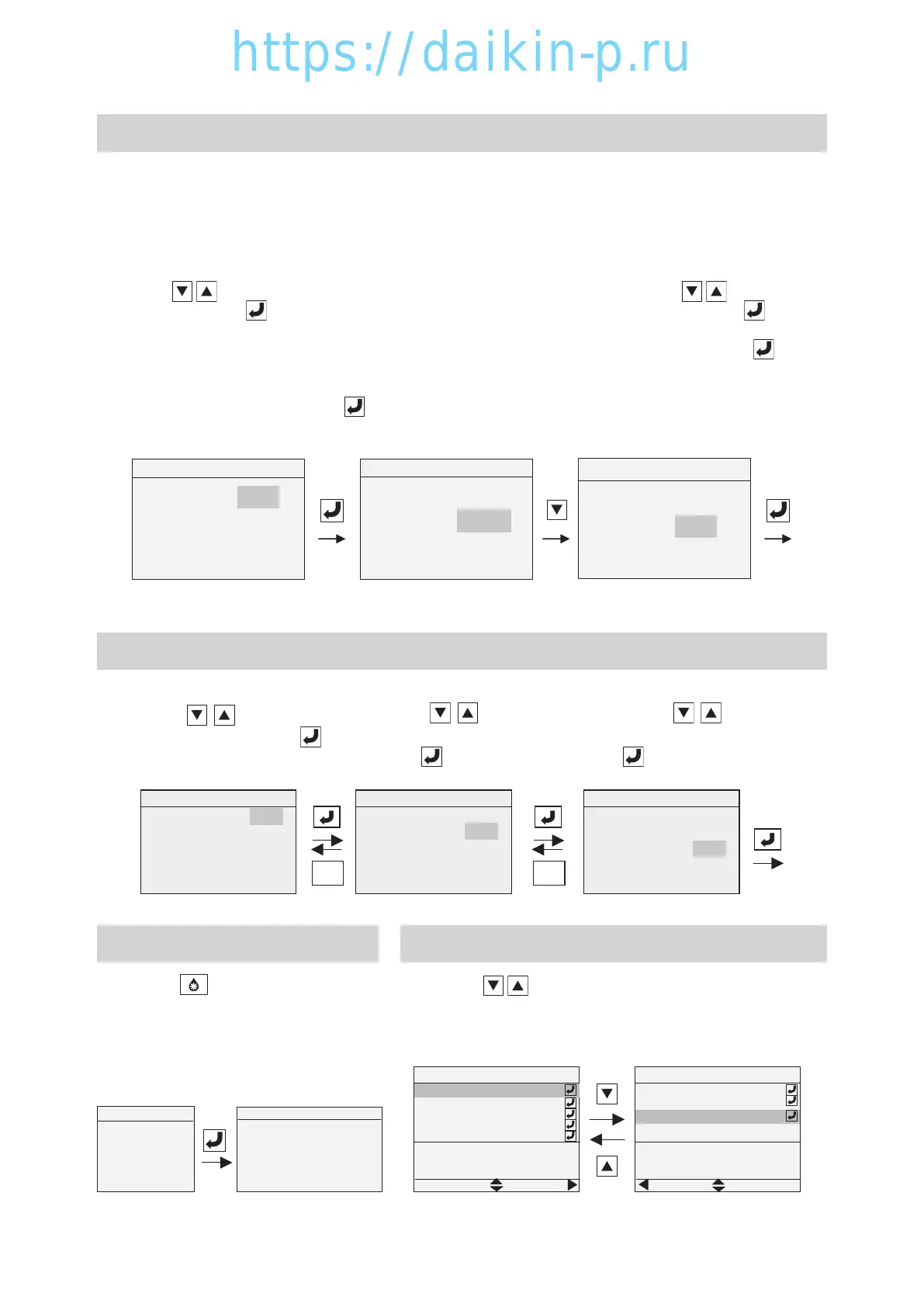
※6 Back Light Set (Adjustment of LCD screen brightness)
Selection of Back Light function
ON :Back light function available
AUTO : Back light function available. (The back light is turned off in the absence of key operation for 5
minutes.)
OFF :Back light off
Brightness Adjustment
1. Press keys to select "ON", "AUTO", or
"OFF" and press key to determine (Fig. 1).
※ When selecting "ON" or "AUTO", the next
screen, Brightness adjustment, is displayed
(Fig. 2).
※ When selecting "OFF", the screen returns to
the Menu screen by pressing key and the
back light is turned off.
2. Adjust brightness by using keys and
determine the selection by pressing key.
(Fig. 3) Brightness:1, 2, 3, 4, 5, 6, 7 (Max)
3. Returns to the Menu screen by using key.
Note: The back light function will not be activated in the battery mode.
Fig. 1
Fig. 2
Fig. 3
Back Light
Back Light
Back Light
Lighting OFF
Brightness
Lighting ON
Brightness 7 (Max)
Lighting ON
Brightness 5
▲▼:Change
ENTER:Confirm
▲▼:Change
ENTER:Confirm
▲▼:Change
ENTER:Confirm
※7 Unit (Scale) Change
1. Temperature Alternate
Press
key to select
"℃ " or "F" and press to
determine.
2. Pressure alternate
Press key to select
"kPa", "PSI" or "Bar" and
press to determine.
3. Ventilation Volume Alternate
Press key to select
"m3/h" or "CFM" and press
to determine.
Unit Convert
Ventilation Volume m3/h
Pressure kPa
Temperature ℃
ESCESC
Unit Convert
Ventilation Volume m3/h
Temperature ℃
Pressure kPa
Unit Convert
Temperature ℃
Pressure kPa
Ventilation Volume m3/h
▲▼:Change
ENTER:Confirm
▲▼:Change
ENTER:Confirm
▲▼:Change
ENTER:Confirm
DEFROST
Operation Screen
During Manual Defrost operation
Manual Defrost
Press
ENTER to Start
ESC to Cancel
※9 Display Alarm
1. Press keys to display current alarm.
* When there are many current alarms, they will be
displayed on more than one page.
*"
No ALARM" is displayed when there is no current alarm.
Current Alarm
1/2
E115 CFM thermal protec…
E117 EFM thermal protec…
CFM thermal protection
activated
E101 High pressure cutout
E107 Comp discharge gas..
E536 INV current sensor..
Current Alarm
E115 CFM thermal protec…
E117 EFM thermal protec…
INV current sensor failure
4 times
E536 INV current sensor..
NEXT
PREV
2/2
※8 Manual Defrost
1. Press key to activate manual
defrosting.
* "DEFROST" is displayed on the
top of Operation display during
Manual Defrost operation.
02章01-18LX10F11B3TR16-02En.indd2-1302章01-18LX10F11B3TR16-02En.indd2-13 2016/02/0316:14:352016/02/0316:14:35


 To Next Page
 Loading...