2-15
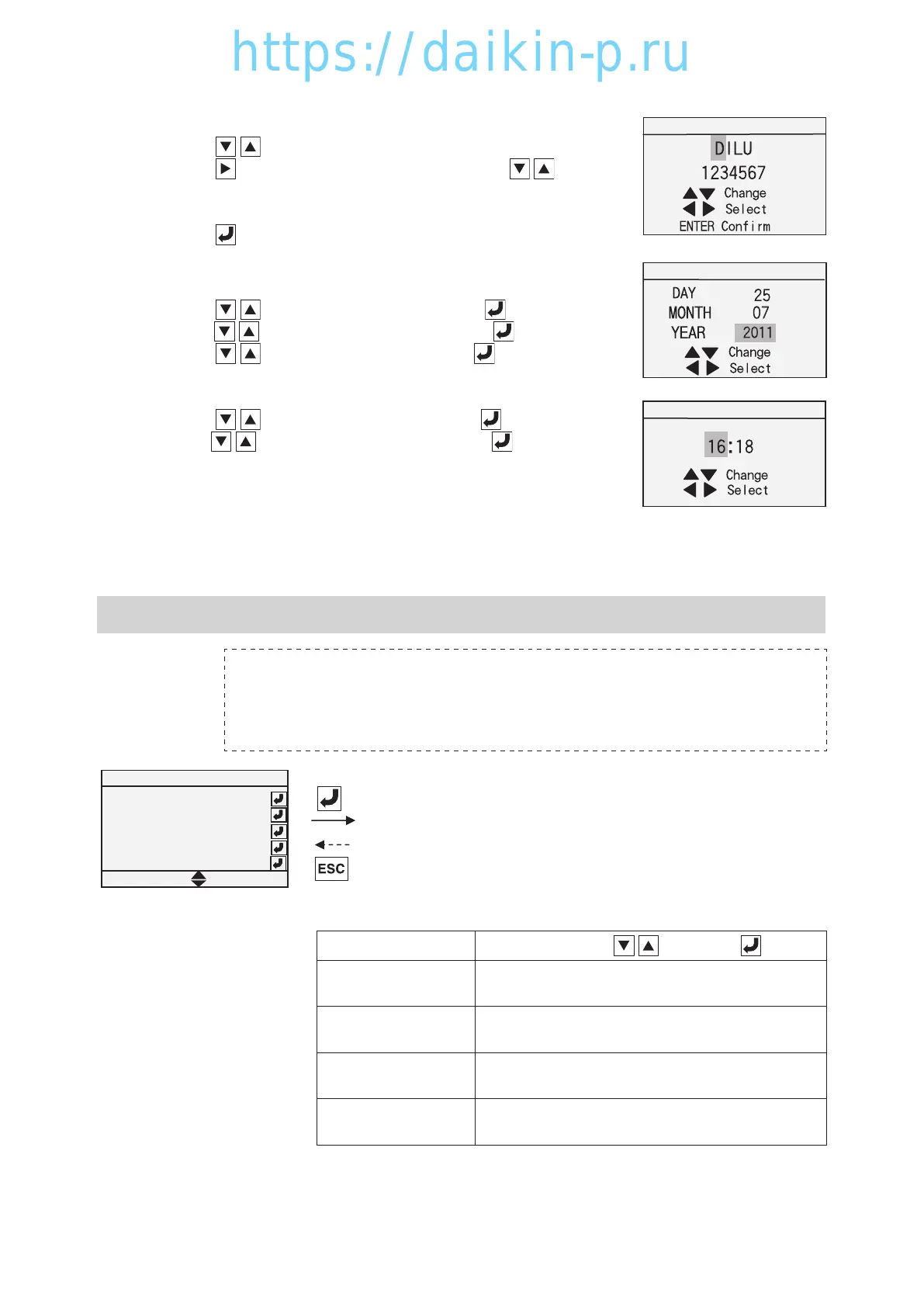
※12-10 Container I.D.
Step 1. Press key to change the 1st letter.
Step 2. Press key to move to the 2nd letter and press key to
change 2nd letter.
Step 3. Change the next letter and 7 numerals with same procedure.
Press
key to determine container I.D.
※12-8 Controller Date
Step 1. Press
key to change YEAR and press key to determine.
Step 2. Press
key to change MONTH and press key to determine.
Step 3. Press key to change DAY and press key to determine.
※12-9 Controller Time
Step 1. Press
key to change TIME and press key to determine.
Step 2. Press key to change MINUTE and press key to determine.
※13 Optional Function Mode
Optional Function
Bulb Mode Function
Rail Mode Function
ASC Function
ACT Function
ON
ON
ON
OFF
OFF
Quest Function
※13-1 Bulb mode function
(※13-2 Rail mode function)
※13-3 AST, Automatic change function of set temperature (for
details, refer to paragraph 1.5.1)
※13-4 ACT, Automatic cold treatment function (for details, refer
to paragraph 1.5.3)
Title display Setting
Change ⇒ Enter
※13-1 Bulb Mode Function Bulb Mode Function
ON: With bulb mode function
OFF: Without bulb mode function
※13-2 Rail Mode Function Rail Mode Function
ON: With rail mode function
OFF: Without rail mode function
※13-3 ASC Function ASC Function
ON: With ASC function
OFF: Without ASC function
※13-4 ACT Function ACT Function
ON: With ACT function
OFF: Without ACT function
Notice !!
1. Optional function setting is done at factory. Normally, setting change at site is not
necessary. (In some cases the function may not operate even after it has been set.)
2. Ensure the circuit breaker is switched OFF after Configuration Set change.
Container I.D.
Controller Date
Controller Time
02章01-18LX10F11B3TR16-02En.indd2-1502章01-18LX10F11B3TR16-02En.indd2-15 2016/02/0316:14:372016/02/0316:14:37

 To Next Page
 Loading...