Operation manual
3
HXHD125A7V1B
VRVIII system indoor unit
4PW62585-1 – 11.2010
4. QUICK START-UP OF THE UNIT
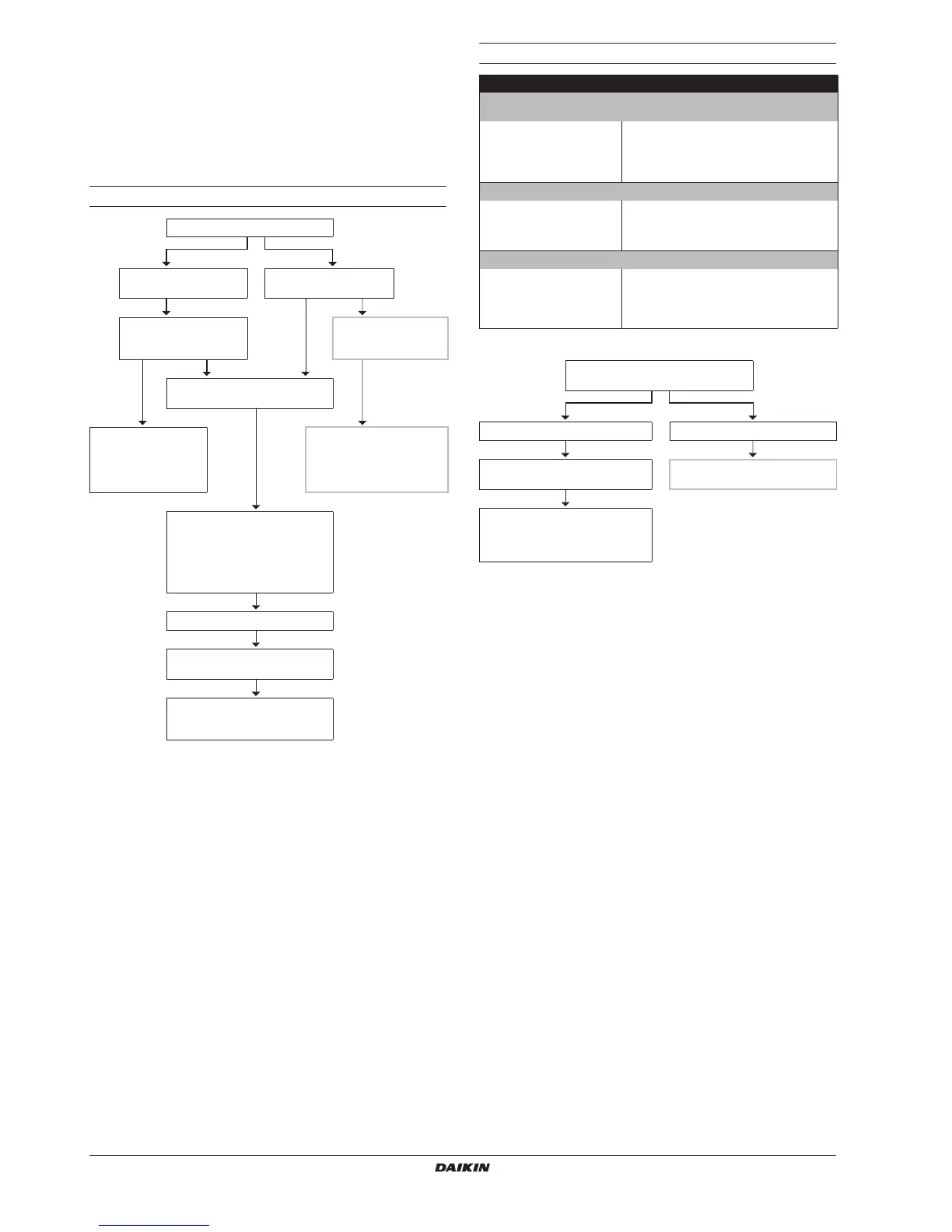
In this chapter the step-by-step procedure is explained for starting up
space heating and domestic water heating.
The more detailed information of how the unit must be operated is
explained in the chapter "5. Operation of the unit" on page 4.
The quick start-up offers the user the possibility to start up the
system before reading the entire manual.
Space heating operation
Domestic water heating operation
Manual storage
Push the bi or bj button
Display:
88
88
88
88
..
..
88
88
starts
blinking
Display: "n"
Set desired room
temperature (e.g. 22°C)
The remote controller
room thermostat
function is not installed
Push the ébi or ébj
button
You have "room
temperature based"
control of your system
(remote controller room
thermostat is installed)
You have "leaving water
temperature based" control of
your system
Set desired leaving water
temperature (e.g. 65°C)
If the display is blank,
automatic leaving water
temperature is enabled in heating
operation
Push the y button
The 0 LED will light up and the unit
will start
For further details and advised
settings, see "5.3. Space heating
operation (
hh
hh
)" on page 6.
Domestic water heating (only if domestic hot water tank option is installed)
Automatic storage (daily water heat-up, once during night and/or once during
day)
Turn on field setting [1-00]
and or [1-02] and then push
the rp button.
See "Automatic storage" on
page 8.
The p icon will display.
Hot water will be produced at next scheduled
action.
When water heat-up starts, the w icon will
be blinking (1 second interval).
Manual storage (one time water heat-up)(refer to scheme below)
Push and hold the w button
for 5 seconds.
See "Manual storage" on
page 9.
The w icon will start blinking (1 second
interval).
Hot water will be produced.
Reheat (continuous, keeping the minimum water temperature)
Push the w button 1 time.
See "Reheat" on page 10.
Hot water will be produced if the domestic hot
water tank temperature is below the selected
value.
Water will be heated up until the selected
value is reached.
Push and hold the w button for
5 seconds
Display: w icon starts blinking Display: "n"
Your water will be heated till
storage set point (one time action)
The domestic hot water tank is not
installed
For further details and advised
settings, see "5.4. Domestic
water heating operation (ww
ww
)" on
pa
ge 8




 To Next Page