EasyManua.ls Logo

Danbit H.264 DVR - Page 46

Default Icon
120 pages
Print Icon
To Next Page IconTo Next Page
To Previous Page IconTo Previous Page
Loading...
46
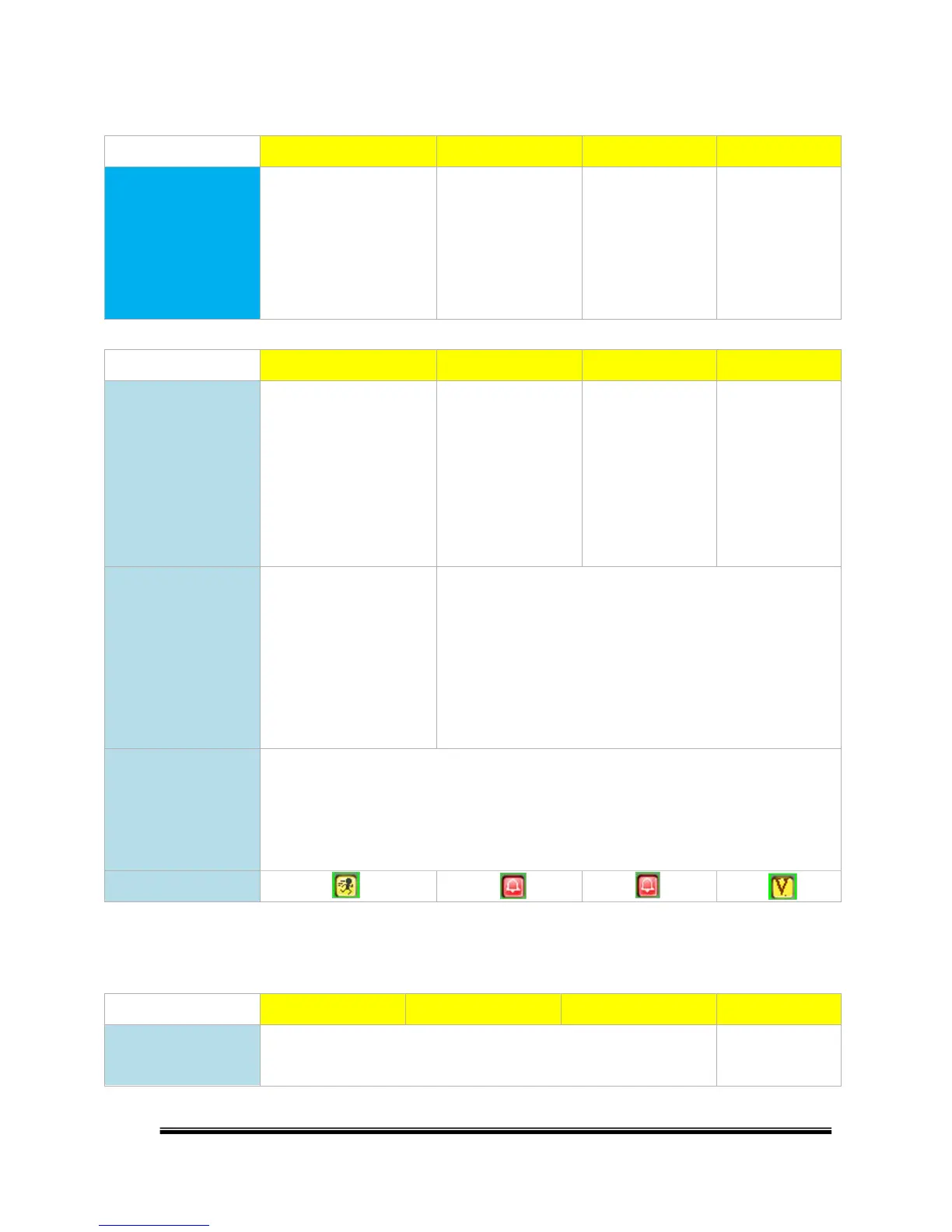
D. Alarm Action and Trigger Condition List
Action \ Type
Motion detection
External Alarm
DI (IP CAM)
Video Loss
Necessary Condition
(All the actions below
can be execute only
when the necessary
condition is met.)
Camera Setup >>Motion
Setup >>Tick "Area 1/2/3"
and set up the area
Alarm Setup >>Alarm
Trigger Setup >>"Ext.
Alarm Detection" set
to "Enable"
Alarm Setup
>>Alarm Trigger
Setup >>"Digital
Input (IP Cam)" set
to "Enable"
Alarm Setup
>>Alarm Trigger
Setup >>"Video
Loss Detection"
set to "Enable"
Action \ Type
Motion detection
External Alarm
DI (IP CAM)
Video Loss
Switch to Single
Channel Screen /
Split Screen
Condition:
Alarm Setup >>Alarm
Trigger Setup >>"Alarm
Auto Switch" set to "Full
Screen(/Split Screen)"
X
X
X
Trigger Relay/ Buzzer
Condition:
Camera Setup >>Motion
Setup >>"Relay(/Buzzer)
Dwell" not set to "Off"
(It's enabled as long as the necessary condition is meet)
*p: Trigger length setting: Alarm Setup >>Alarm Output Setup
>>Relay(/Buzzer) Time
*p"Ext. Alarm Relay(/Buzzer) Time" length setting
determines the trigger lenth of both "External Alarm" and
"DI(IP CAM)"
Written in Log
(Can be used for
event search
playback)
Condition:
Alarm Setup >>Alarm Event Setup >>Tick "Motion Even" / "Ext. Alarm Eventt" / "Digital
Input Event" / "Video Loss Event"
Icon on Live Screen
Action \ Type
Motion detection
External Alarm
DI (IP CAM)
Video Loss
Pre- / Post-alarm
Recording
O
Pre-:O Post-:X