EasyManua.ls Logo

Danby DPAC8KDB - Operating Instructions; Draining Excess Water; Air Conditioning Mode Operation

Danby DPAC8KDB
28 pages
Print Icon
To Next Page IconTo Next Page
To Previous Page IconTo Previous Page
Loading...
OPERATING
INSTRUCTIONS
i
DRAINING
EXCESS
WATER
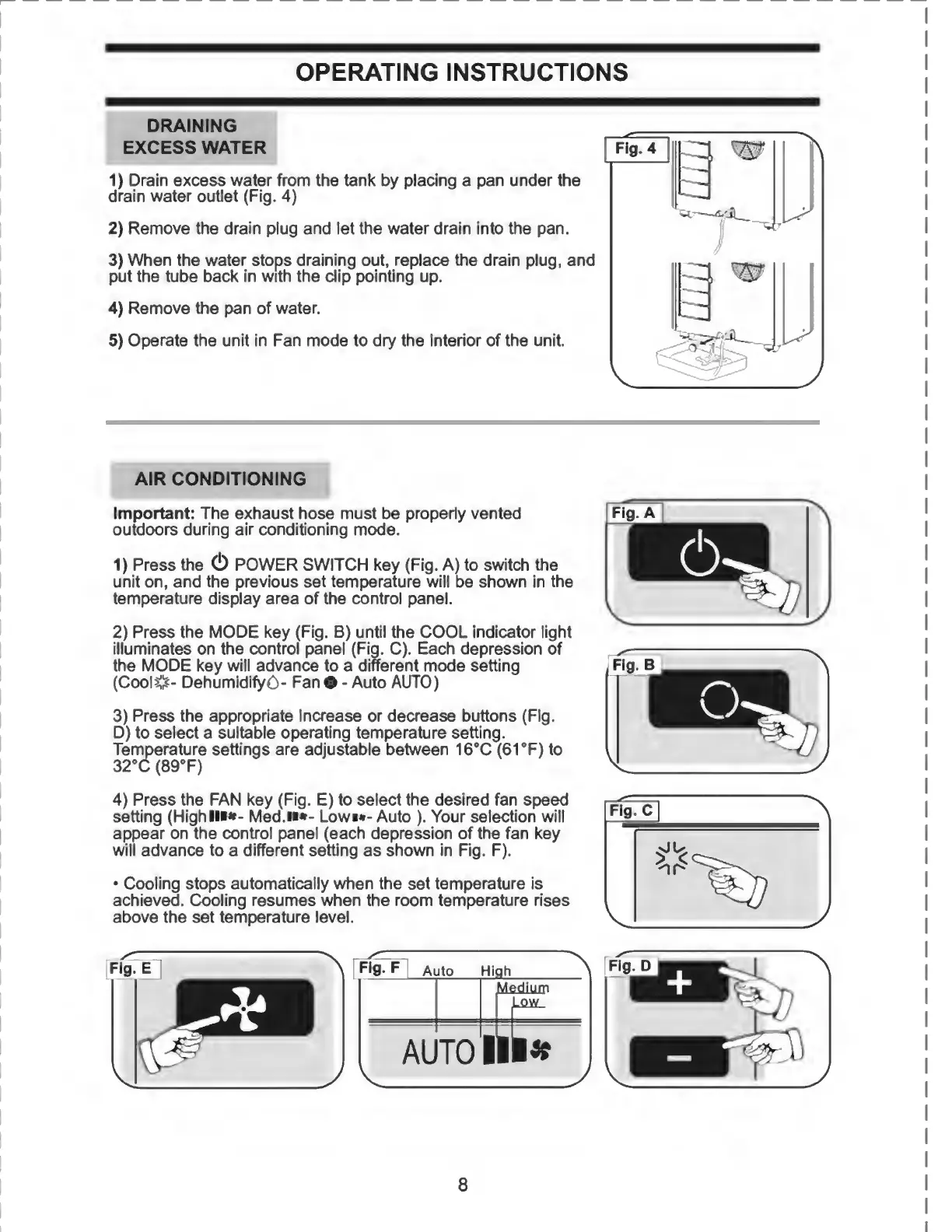
1)
Drain
excess
water
from
the
tank
by
placing
a
pan
under
the
drain
water
outlet
(Fig.
4)
2)
Remove
the
drain
plug
and
let
the
water
drain
into
the
pan.
3)
When
the
water
stops
draining
out,
replace
the
drain
plug,
and
put
the
tube
back
in
with
the
dip
pointing
up.
4)
Remove
the
pan
of
water.
5)
Operate
the
unit
in
Fan
mode
to
dry
the
interior
of
the
unit.
AIR
CONDITIONING
Important:
The
exhaust
hose
must
be
properly
vented
outdoors
during
air
conditioning
mode.
1)
Press
the
(!)
POWER
SWITCH
key
(Fig.
A)
to
switch
the
unit
on,
and
the
previous
set
temperature
will
be
shown
in
the
temperature
display
area
of
the
control
panel.
2)
Press
the
MODE
key
(Fig.
B)
until
the
COOL
indicator
light
illuminates
on
the
control
panel
(Fig.
C).
Each
depression
of
the
MODE
key
will
advance
to
a
different
mode
setting
(CoolCs-
DehumidifyO-
Fan
-
Auto
AUTO)
3)
Press
the
appropriate
increase
or
decrease
buttons
(Fig.
D)
to
select
a
suitable
operating
temperature
setting.
Temperature
settings
are
adjustable
between
16°C
(61
°F)
to
32°C
(89°F)
4)
Press
the
FAN
key
(Fig.
E)
to
select
the
desired
fan
speed
setting
(HighllM-
Med.n*-
Lowm-
Auto
).
Your
selection
will
appear
on
the
control
panel
(each
depression
of
the
fan
key
will
advance
to
a
different
setting
as
shown
in
Fig.
F).
Cooling
stops
automatically
when
the
set
temperature
is
achieved.
Cooling
resumes
when
the
room
temperature
rises
above
the
set
temperature
level.

Related product manuals