EasyManua.ls Logo

Danby DPAC8KDB - Care and Maintenance Procedures; Fan and Auto Mode Operation; Cleaning the Unit and Air Filter

Danby DPAC8KDB
28 pages
Print Icon
To Next Page IconTo Next Page
To Previous Page IconTo Previous Page
Loading...
CARE
AND
MAINTENANCE
Note:
During
Fan
mode,
the
exhaust
hose
does
not
have
to
be
vented
outdoors.
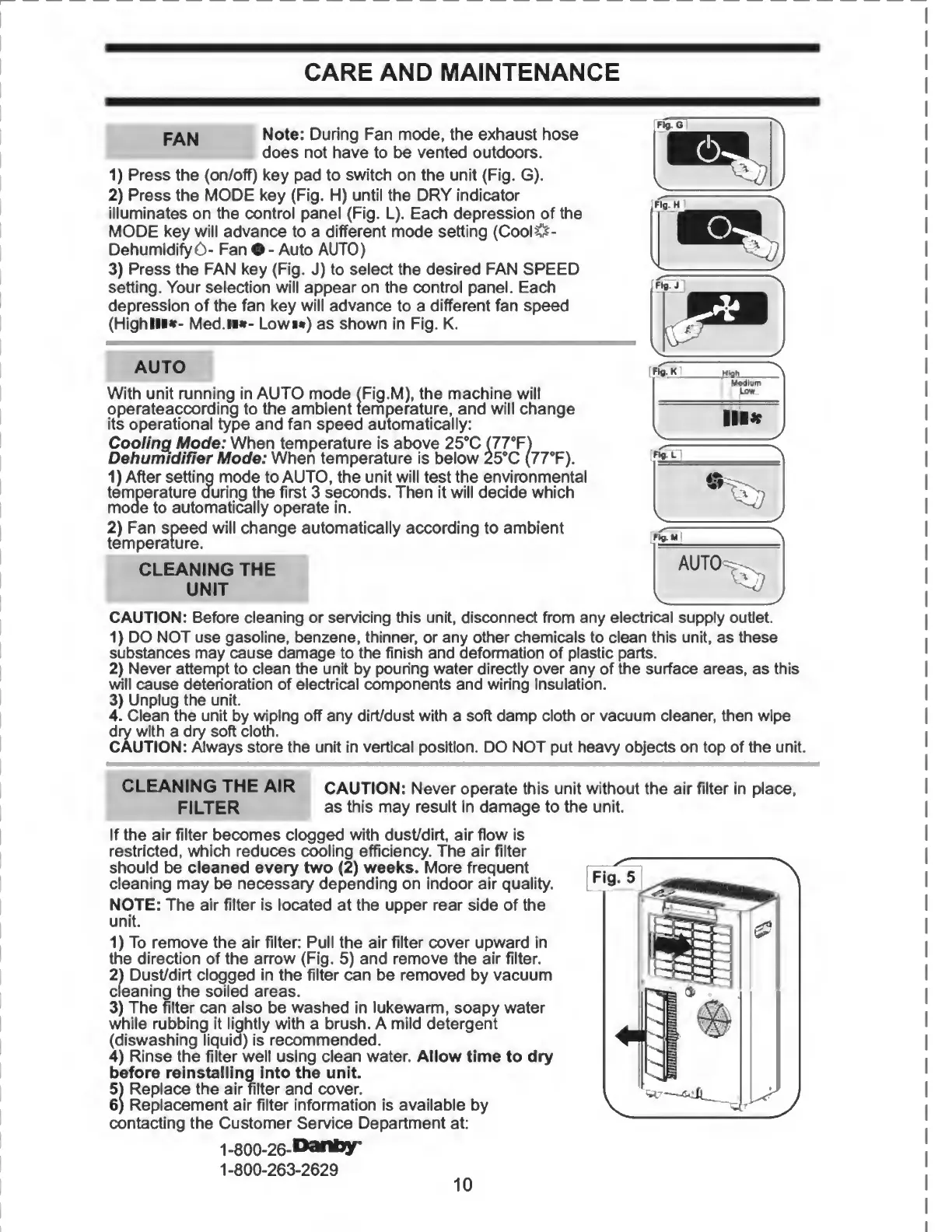
1)
Press
the
(on/off)
key
pad
to
switch
on
the
unit
(Fig.
G).
2)
Press
the
MODE
key
(Fig.
H)
until
the
DRY
indicator
illuminates
on
the
control
panel
(Fig.
L).
Each
depression
of
the
MODE
key
will
advance
to
a
different
mode
setting
(CoolO-
DehumidifyO-
Fan
O
-
Auto
AUTO)
3)
Press
the
FAN
key
(Fig.
J)
to
select
the
desired
FAN
SPEED
setting.
Your
selection
will
appear
on
the
control
panel.
Each
depression
of
the
fan
key
will
advance
to
a
different
fan
speed
(Highlli*-
Med.«»-
Lowm)
as
shown
in
Fig.
K.
AUTO
With
unit
running
in
AUTO
mode
(Fig.M),
the
machine
will
operateaccording
to
the
ambient
temperature,
and
will
change
its
operational
type
and
fan
speed
automatically:
Cooling
Mode:
When
temperature
is
above
25°C
(77°F)
Dehumidifier
Mode:
When
temperature
is
below
25°C
(77°F).
1)
After
setting
mode
to
AUTO,
the
unit
will
test
the
environmental
temperature
during
the
first
3
seconds.
Then
it
will
decide
which
mode
to
automatically
operate
in.
2)
Fan
speed
will
change
automatically
according
to
ambient
temperature.
CAUTION:
Before
cleaning
or
servicing
this
unit,
disconnect
from
any
electrical
supply
outlet.
1)
DO
NOT
use
gasoline,
benzene,
thinner,
or
any
other
chemicals
to
clean
this
unit,
as
these
substances
may
cause
damage
to
the
finish
and
deformation
of
plastic
parts.
2)
Never
attempt
to
clean
the
unit
by
pouring
water
directly
over
any
of
the
surface
areas,
as
this
will
cause
deterioration
of
electrical
components
and
wiring
insulation.
3)
Unplug
the
unit.
4.
Clean
the
unit
by
wiping
off
any
dirt/dust
with
a
soft
damp
cloth
or
vacuum
cleaner,
then
wipe
dry
with
a
dry
soft
cloth.
CAUTION:
Always
store
the
unit
in
vertical
position.
DO
NOT
put
heavy
objects
on
top
of
the
unit.
CAUTION:
Never
operate
this
unit
without
the
air
filter
in
place,
as
this
may
result
in
damage
to
the
unit.
If
the
air
filter
becomes
clogged
with
dust/dirt,
air
flow
is
restricted,
which
reduces
cooling
efficiency.
The
air
filter
should
be
cleaned
every
two
(2)
weeks.
More
frequent
cleaning
may
be
necessary
depending
on
indoor
air
quality.
NOTE:
The
air
filter
is
located
at
the
upper
rear
side
of
the
unit.
1)
To
remove
the
air
filter:
Pull
the
air
filter
cover
upward
in
the
direction
of
the
arrow
(Fig.
5)
and
remove
the
air
filter.
2)
Dust/dirt
clogged
in
the
filter
can
be
removed
by
vacuum
cleaning
the
soiled
areas.
3)
The
filter
can
also
be
washed
in
lukewarm,
soapy
water
while
rubbing
it
lightly
with
a
brush.
A
mild
detergent
(diswashing
liquid)
is
recommended.
4)
Rinse
the
filter
well
using
clean
water.
Allow
time
to
dry
before
reinstalling
into
the
unit.
5)
Replace
the
air
filter
and
cover.
6)
Replacement
air
filter
information
is
available
by
contacting
the
Customer
Service
Department
at:
1-800-26-D**y*
1-800-263-2629
10
CLEANING
THE
AIR
FILTER
CLEANING
THE
UNIT
FAN
I

Related product manuals