EasyManua.ls Logo

Danby DPAC8KDB - Control Panel Overview and Features; LCD Display Indicators; Mode and Fan Speed Controls

Danby DPAC8KDB
28 pages
Print Icon
To Next Page IconTo Next Page
To Previous Page IconTo Previous Page
Loading...
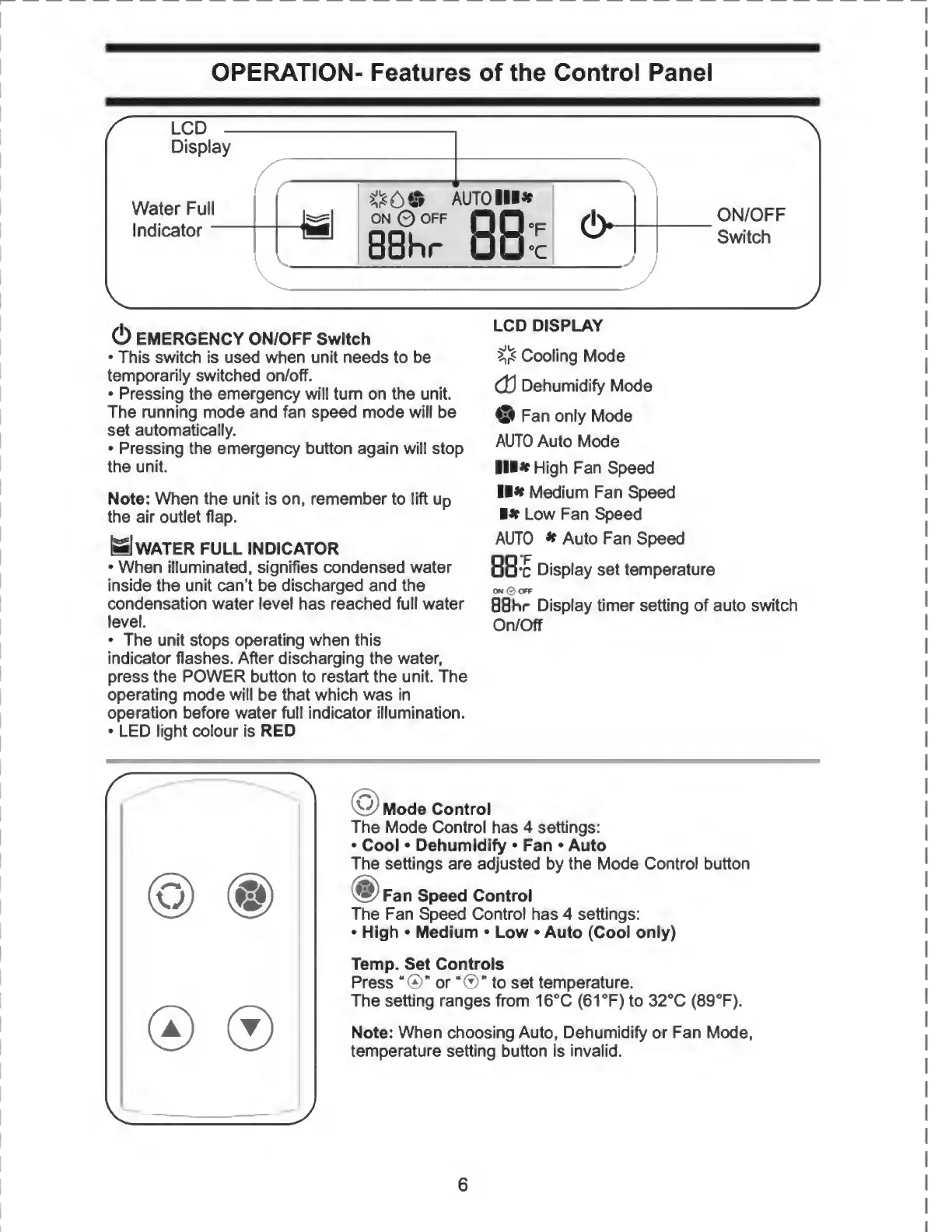
OPERATION-
Features
of
the
Control
Panel
(!)
EMERGENCY
ON/OFF
Switch
This
switch
is
used
when
unit
needs
to
be
temporarily
switched
on/off.
Pressing
the
emergency
will
turn
on
the
unit.
The
running
mode
and
fan
speed
mode
will
be
set
automatically.
Pressing
the
emergency
button
again
will
stop
the
unit.
LCD
DISPLAY
Cooling
Mode
(U
Dehumidify
Mode
o
Fan
only
Mode
AUTO
Auto
Mode
III*
High
Fan
Speed
Note:
When
the
unit
is
on,
remember
to
lift
up
***
MecJium
Fan
Speed
the
air
outlet
flap.
*
Low
Fan
Speed
|mJ
WATER
FULL
INDICATOR
When
illuminated,
signifies
condensed
water
inside
the
unit
can't
be
discharged
and
the
condensation
water
level
has
reached
full
water
level.
The
unit
stops
operating
when
this
indicator
flashes.
After
discharging
the
water,
press
the
POWER
button
to
restart
the
unit.
The
operating
mode
will
be
that
which
was
in
operation
before
water
full
indicator
illumination.
LED
light
colour
is
RED
AUTO
*
Auto
Fan
Speed
88
*c
Display
set
temperature
ON
0
OFF
BBhr
Display
timer
setting
of
auto
switch
On/Off
Mode
Control
The
Mode
Control
has
4
settings:
Cool
Dehumidify
Fan
Auto
The
settings
are
adjusted
by
the
Mode
Control
button
<§>
Fan
Speed
Control
The
Fan
Speed
Control
has
4
settings:
High
Medium
Low
Auto
(Cool
only)
Temp.
Set
Controls
Press
“©
or"®"
to
set
temperature.
The
setting
ranges
from
16°C
(61
°F)
to
32°C
(89°F).
Note:
When
choosing
Auto,
Dehumidify
or
Fan
Mode,
temperature
setting
button
is
invalid.
6
I

Related product manuals