EasyManua.ls Logo

Danby DPAC8KDB - Remote Control Operation; Power and Mode Controls; Temperature and Timer Settings

Danby DPAC8KDB
28 pages
Print Icon
To Next Page IconTo Next Page
To Previous Page IconTo Previous Page
Loading...
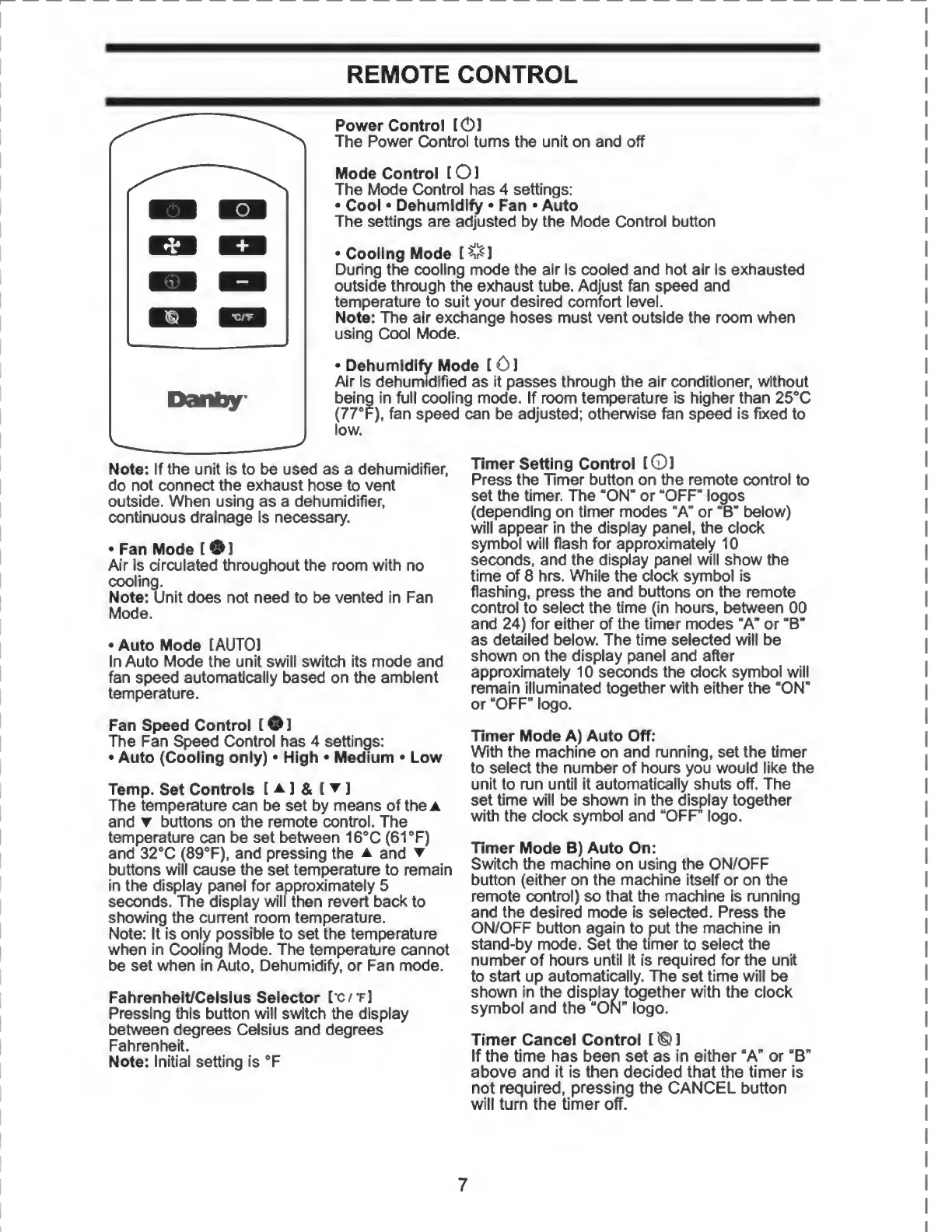
REMOTE
CONTROL
Power
Control
[0]
The
Power
Control
turns
the
unit
on
and
off
Mode
Control
(01
The
Mode
Control
has
4
settings:
Cool
Dehumidify
Fan
Auto
The
settings
are
adjusted
by
the
Mode
Control
button
Cooling
Mode
[^1
During
the
cooling
mode
the
air
is
cooled
and
hot
air
is
exhausted
outside
through
the
exhaust
tube.
Adjust
fan
speed
and
temperature
to
suit
your
desired
comfort
level.
Note:
The
air
exchange
hoses
must
vent
outside
the
room
when
using
Cool
Mode.
Dehumidify
Mode
[
01
Air
is
dehumidified
as
it
passes
through
the
air
conditioner,
without
being
in
full
cooling
mode.
If
room
temperature
is
higher
than
25°C
(77°F),
fan
speed
can
be
adjusted;
otherwise
fan
speed
is
fixed
to
low.
Note:
If
the
unit
is
to
be
used
as
a
dehumidifier,
do
not
connect
the
exhaust
hose
to
vent
outside.
When
using
as
a
dehumidifier,
continuous
drainage
is
necessary.
Fan
Mode
[
*51
Auto
Mode
IAUT01
In
Auto
Mode
the
unit
swill
switch
its
mode
and
fan
speed
automatically
based
on
the
ambient
temperature.
Fan
Speed
Control
[
®
]
The
Fan
Speed
Control
has
4
settings:
Auto
(Cooling
only)
High
Medium
Low
Temp.
Set
Controls
[
a
]
&
[
]
The
temperature
can
be
set
by
means
of
the
a
and
buttons
on
the
remote
control.
The
temperature
can
be
set
between
16°C
(61
°F)
and
32°C
(89°F),
and
pressing
the
a
and
buttons
will
cause
the
set
temperature
to
remain
in
the
display
panel
for
approximately
5
seconds.
The
display
will
then
revert
back
to
showing
the
current
room
temperature.
Note:
It
is
only
possible
to
set
the
temperature
when
in
Cooling
Mode.
The
temperature
cannot
be
set
when
in
Auto,
Dehumidify,
or
Fan
mode.
Fahrenheit/Celsius
Selector
I'C/t]
Pressing
this
button
will
switch
the
display
between
degrees
Celsius
and
degrees
Fahrenheit.
Note:
Initial
setting
is
°F
7
I
Air
is
circulated
throughout
the
room
with
no
cooling.
Note:
Unit
does
not
need
to
be
vented
in
Fan
Mode.
Timer
Setting
Control
l©]
Press
the
Timer
button
on
the
remote
control
to
set
the
timer.
The
“ON"
or
“OFF"
logos
(depending
on
timer
modes
“A"
or
"B"
below)
will
appear
in
the
display
panel,
the
clock
symbol
will
flash
for
approximately
10
seconds,
and
the
display
panel
will
show
the
time
of
8
hrs.
While
the
dock
symbol
is
flashing,
press
the
and
buttons
on
the
remote
control
to
select
the
time
(in
hours,
between
00
and
24)
for
either
of
the
timer
modes
“A"
or
“B"
as
detailed
below.
The
time
selected
will
be
shown
on
the
display
panel
and
after
approximately
10
seconds
the
clock
symbol
will
remain
illuminated
together
with
either
the
“ON”
or
“OFF"
logo.
Timer
Mode
A)
Auto
Off:
With
the
machine
on
and
running,
set
the
timer
to
select
the
number
of
hours
you
would
like
the
unit
to
run
until
it
automatically
shuts
off.
The
set
time
will
be
shown
in
the
display
together
with
the
clock
symbol
and
“OFF
logo.
Timer
Mode
B)
Auto
On:
Switch
the
machine
on
using
the
ON/OFF
button
(either
on
the
machine
itself
or
on
the
remote
control)
so
that
the
machine
is
running
and
the
desired
mode
is
selected.
Press
the
ON/OFF
button
again
to
put
the
machine
in
stand-by
mode.
Set
the
timer
to
select
the
number
of
hours
until
it
is
required
for
the
unit
to
start
up
automatically.
The
set
time
will
be
shown
in
the
display
together
with
the
clock
symbol
and
the
“ON”
logo.
Timer
Cancel
Control
[
®
1
If
the
time
has
been
set
as
in
either
“A"
or
“B"
above
and
it
is
then
decided
that
the
timer
is
not
required,
pressing
the
CANCEL
button
will
turn
the
timer
off.

Related product manuals