
 Need help?
Do you have a question about the Danfoss MCX and is the answer not in the manual?
Details the MMIMYK's functions as a programming module, gateway, and data logger with a graphic display and keyboard.
Provides links to guidelines for CAN and RS485 fieldbus installation on the Danfoss website.
Explains key terms like EMC (Electromagnetic Compatibility) and EMI (Electromagnetic Interference).
Explains how MMIMYK can be powered via direct connection to MCX, network connection, or external power.
Advises on mounting MMIMYK on a DIN-rail in a vibration-free environment for optimal performance.
Key points for reliable USB connection: cable holder, length, type, shielding, and placement away from noise sources.
Recommends 24 Vac power for data logging and notes MMIMYK's ability to save data during power failures.
Discusses how PC USB host interface quality impacts USB gateway reliability in noisy environments.
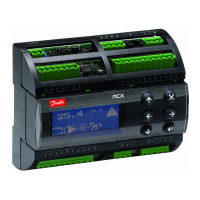
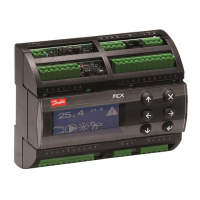
The MMIMYK is an advanced "all in one" device designed to perform multiple functions, including acting as a programming module, a gateway, and a data logger. It features a bright graphic display and a keyboard, enabling users to configure the module for various functions. To extend its memory capacity, the MMIMYK also includes a slot for an MMC (Multi Media Card).
The MMIMYK serves as a versatile tool for managing and interacting with MCX controllers and other devices within a network. Its primary functions are:
The MMIMYK is designed for flexible power supply options and robust connectivity:
Multiple Power Sources: The MMIMYK can be powered through several sources:
Connectivity:
User Interface: The device features a bright graphic display and a keyboard, allowing for direct configuration and interaction with the module's functions without necessarily needing an external computer for basic setup.
While the manual primarily focuses on installation and usage, certain aspects contribute to the device's reliability and ease of maintenance:
Robust Installation Guidelines: The manual provides detailed guidelines for correct installation, particularly when the MMIMYK is used as a gateway or data logger. Adhering to these guidelines helps prevent problems and ensures optimal performance.
Mounting: The MMIMYK is designed for convenient mounting on a DIN-rail, which is a standard practice in industrial control cabinets, simplifying installation and organization.
Vibration Resistance: It is recommended that the cabinet where the MMIMYK is mounted be mainly vibration-free. This consideration helps prevent problems with the USB connector or memory card, thereby extending the device's lifespan and ensuring stable operation.
Electromagnetic Compatibility (EMC) and Electromagnetic Interference (EMI) Considerations: The manual emphasizes the importance of EMC/EMI considerations, especially for reliable USB connections in electromagnetically noisy environments. Recommendations include:
Data Integrity for Data Logging: The recommendation for a 24 Vac power supply in fixed data logging installations, coupled with the device's ability to save data during power failures, highlights a key maintenance-related feature. This design choice ensures that valuable logged data is not lost, reducing the need for data recovery efforts and improving the overall reliability of monitoring systems.
The MMIMYK's design and recommended installation practices aim to provide a reliable, versatile, and user-friendly solution for programming, gateway, and data logging applications within industrial control systems, particularly those utilizing MCX controllers.
 General
| Category | Controller |
|---|---|
| Manufacturer | Danfoss |
| Mounting | DIN rail |
| Type | Programmable controller |
| Protection Class | IP20 |
| Display | LCD |
| Communication | RS485 |
| Digital inputs | 8 |
| Analog inputs | 4 |
| Output Current | 2 A |
| Communication Protocol | Modbus RTU |
| Protocols | Modbus |





 To Next Page