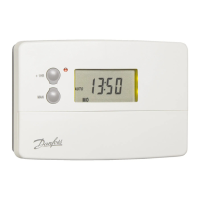
The Danfoss TS715 is a single-channel timeswitch designed to control heating and hot water systems. It allows users to program their system to switch on and off at specific times, offering flexibility to suit various lifestyles and needs. The device is suitable for installation by a qualified electrician or competent heating installer, adhering to current IEEE wiring regulations.
Function Description
The TS715 timeswitch enables users to set up to three ON/OFF times per day. These programmed times dictate when the heating and hot water system will activate and deactivate. The device supports different programming modes, including 5/2 day, 7 day, and 24 hour, allowing for tailored scheduling based on weekdays/weekends, individual days, or a consistent daily schedule, respectively.
The timeswitch features a clear digital display that shows the current time, day, and operational status (ON, OFF, AUTO, ALLDAY). It includes several buttons for setting the time, day, and programming ON/OFF events.
Operational Modes:
- AUTO: The system operates according to the programmed ON/OFF times.
- ON: The system remains constantly on, overriding any programmed OFF times.
- OFF: The system remains constantly off, overriding any programmed ON times.
- ALLDAY: The system turns on at the first programmed ON time and stays on until the last programmed OFF time of the day.
Temporary Overrides:
The TS715 includes two convenient temporary override buttons:
- +1HR: When pressed in AUTO or ALLDAY mode, this button extends the system's current ON period by one hour. If the system is OFF, pressing this button will turn it on for one hour and then revert to OFF.
- MAN (Manual): When pressed in AUTO or ALLDAY mode, this button toggles the system's state. If the system is ON, it will switch OFF until the next programmed ON time. If the system is OFF, it will switch ON until the next programmed OFF time. These overrides do not affect the stored programme.
Clock Adjustment:
The timeswitch allows for easy adjustment of the clock forward or backward, useful for daylight saving changes. This feature is accessed by pressing and holding either the '+' or '-' button, depending on whether the clock needs to go forward or back.
Important Technical Specifications
- Power Supply: 230 Vac, ±15%, 50/60 Hz
- Switching Action: 1 x SPDT voltage free, Type 1B
- Switch Rating: Max 264 Vac, 3(1)A
- Battery Back-up: 24 hours minimum (ensures settings are retained during power outages)
- Setting/Running Accuracy: ±1 minute
- Dimensions (W, H, D): 135 x 88 x 32 mm
- Design Standard: EN 60730-2-7
- Control Pollution Situation: Degree 2
- Rated Impulse Voltage: 2.5kV
- Ball Pressure Test: 75°C
- Compliance: This product complies with the Electro-Magnetic Compatibility Directive (EMC) (89/336/EEC), (92/31/EEC) and the Low Voltage Directive (LVD) (73/23/EEC), (93/68/EEC). It carries the CE mark.
Usage Features
Initial Setup and Programming:
- Reset: Before initial use or if settings become confused, open the front flap and press the RESET button using a non-metallic object until a click is heard and the red light flashes once. This reinstates preset programmes and sets the time to 12:00 PM on Monday.
- Display Format: Toggle between 24-hour clock and AM/PM display by pressing and holding the DAY and NEXT ON/OFF buttons for 1.5 seconds.
- Set Time and Day:
- Press PROG once. "SET TIME" will appear, and the time will flash. Use the '+' and '-' buttons to adjust the time (press and hold for 10-minute increments).
- Press DAY repeatedly to set the correct day (MO for Monday, TU for Tuesday, etc.).
- Accept Preset Programmes: If satisfied with the factory preset programmes (detailed on page 10 of the manual), press the PROG button until the time appears and the colon flashes. The unit will then be in RUN mode.
Changing Preset Programmes:
The TS715 can be configured by the installer for one of three programming modes:
- 5/2 Day Mode: One set of programmes for weekdays (Mon-Fri) and another for weekends (Sat-Sun).
- Press PROG until "SET ON TIME" and "MOTUWETHFR" appear. Use '+' and '-' to set the first ON time (Event 1).
- Press NEXT ON/OFF to move to the next event (e.g., first OFF time, Event 2). Continue setting ON/OFF times for weekdays.
- Press DAY once; "SASU" will appear for Saturday/Sunday. Either press COPY to duplicate weekday settings or program new ON/OFF times using NEXT ON/OFF and '+'/' -'.
- 7 Day Mode: Different settings for each day of the week.
- Press PROG until "SET ON TIME" and "MO" appear. Set ON/OFF times for Monday using NEXT ON/OFF and '+'/' -'.
- Press DAY once; "TU" will appear for Tuesday. Either press COPY to duplicate the previous day's settings or program new ON/OFF times. Repeat for each day of the week.
- 24 Hour Mode: One set of programmes for the entire week.
- Press PROG until "SET ON TIME" appears. Set ON/OFF times for the day using NEXT ON/OFF and '+'/' -'. These settings will apply to all days.
After programming, press PROG to return to RUN mode.
Running the Programme:
In RUN mode, press the SELECT button to cycle through the operational modes: ON, OFF, ALLDAY, and AUTO.
Maintenance Features
- Battery Back-up: The internal battery ensures that programmed settings are retained for at least 24 hours in the event of a power cut, minimizing the need for reprogramming after short power interruptions.
- Troubleshooting Guide: The manual includes a comprehensive "Fault Check List" for both "No Hot Water" and "No Heating" scenarios. This guide helps users diagnose common issues by checking various components like the red light indicator, fuse, cylinder thermostat, room thermostat, boiler status, and reset button. It provides step-by-step instructions for basic checks and advises when to contact a local heating engineer.
- Installer Settings: The unit has DIL switches on the rear that must be set by the installer to configure the desired programming mode (24 Hour, 5+2 Day, or 7 Day) and the number of ON/OFF events per day (2 or 3). An "INSTALLER SETTING" tick box on an internal flap label helps users identify the configured mode.
- Wiring Conversion Tables: The manual provides detailed wiring conversion tables for replacing various existing timeswitches with the Danfoss TS715, simplifying installation for electricians. It also specifies that a wire link between L & COM terminals or terminal 1 & L may be required depending on the existing wallplate and mains voltage system.
- Contact Information: Danfoss Randall provides technical support via phone and email, as well as a website for further information. A large print version of the instructions is also available upon request.

 Need help?

 To Next Page

 General