®
3
• locate the ON-OFF switch on the control box and switch to OFF (O) for a period of 5 seconds... then switch back to ON (I).
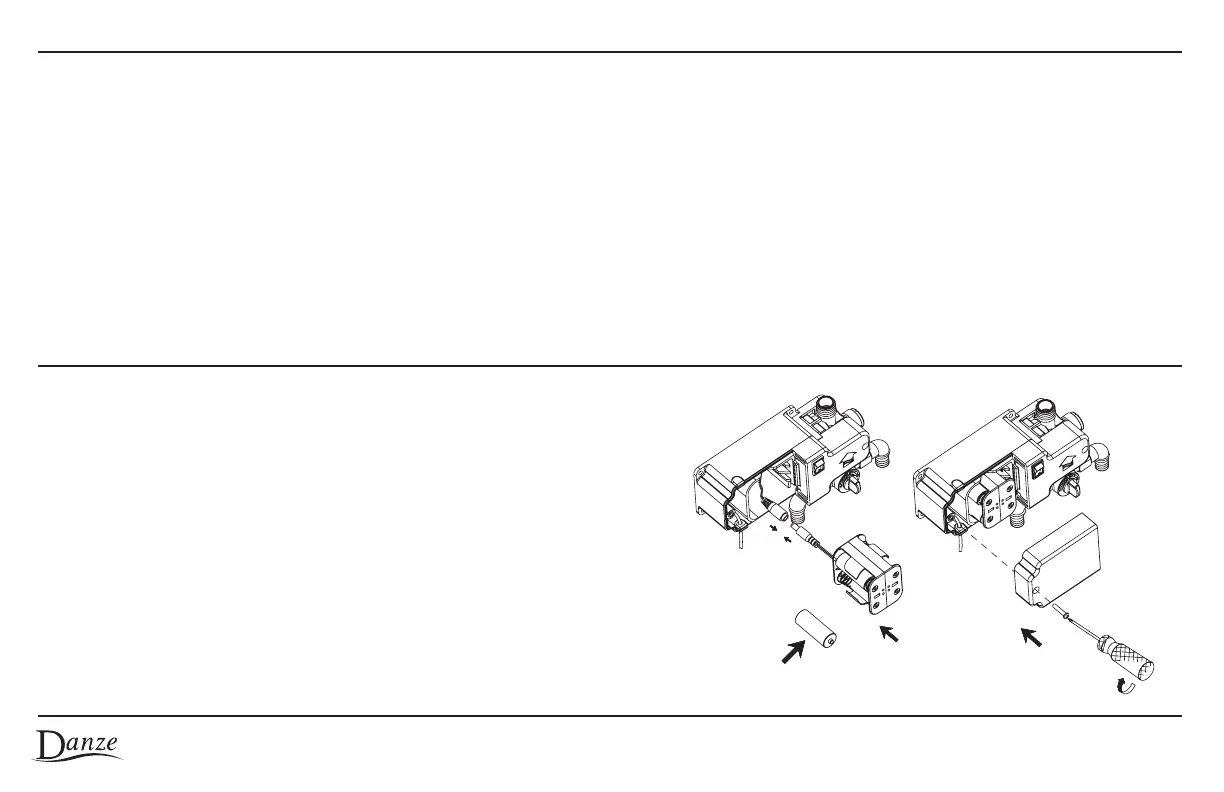
• When the red light flashes continuously, the batteries need to be changed
• Remove the sensor control box cover by unscrewing the left hand screw
• Carefully unplug and remove the battery pack
• Remove old batteries and install 4 fresh “C” sized batteries (taking care to
observe the required battery polarity) into the battery pack
• Re-insert battery pack into the sensor control box cavity and re-connect plug
• Re-install sensor control box cover taking care not to pinch wires.
• Turn on faucet by pushing ON-OFF switch to ON (1).
• You can program the flow time during the first 5 seconds after the power is switched on. During this 5 seconds a red light in the sensor
window will turn on and stay lit for a 5 second period. To program, place your hand in front of the sensor while the light is on.
• As you keep your hand in front of the sensor the light will begin to blink at one second intervals. Each blink will account for a 5 second
automatic run time (e.g. 4 blinks = 20 seconds). The maximum flow time is at 45 seconds or 9 blinks.
Note: beyond 9 blinks the unit will set the maximum flow time (45 seconds).
• After the desired number of blinks, remove the hand, wait a few seconds and the sensor will blink 3 times to confirm the new run time.
• On power-off conditions the last programmed parameters are retained in memory.
How To Change Flow-time Of Hands Free Operation
Changing Batteries
© 2009 Danze, Inc. All rights reserved.


 To Next Page