DPR-145 User Manual V-3.0 (14.09.2016)
-13-
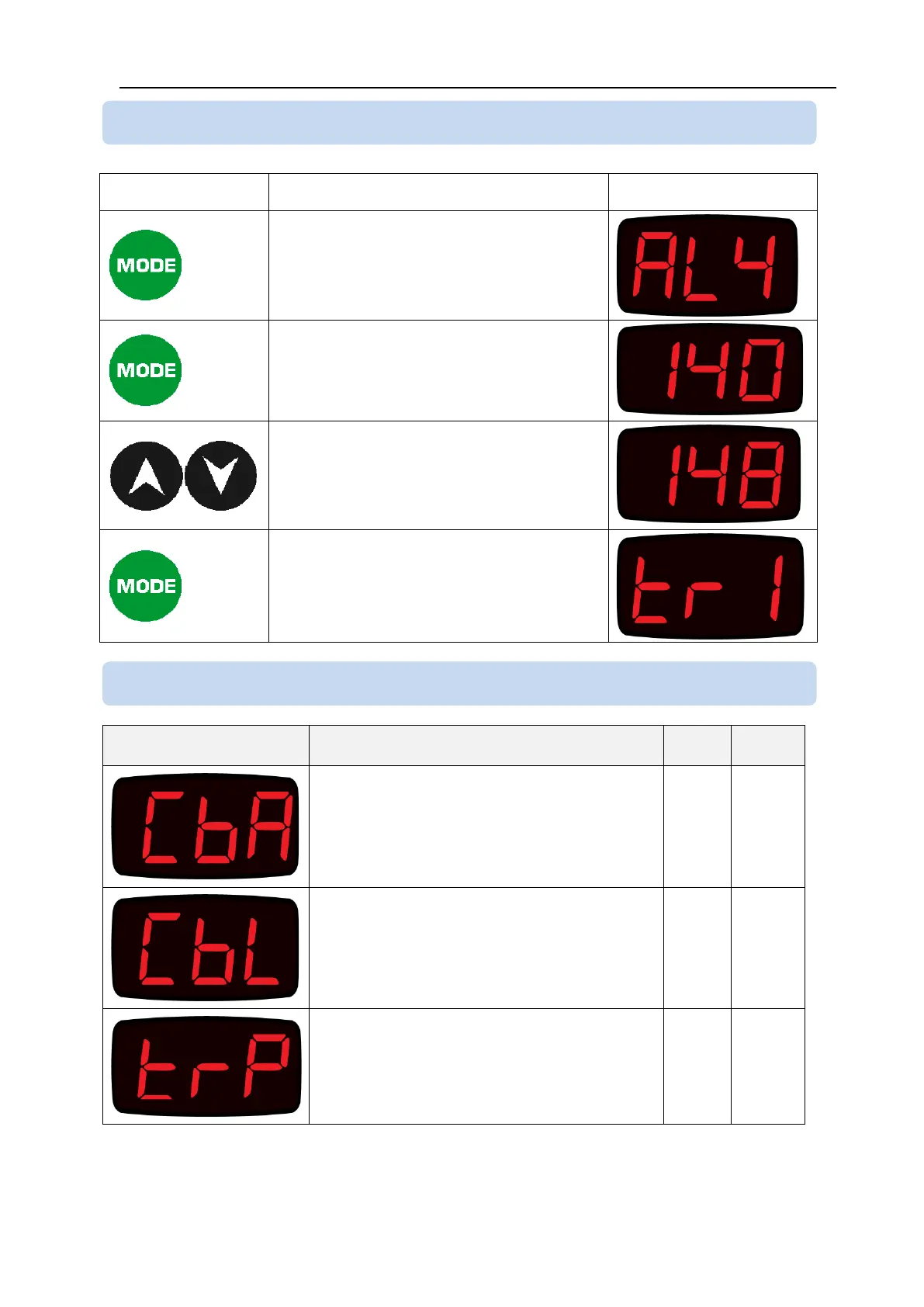
The parameter to be modified is
selected with MODE button.
When the parameter name is on
display, hold the MENU button
pressed during 5 seconds. The
parameter value will be displayed.
Adjust the parameter using up/down
arrow buttons.
In order to increase/decrease faster
you can hold arrow buttons pressed.
When MODE button is pressed, the
parameter value is recorded and the
next parameter name is displayed.
PT100 CABLE SECTION ()
PT100 cable section in mm
2
.
The factory set value is 0.5mm
2
.
PT100 CABLE LENGTH ()
PT100 cable length in meters (m).
The factory set value is 0m.
TRIP RELAY TEST ()
Used to test the TRIP relay. The value of
“1” activates the relay. The value of “0”
deactivates it.
5.4 MODIFYING PROGRAM PARAMETERS
5.5 PROGRAM PARAMETER LIST



 To Next Page