44
Installing the Identication Reader (MSR/iButton/
Fingerprint/RFID/M+i) (Optional)
WARNING:
Be sure to turn off the power of the Touch Terminal before making any
connection or disconnection.
NOTE:
• The identication reader can be installed on either side of the Touch Terminal.
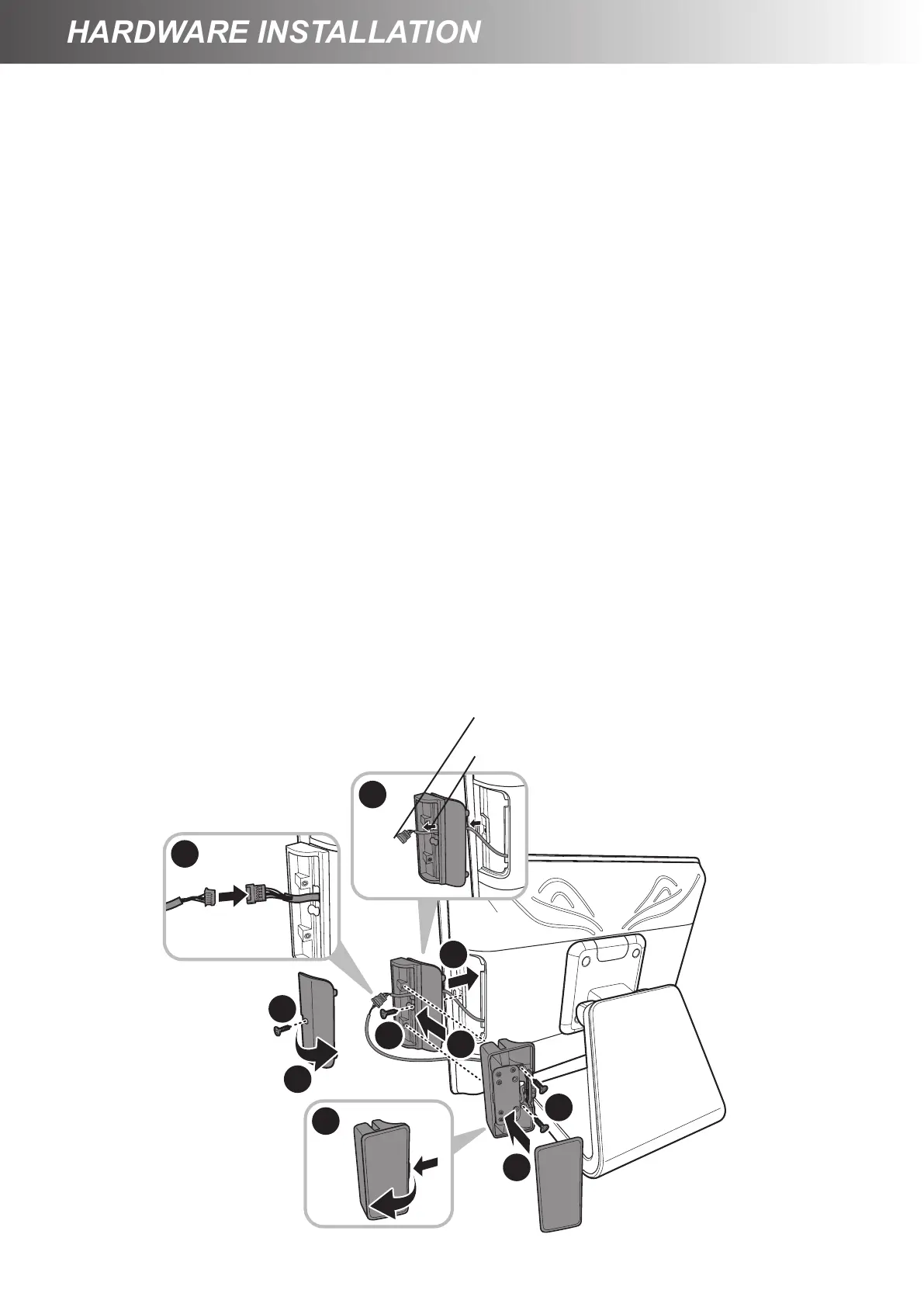
1. Remove the screw securing the HDD/identication reader compartment cover to the Touch
Terminal. (a)
2. Detach the HDD/identication reader compartment cover from the Touch Terminal. (b)
3. Route the optical identication reader connector through the opening on the support bracket. (c)
4. Align and install the support bracket to the Touch Terminal. (d)
5. Secure the support bracket to the Touch Terminal with the screw. (e)
6. Detach the identication reader compartment cover. (f)
7. Connect the identication reader connector with the optional identication reader connector. (g)
8. Align by the screw holes and then install the identication reader to the support bracket. (h)
9. Secure the identication reader to the support bracket with the two screws. (i)
10. Attach the identication reader compartment cover to the identication reader. (j)
a
b
c
e
g
i
j
h
f
d
Opening on the support bracket
Optical identication reader connector



 To Next Page