Console Location
10
Wall Mounting
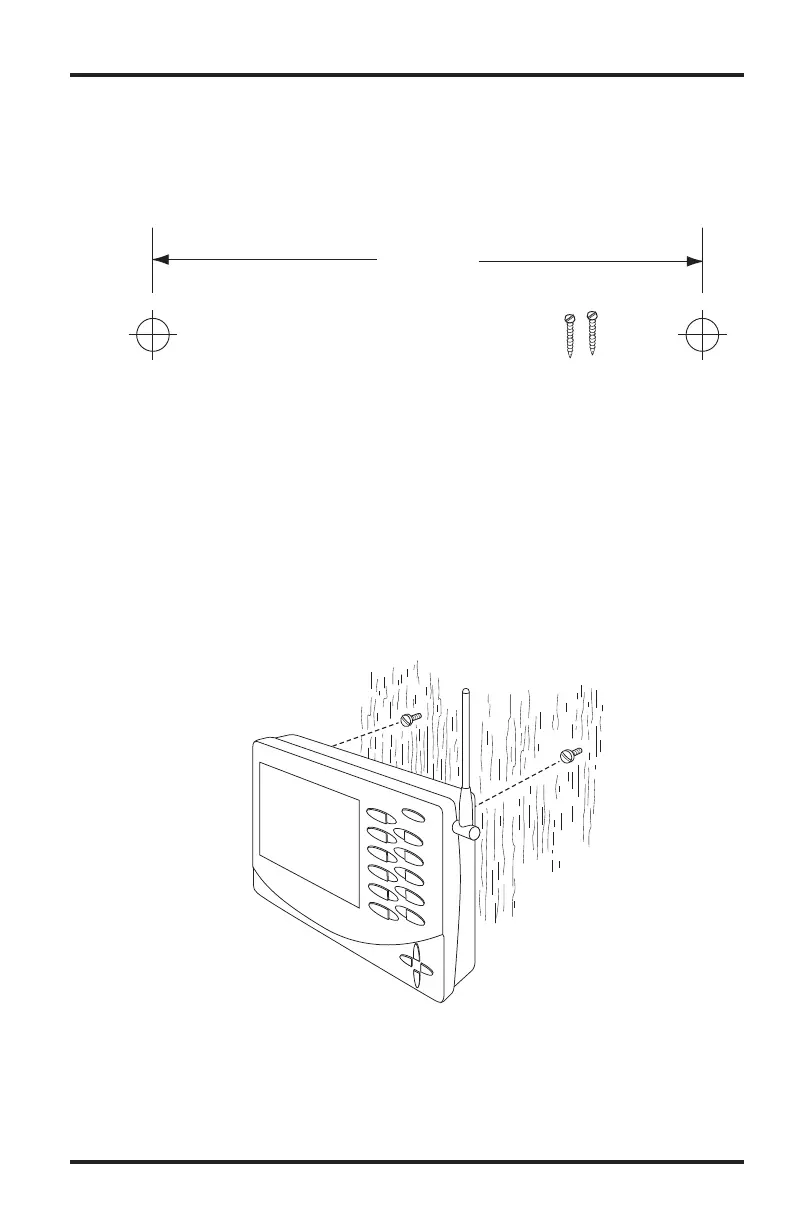
The console mounts to the wall using two keyholes located on the back of the case.
To mount the console on a wall:
1. Use a ruler to mark two mounting hole positions on the wall 8 inches (203 mm)
apart.
This is a representation for the mounting hole positions. This template is not true to size.
If installing a cabled Vantage Pro2 console with sensor cable running inside the
wall, mount the console over an empty switch box.
2. Use a drill and a 3/32 or 7/64''(2.5 mm) drill bit to drill two pilot holes for the
screws.
3. Using a screwdriver, drive the two #6 x 1'' pan head self-threading screws into
the wall. Leave at least 1/8'' (3 mm) between the wall and the heads of the
screws.
4. If the kickstand has been pulled out from the case, push it back into its upright
and locked position.
5. Guide the two keyholes on the back of the console over the two screws.
Drill two 3/32" or 7/64" (2.4 to 2.8mm) holes
8" (203mm) apart for the #6 x 1" mounting screws.
8" (203mm)














 To Next Page