
 Need help?
Do you have a question about the DaytonAudio HTA100 and is the answer not in the manual?
Essential safety guidelines to prevent electric shock, fire, and ensure proper ventilation.
Details FCC compliance rules for the device, including interference guidelines.
Ports for digital (optical, coaxial) and analog (auxiliary, phono) audio sources.
Ports for subwoofers, speakers, Bluetooth antenna, and AC power.
Terminal for turntable ground and switch for selecting operating voltage.
Instructions for connecting speaker wires, including banana plugs.
How to connect a subwoofer and headphones to the amplifier.
Steps to connect turntables to the phono or AUX input.
Guide to pairing and streaming audio wirelessly via Bluetooth.
Solutions for power-on failures, sudden shutdowns, and no sound output.
Addressing low volume, weak bass, humming, and distortion issues.
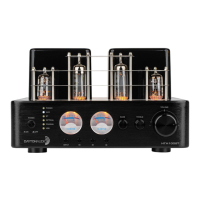
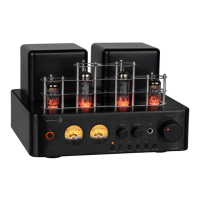
The Dayton Audio HTA100 is a 100W integrated stereo hybrid tube amplifier designed to combine the warm, natural sound quality of vacuum tube amplification with modern power efficiency. This amplifier utilizes vacuum tubes in the preamp input section and a solid-state Class A/B output power amplifier. It features multiple analog and digital inputs, allowing for connection to various modern devices, including computers.
The HTA100 serves as a central audio hub, amplifying audio signals from various sources and delivering them to speakers or headphones. Its hybrid design leverages the sonic characteristics of vacuum tubes for the preamplification stage, contributing to a rich and natural sound, while the solid-state output stage provides robust and efficient power delivery. The amplifier includes a built-in phono preamp, enabling direct connection of turntables without the need for additional hardware. A high-quality USB-DAC is integrated for direct digital audio connection to computers, supporting high-resolution audio playback. The amplifier also features a dedicated subwoofer output, allowing users to easily integrate a powered subwoofer for enhanced bass response. Bluetooth connectivity is included for wireless audio streaming from compatible devices.
The front panel of the HTA100 offers intuitive controls for ease of use. A power switch/indicator turns the device on and off, with an amber illuminated ring indicating power status. Two meters display the audio output level for the left and right channels. Bass and treble control knobs allow users to adjust the tone to their preference. A headphone output is provided for private listening, accepting 1/4" TRS headphone connectors. Plugging in headphones automatically mutes the speaker and subwoofer outputs. A large volume control knob adjusts the overall output level, allowing users to experience the warm tone generated by the tube preamplifier. A source input selector with corresponding illuminated buttons allows users to choose between various inputs, including Phono, Aux, Bluetooth, Optical, Coaxial, and PC-USB. The PC-USB input is only selectable when a device is connected and powered on.
The rear panel provides a comprehensive array of connection options. Speaker outputs are available for connecting passive speakers, with clear markings for positive and negative terminals to ensure correct polarity. The amplifier is designed to power speakers with a minimum impedance of 4 ohms. It is important not to bridge the speaker outputs as this can damage the amplifier. A subwoofer output (SW OUT) is provided via a single RCA cable for connecting to a powered subwoofer or separate subwoofer amplifier. This output delivers a full-range mono signal, with its volume controlled by the front panel volume knob. Digital inputs include an optical (OPT) input and a coaxial (COAX) input, both supporting SPDIF LPCM up to 48 kHz 16 Bit. A PC-USB input supports audio up to 192 kHz 32 Bit. Line-level (AUX) inputs and a phono input are available for analog sources. A Bluetooth antenna port is present for connecting the supplied antenna, ensuring optimal signal strength for wireless streaming. A ground terminal is included for connecting the ground wire from a turntable. An AC voltage selector switch allows users to select between 110V and 220V operation, with a corresponding internal fuse change required for 220V operation. The AC power input is a standard IEC socket for connecting the main power cable.
Connecting speakers involves using insulated two-conductor wire, ensuring consistent polarity between the amplifier and speakers. Banana plug cables can be connected by tightening the knob and inserting the plug into the terminal. For bare speaker wires, users need to strip about 3/8" of insulation, twist the bare wires, unscrew the knob, insert the wire into the side hole, and then tighten the knob to secure it.
Connecting a turntable requires ensuring the turntable outputs a phono signal and connecting it to the PHONO RCA plugs on the amplifier. If the turntable outputs a line-level signal, it should be connected to the AUX input. The turntable's ground wire should be connected to the ground terminal on the amplifier.
For Bluetooth connectivity, the supplied antenna must be connected to the BT ANTENNA port, and the Bluetooth input selected on the amplifier. Users can then pair their smart device with "HTA100" from their device's Bluetooth settings. The Bluetooth source light will flash during pairing and remain solid once connected.
The HTA100 is designed for user-friendly operation, with minimal specific maintenance actions required beyond proper setup and handling. The user manual emphasizes important safety instructions, including not removing the cover due to the risk of electric shock and the absence of user-serviceable parts inside. Servicing should be referred to qualified personnel. The unit should be operated in a well-ventilated area with a minimum clearance of 2 inches from ventilation openings to prevent overheating.
Troubleshooting guidance is provided for common issues. If the unit fails to turn on, users should check power cable connections and verify the voltage selection switch setting. If the unit turns off suddenly, checking for short circuits in speaker wires and speaker malfunctions is recommended. For no sound output, users should verify the correct input selection, ensure headphones are unplugged, and check cable connections. Low volume issues can be addressed by checking the playback device's volume and ensuring correct speaker polarity. If the sound lacks bass, users should check the bass control knob. A "humming sound" may indicate a missing ground connection between the amplifier and turntable. Turntable distortion can be resolved by verifying the turntable's output signal type (line or phono) matches the amplifier input, and ensuring proper grounding.
The amplifier is covered by a 5-year limited warranty, ensuring repair or replacement for defects in material and workmanship. All warranty service must be performed by an authorized Dayton Audio technician or service facility. Users are encouraged to register their device on the Dayton Audio website for more information.
 General
| Damping Factor | > 100 |
|---|---|
| Frequency Response | 20 Hz - 20 kHz |
| Inputs | RCA |
| Outputs | Speaker terminals |
| Input Impedance | 47k Ohms |

 To Next Page