4
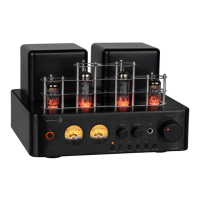
Controls and Functions
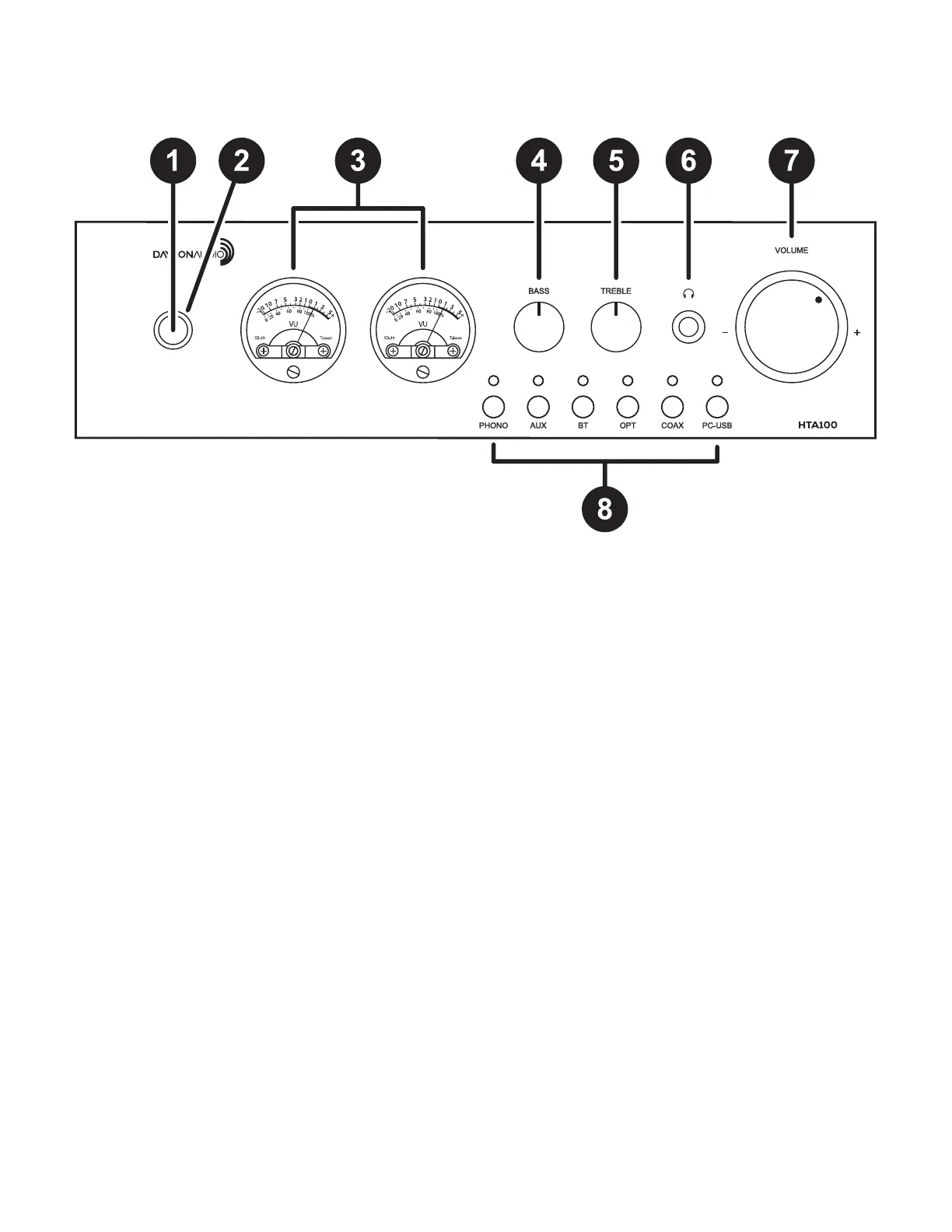
1. POWER SWITCH/INDICATOR
Turns the device on and off.
2. POWER INDICATOR
The ring surrounding the power switch will
illuminate amber when the unit is turned on.
3. METERS
Indicates the audio output level of the left and
right channels.
4. BASS CONTROL
Adjusts the volume level for the bass output.
5. TREBLE CONTROL
Adjusts the volume level for the treble output.
6. HEADPHONE OUTPUT
The headphone output allows you to listen to any
input privately without playing audio through your
speakers. The output accepts ¼" TRS headphone
connectors. Plugging in headphones here will cut off
the signal to the speakers and SW OUT [10].
NOTE: To avoid accidental damage to your head
-
phones or speakers always turn down the volume
before connecting or disconnecting headphones.
7. VOLUME CONTROL
Turn this up to begin experiencing the warm natural
tone generated by the tube preamplier.
8. SOURCE INPUT SELECTOR
Press the corresponding input button to select the
desired source. The corresponding light will illumi
-
nate when the input is selected.
NOTE: PC-USB input will not be selectable
unless there is a device connected to the unit
and powered on.
Front Panel


 To Next Page