ABOUT GATING
Noise reduction
The basic purpose oi a noise gate is to
remove unwanted background sounds
in the
spaces between
desired foreground sounds. Note that there has to be some real distance
in level between the
unwanted and
wanted material
—
at least
a
few dB
—
in order
for
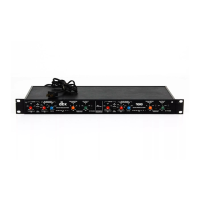
the 166's
gate to "get its foot in the
door.V
If levels are too close (e.g., because of earlier
compression,
or
because the mikes
were closer to
the unwanted than to the wanted
sound), the
gating efforts of the 1 66 will be for naught.
One of the
more common
uses
for
a gate is
to tighten or "dry up" drum sounds. As
with most dynamics
processing, it's ideal if there is a
sep>arate mike
on each drum
and
cymbal (or group
oi cymbals) and each is individually
gated. Each mike
is
auditioned
separately and the gate
threshold
adjusted to
eliminate the sound of all but the desired
drum. (Hint: start with the threshold
very low,
so all the sounds come through, then
increase
it until only the desired drum is left.) It's likely
that you'll find the Fast
release
setting best for most drums, while slow usually is
better for cymbals and some toms.
When
things are
adjusted correctly, each drum will sound
tight, punchy, and dry
—
detailed and defin^.
When you don't have
erK>ugh mikes (or 166es0 to cover each
drum,
then group them:
snare and center
toms, side toms, bass, cymbals.
The
idea is to
get
as close as p>ossible to
only one
mike
on
at
a
time so only one sound is
picked
up,
instead of several.
Another common use
for a gate is in vocal recording. Especially after compression,
the noises picked up by a mike an inch away from a
singer's mouth can be very obtrusive.
Try
the 166 in
its slow relecise mode to
gate out these noises. Other applications
include
keeping live drum tracks from "contaminating"
an acoustic-piano track, and general solv-
ing
of
other
sorts of leakage problems.
Chanf^g sound
quality
There's more to gating
than just keeping out unwanted background noises: you can
use the 1
66
gates to
change sonic character. This is because gates can be used to reduce
or
otherwise alter tfie quality
of instrumental ambience
and reverb.
As the sound decays
after an
instrument stops, its reverberation level will
fall through the
166's
Threshold
setting, below which it can be made to die out more or less quickly
—
in any case faster
than the natural
sound. Experiment with changing the "tail" of the sound; the
fast setting
will nearly
eliminate reverb.
In other situations, a 166 can be
used
to prevent or
reduce leakage among mikes in
sound reinforcement or during panel
discussions. Simply set the
Threshold
control below
the level of the music or
speech. Similarly, in broadcasting, a 166 can be
used
to
clean
up noisy feeds Oand lines,
ENG audio) if
it's
placed at the output.
Wind
or air-condition-
ing noise during a
remote interview can be controlled as well: proper
166
gate attenua-
tion can keep
noise during pauses from being either loud
(obtrusive-sounding) or too soft
(peculiar-sounding)
—
or modulated.
The
attack time of the
166
gate is
short,
so
the complete transient at the beginning
of a sound
comes through.
We've
already touched on the
differences between the Fast
and
Slow release rates, but never hesitate to
experiment to get the best results for a
particular
situation.
-
7
-


 To Next Page