Getting Started
2
Section 1
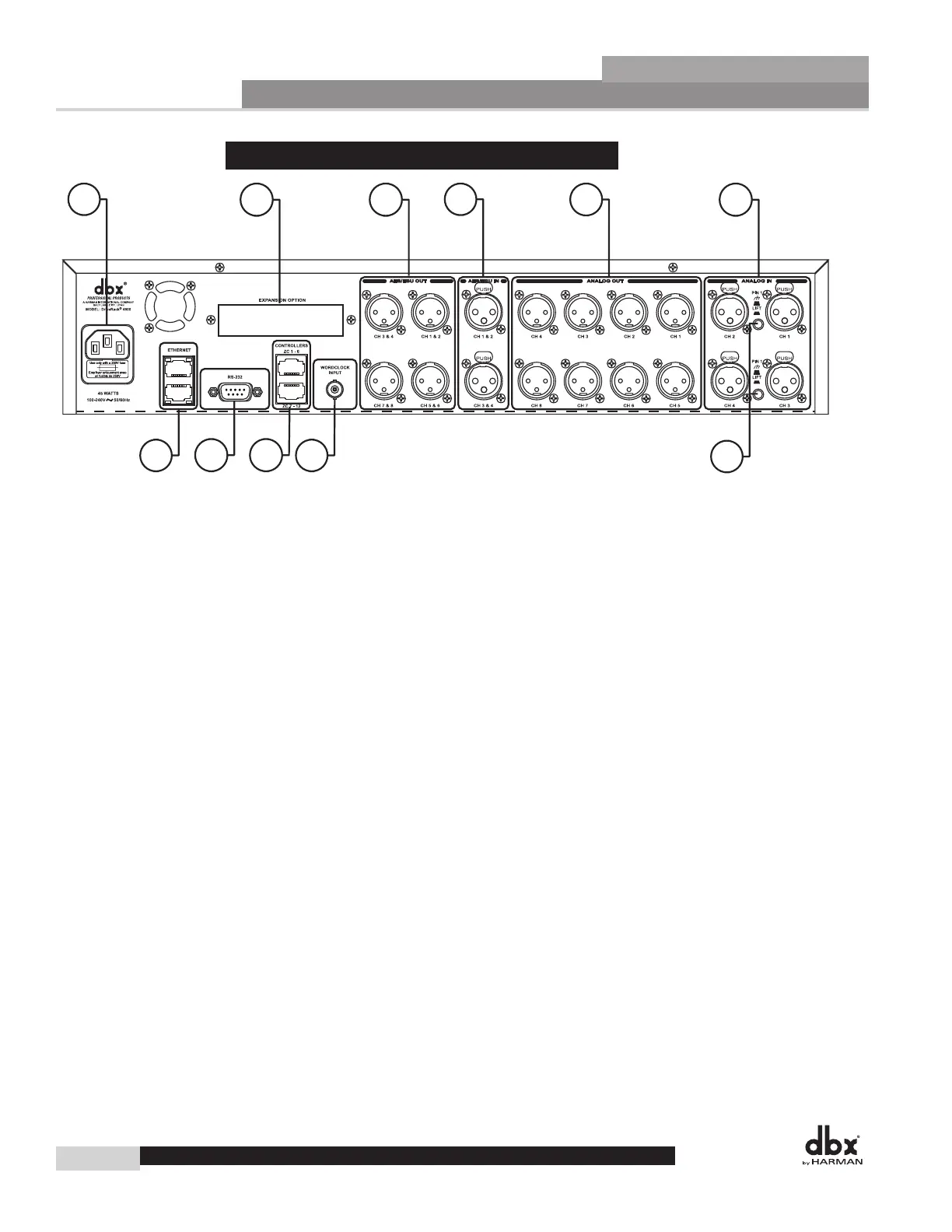
1.1 - Rear Panel 4800/4820
1
23
4
5
6
7
89
10
11
1. IEC Power Cord Receptacle
The 4800 and 4820 come with a power supply that will accept voltages ranging from 100V-240V at fre-
quencies from 50Hz-60Hz. An IEC cord is included for both a US and European style AC mains plug.
2. Optional CobraNet
™
Connection (RJ-45)
The Option Slot is for a CobraNet card that provides CobraNet audio and control networking.
3. Digital AES/EBU Output Channels 1-8 (XLR)
The eight AES/EBU output channels (four XLR connectors) are transformer isolated.
4. Digital AES/EBU Input Channels 1-4 (XLR)
The four digital AES/EBU input channels (two XLR connectors) are transformer isolated.
5. Analog Output Channels 1-8 (XLR)
The eight analog outputs of the 4800 and 4820 are electronically balanced and the signals sent to these
outputs are analog copies of the AES/EBU outputs. An optional Input/Output isolation transformer pack-
age is available.
6. Analog Input Channels 1-4 (XLR)
The four analog inputs of the 4800 and 4820 are electronically balanced. An optional Input/Output isola-
tion transformer package is available.
7. Ethernet Connection (RJ-45)
These RJ-45 connections are used to network DriveRack devices and control them via Ethernet.
8. PC Connection (DB-9)
This DB-9 connection is used to communicate with the PC GUI and uses RS-232 protocol. This con-
nection requires a Null modem cable (included with the unit).
DriveRack
®
4800/4820 User Manual
DriveRack
®



 To Next Page