70
Sect/Secc 7
DriveRack
™
DriveRack™ User Manual/Manual de instrucciones
Basic VENUE View
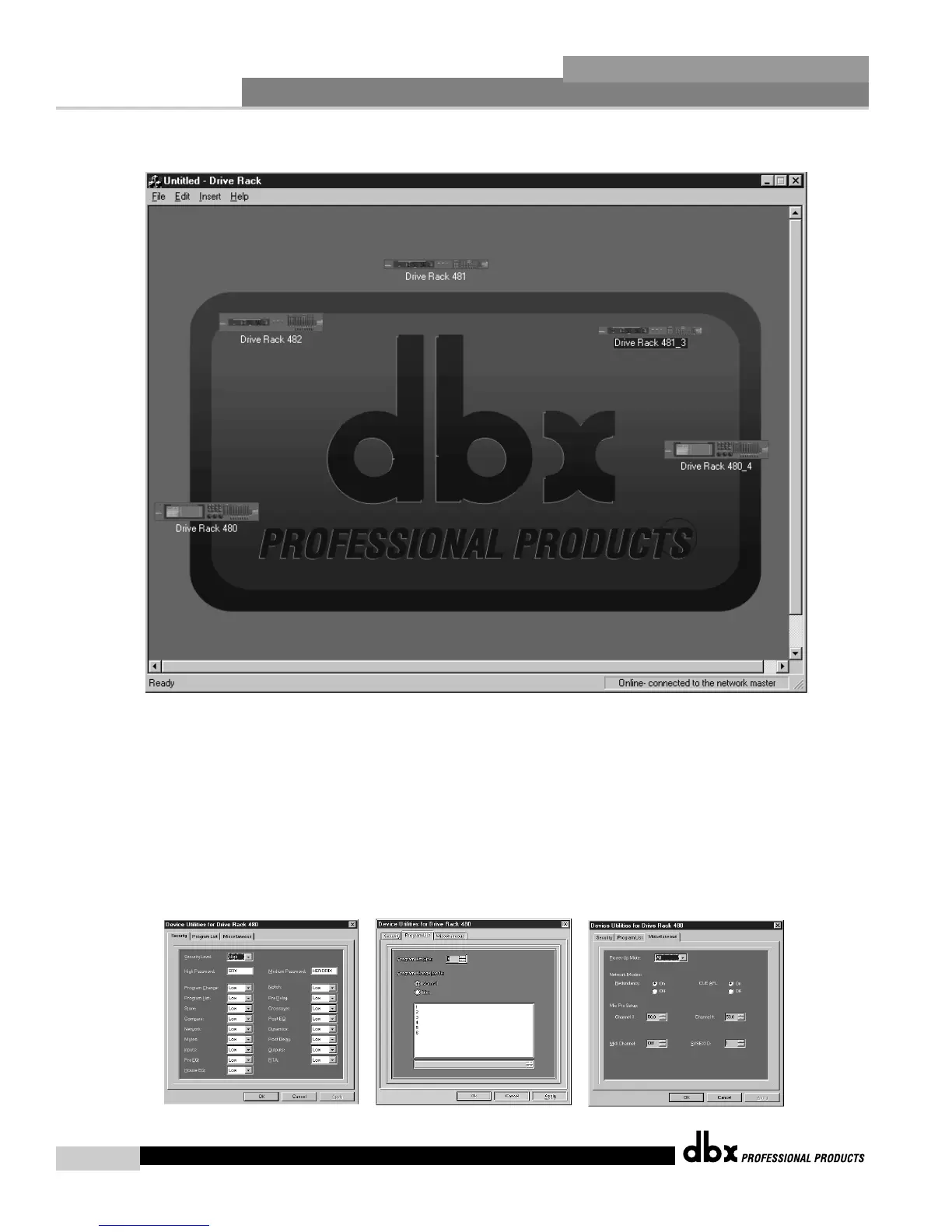
• At this point, the DriveRack™ icons represent each unit that is
currently setup to operate in the Network. To edit any unit in the
network, select the desired unit with the mouse and double click.
• To adjust the utility menu features of any unit in the network and
Right-Click-hold to pull down the utility menu. The utility menus will
appear as follows:
Vista básica VENUE
• En este punto, los iconos DriveRack™ representan cada unidad que
está configurada en ese momento para funcionar en la red. Para editar
cualquier unidad, elija la unidad deseada con el ratón y haga doble
clic.
• Para ajustar las funciones del menú de utilidades de cualquier unidad
de la red, haga clic con el botón derecho del ratón y manténgalo
pulsado para desplegar el menú de utilidades. Los menús de utilidades
aparecerán del siguiente modo:



 To Next Page