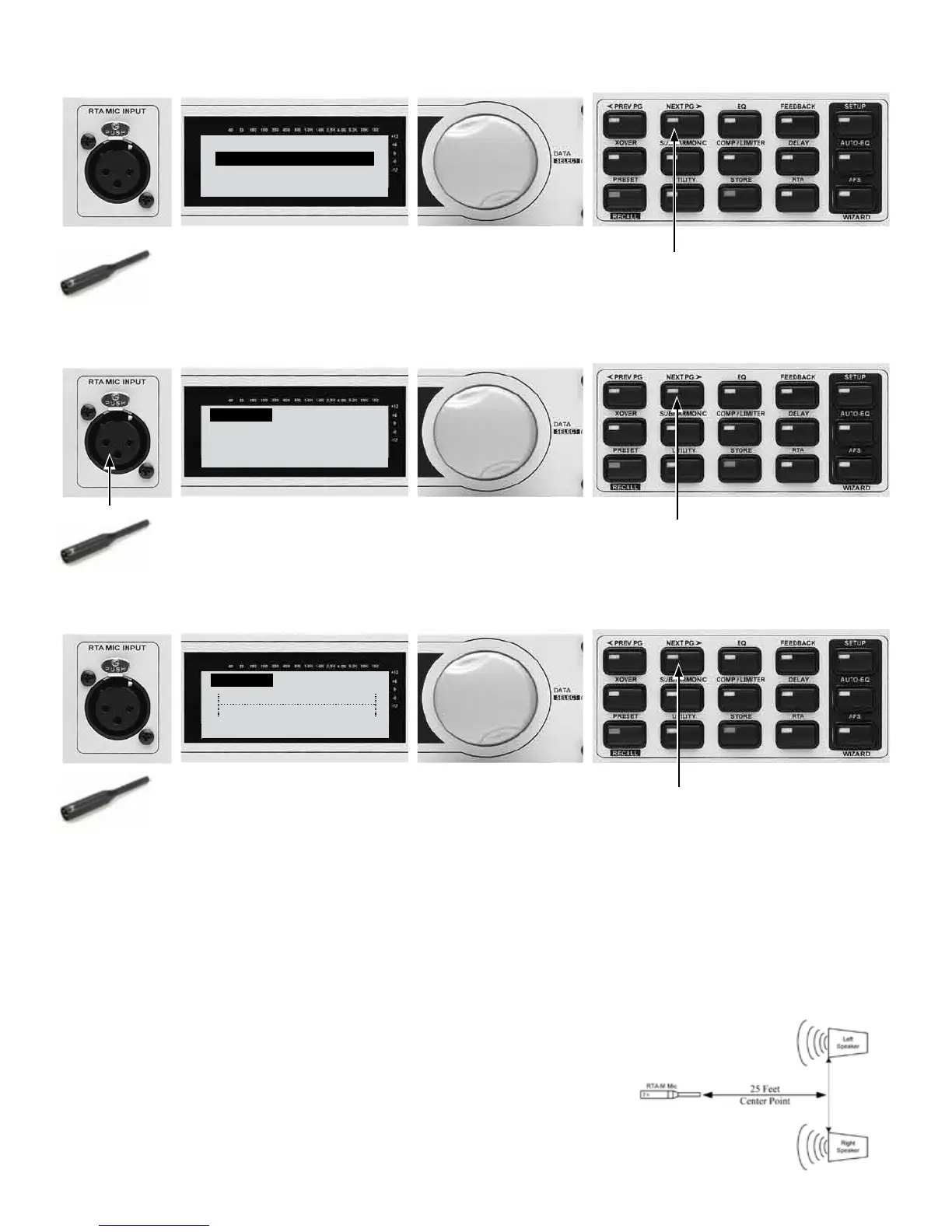
24.
DriveRack PA+
SYSTEM SETUP WIZARD
<NEXT PG> to advance
<RTA> skips SETUP
Press the NEXT PG button.
25.
AUTO-EQ
Connect RTA Mic to:
RTA MIC INPUT
<NEXT PG> to advance
25B - Press the NEXT PG button.
25A - Connect the RTA-M mic here (if it
isn’t already connected).
26.
AUTO-EQ Target Curve
˘Flat
26B - Press the NEXT PG button.
26D - Press the NEXT PG button.
26A - Turn the Data Wheel to change the
RESPONSE curve you want the DriveRack
PA+ to use for AUTO EQ (Flat typical).
26C - Press the Data Wheel to set the
PRECISION. Turn the Data Wheel to choose
High, Medium or Low precision (Medium
typical).
27. The RTA-M mic should already be plugged into the RTA input of the DriveRack PA+. Place this mic on a
mic stand and aim it between the left and right speakers approximately 25’ away.



 To Next Page