24
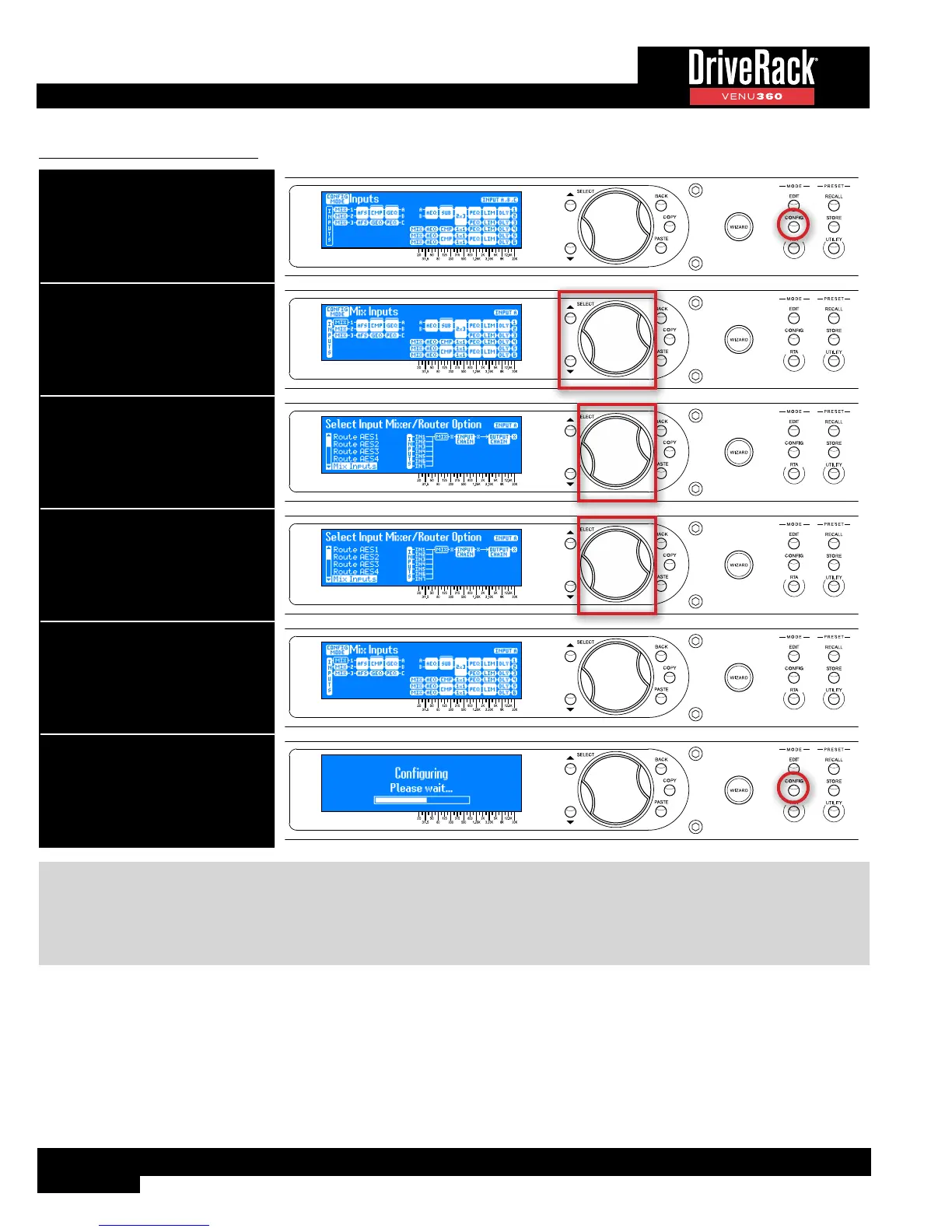
To configure a Mixer/Router:
1. Press the CONFIG button.
2. Select a Mixer/Router module
using the SELECT wheel and UP/
DOWN buttons.
3. Press the SELECT wheel to enter
the Mixer/Router Configuration
menu.
4. Select the desired option by
turning then pressing the SELECT
wheel.
5. Repeat steps 2-4 to configure
any additional Router/Mixer
modules. See TIP following table
for information on copying/pasting
Router/Mixer module types.
6. Press the CONFIG button twice to
apply the changes.
TIP: When multiple Mixers/Routers of the same type need to be configured, the COPY/PASTE buttons can be used to
copy one Mixer/Router type and paste it to another Mixer/Router location, rather than entering the Mixer/Router Selection
menu for each one. “Input” Mixer/Router types can be copied and pasted to other “Input” Mixer/Router locations. “Mid”
Mixer/Router types can be copied and pasted to other “Mid” Mixer/Router locations. This provides a much more efficient
way to configure multiple Mixer/Router modules as the same type.



 To Next Page