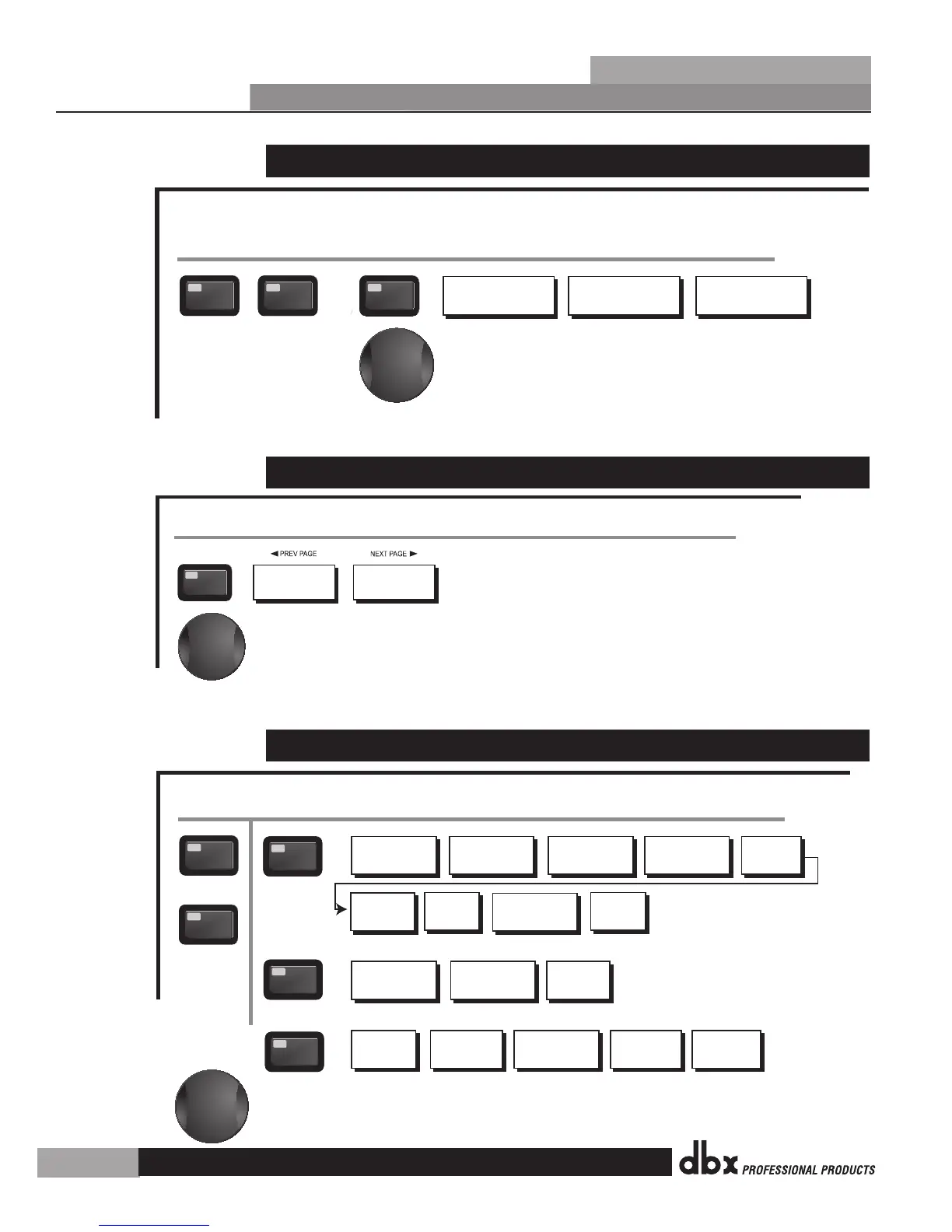
3.7 Navigating the AFS Section
The NEXT and PREV
buttons scroll through
the pages of selected module.
Navigating the Advanced Feedback Supression (AFS) Section
AFS On/Off
AFS Clear
Mode - Fixed/Live
Type- Speech, Low,Med and High
Number of Fixed filters 0-12
Live filter Lift - On/Off
Lift After - 0-60
AFS
AFS
From preset mode, press the AFS button. Pressing the Data Wheel will select the parameter to be edited.
<PREV PG NEXT PG>
Successive presses of the Data wheel will select
parameters within the currently selected page.
3.8 Navigating the Utility Section
Successive presses of the Data wheel will select
parameters within the currently selected page.
Navigating the Utility Section
LCD Contrast 1-16
AEQ Plot - RTA/GEQ
Sales Banner - On/Off
UTILITY
Meter Page
UTILITY
From preset mode, press and hold the UTILITY button. Pressing the Data Wheel will select the parameter to be edited.
3.9 Navigating the Wizard Section
The NEXT and
PREV buttons
scroll through
the pages of
selected module.
Navigating the WIZARD Section
Input Setup - Stereo or
Mono
SETUP
- PRESS AND HOLD TO ACCESS SETUP WIZARD
Main Speaker Select-
See list
Sub Speaker Select-
See list
Main Speaker
Levels
Load New
Preset
Connect Mic Pink Noise Level
-Inf to 20dB
Auto EQ
Select Number of
Fixed Filters
- 0-12
Mixer gain turn
down prompt
Select Type -
Low, Med, High mode
Mixer Gain Adjust-
WIZARD
From preset mode, press and hold one of the WIZARD buttons (Setup, EQ, or AFS).
<PREV PG
NEXT PG>
Fixed Filter Setup
Done-
Successive presses of the Data wheel will select
parameters within the currently selected page.
Sub Speaker
Levels
Auto level -
Connect Mic
Pink Noise Level
-Inf to 20dB
Auto level
Complete
EQ
AFS
- PRESS AND HOLD TO ACCESS EQ WIZARD
- PRESS AND HOLD TO ACCESS AFS WIZARD
DriveRack
®
PX
Section 3
Editing Functions
18


 To Next Page