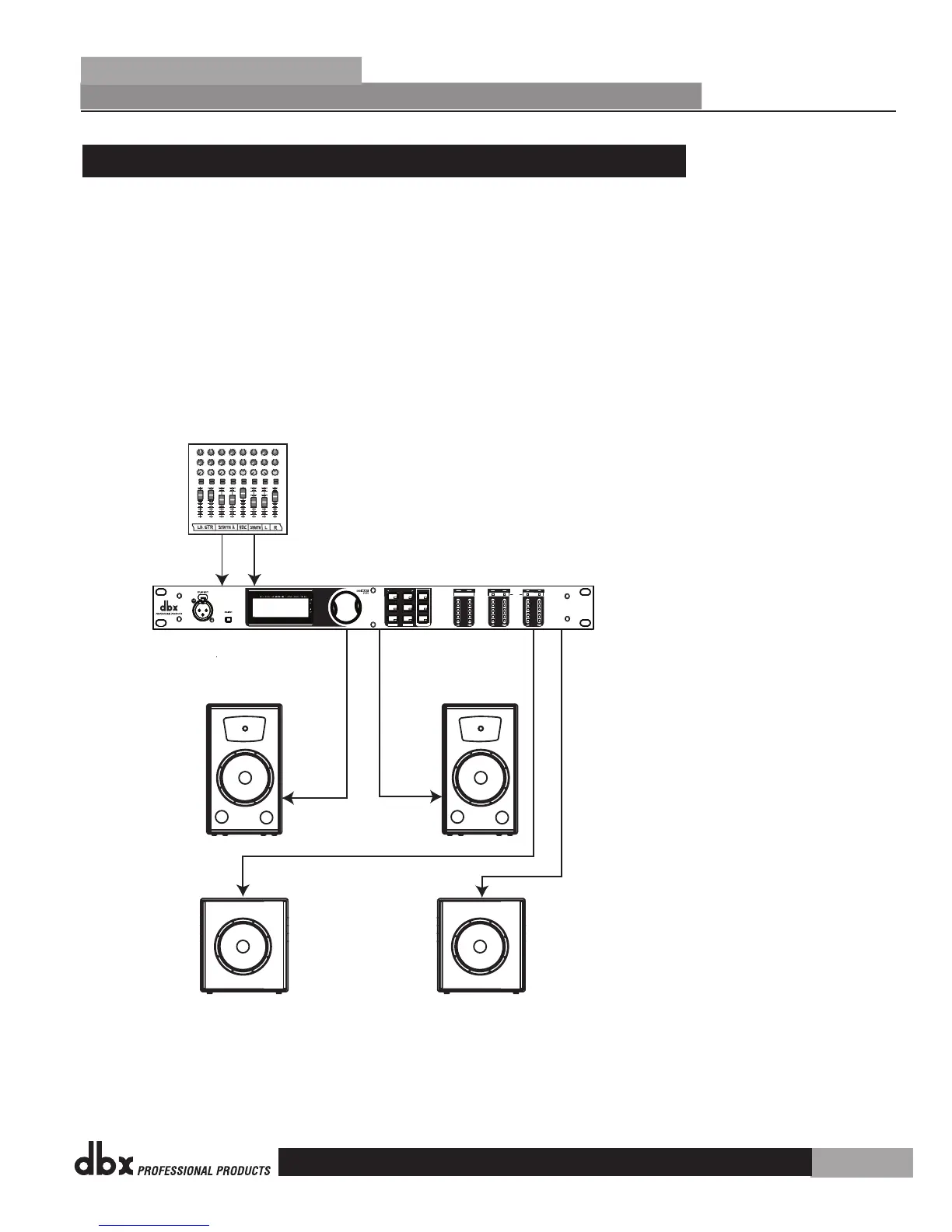
6.3 Two Mains/Two Subwoofers Setup
Hardware
Make sure that the mixer and powered speakers are turned off prior to powering up the
DriveRack® PX.
Connect the outputs from the mixer to the inputs of the DriveRack® PX.
Connect the main outputs of the DriveRack® PX to the main powered speakers.
Connect the sub outputs of the DriveRack® PX to the sub powered speakers.
Software
Use the Wizard to set up a specific preset. Press and hold the <SETUP> button to begin.
See page 8 for more information.
Right Main
Pan
Mute
-10
0
+5
+10
-20
-30
-
-5
L / R
Mute
L / R
Mute
L / R
Mute
L / R
-5
-4
-3
-2
-1
0
+1
+2
+3
+4
+5
Pan
-5
-4
-3
-2
-1
0
+1
+2
+3
+4
+5
Pan
-5
-4
-3
-2
-1
0
+1
+2
+3
+4
+5
Pan
-5
-4
-3
-2
-1
0
+1
+2
+3
+4
+5
Pan
-5
-4
-3
-2
-1
0
+1
+2
+3
+4
+5
Pan
-5
-4
-3
-2
-1
0
+1
+2
+3
+4
+5
Pan
-5
-4
-3
-2
-1
0
+1
+2
+3
+4
+5
Pan
-5
-4
-3
-2
-1
0
+1
+2
+3
+4
+5
1 2 3 4
-10
0
+5
+10
-20
-30
-
-5
-10
0
+5
+10
-20
-30
-
-5
-10
0
+5
+10
-20
-30
-
-5
Mute
L / R
5
-10
0
+5
+10
-20
-30
-
-5
Mute
L / R
6
-10
0
+5
+10
-20
-30
-
-5
Mute
L / R
-10
0
+5
+10
-20
-30
-
-5
Aux 1
0
2
4 6
8
10
Aux 2
0
2
4 6
8
10
Aux 1
0
2
4 6
8
10
Aux 2
0
2
4 6
8
10
Aux 1
0
2
4 6
8
10
Aux 2
0
2
4 6
8
10
Aux 1
0
2
4 6
8
10
Aux 2
0
2
4 6
8
10
Aux 1
0
2
4 6
8
10
Aux 2
0
2
4 6
8
10
Aux 1
0
2
4 6
8
10
Aux 2
0
2
4 6
8
10
Aux 1
0
2
4 6
8
10
Aux 2
0
2
4 6
8
10
Aux 1
0
2
4 6
8
10
Aux 2
0
2
4 6
8
10
Mute
L / R
-10
0
+5
+10
-20
-30
-
-5
Mixer
JBL PRX515
JBL PRX518
Left/Mono
Main
Right Sub
Left/Mono
Sub
Left/Mono Input
Right Input
SETUP
AFS
RECALL
SUBHARMONIC
COMP/LIMITER
UTILITY
PRESET
NEXT PG
STORE
EQ
WIZARD
Inputs
Sub Outs
UTILITY
PREV PG
WIZARD
0
6
12
24
36
SIG
Headroom dB
Headroom dB
Headroom dB
Outputs
Limiter
DriveRack PX
®
Powered Speaker
Optimizer
0
6
12
24
36
SIG
0
6
12
24
36
SIG
JBL PRX515
JBL PRX518
1.
2.
3.
4.
1.
DriveRack
®
PX
Section 6
Application Guide
31


 To Next Page