Quick Start
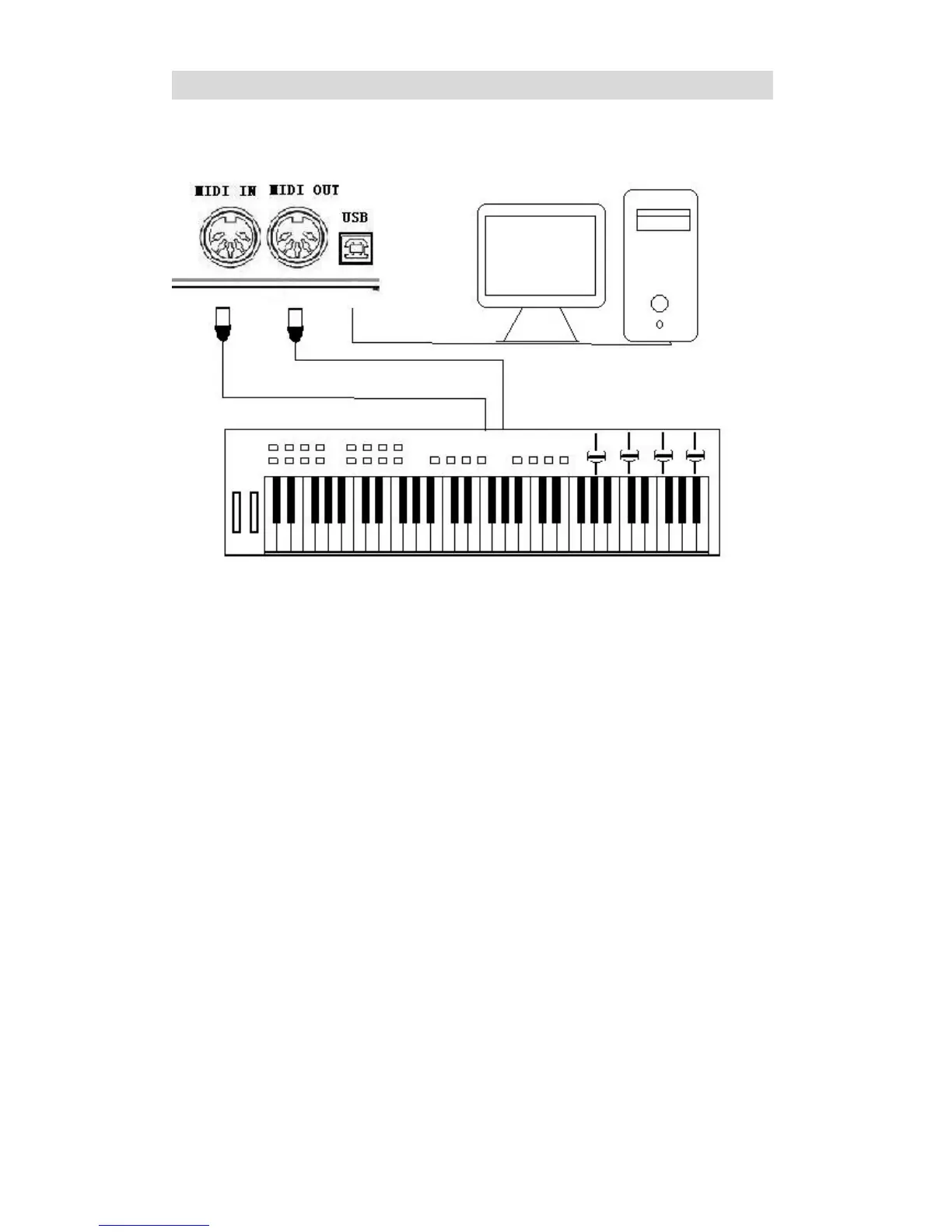
Connecting a MIDI Equipment Connecting MIDI device
There are 5 pin MIDI jacks (MIDI IN, MIDI OUT) and USB midi jack on the rear panel of this
module. Users can use this module as a sound source to any midi device or computer by
connecting the midi cable to these jacks. When connecting MIDI to a Device, it will say "find new
equipment" in the Device menu.
MIDI (Musical Instrument Digital Interface) is a world standard that allows a wide variety of
instruments and computers to transmit and receive performance and other data with one another.
To use the MIDI, you have to use a MIDI cable to connect to an external device.
MIDI IN – The MIDI IN jack when connected to an external MIDI device receives MIDI data
from the corresponding external MIDI device.
MIDI OUT – The MIDI OUT jack when connected to an external MIDI device transmits MIDI
data produced by this Instrument to the corresponding external MIDI device.
The function of USB is the same as MIDI IN and MIDI OUT, the only difference is with the cable
used. You can use a normal USB cable to connect to a computer or other device.
Connecting to a Media Player
The AUX jack at the rear panel can be used to connect to a media player such as a MP3 player.
Power Supply
Make sure the power is switched OFF and connect the supplied AC/DC adaptor to the DC IN jack.
CAUTION: Before turning the power on or off for all components, set all volume levels to
minimum.


 To Next Page