202 RR
Operating instructions and warnings
19
8 USE INSTRUCTIONS
After making all connections to the terminal board, remember to short-circuit, whenever needed, any
unused input (see “connection to the control board”) and power the card: on the display you will read for
a few seconds “rES-” followed by the symbol “----” which stands for gate closed.
8.1 Visualisation of inputs status
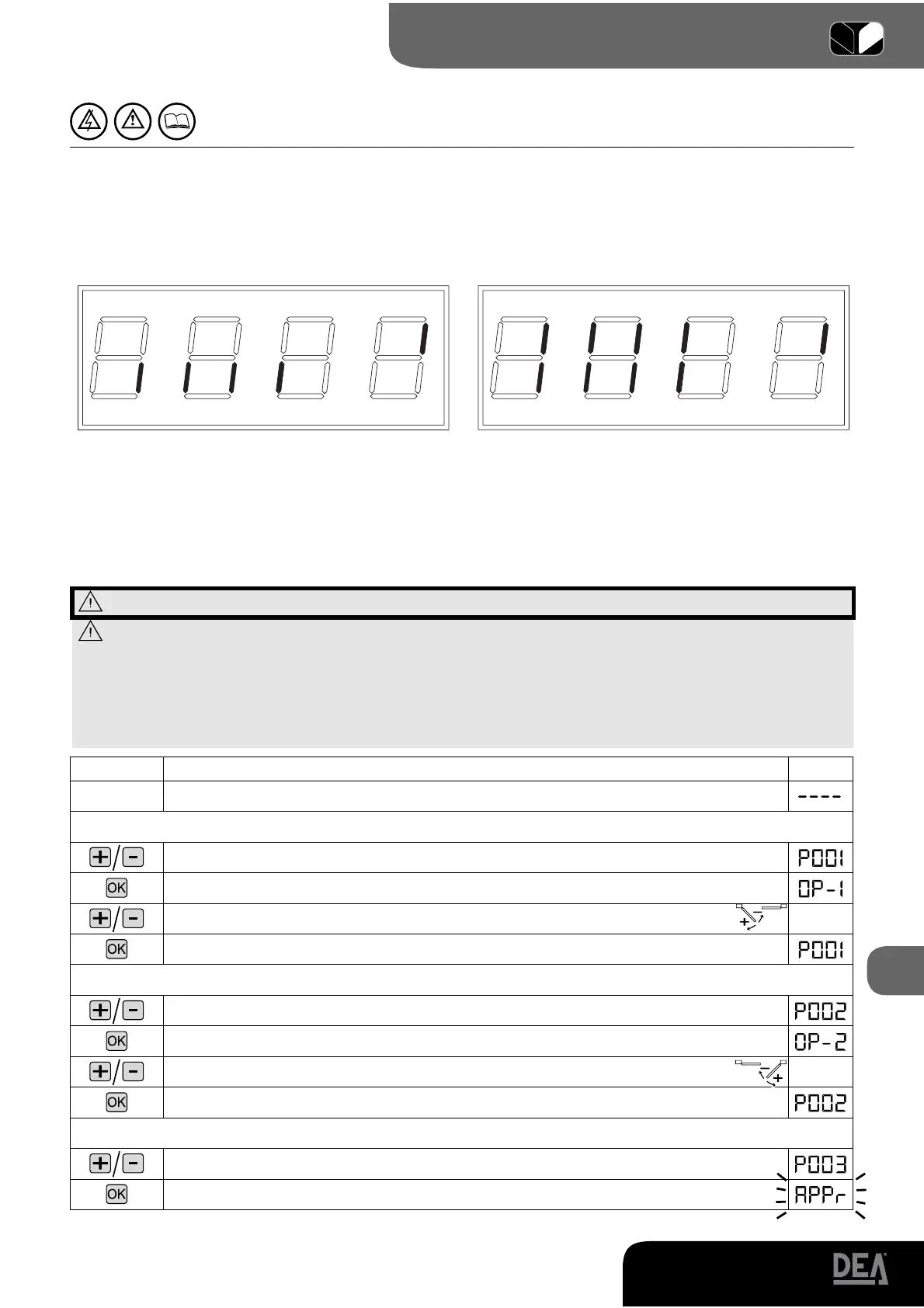
Press on the “OK” key to check that all inputs have been properly connected.
Basic installation Complete installation
By pressing the “OK” key when the control board awaits further instructions (“----”) the display shows
some vertical segments: each one of them is associated to one of the control board inputs (see the picture
above). When the segment is lit it means that the contact associated to it is closed, on the contrary, when
it is not lit the contact is open.
8.2 Setup and memorization of motor stroke
WARNING For a correct adjustment of the oil pressure operators, refer to page.25.
WARNING Before the learning of the operators stroke:
• Select the type of operators: with encoder (P034=0 and J8=J10=pos. A); without encoder (P034=1
and J8=J10=pos. B).
• Select the number of operators used: 2 operators (P029=0); 1 operator (P029=1).
• Make sure that eventual safety devices, photocells and limit switches are connected and working cor-
rectly. Their presence is automatically detected by the control panel during the learning.
Instructions Function
Display
The control board is ready to receive instructions
Leaf 1 positioning
Scroll down the parameters until you visualize procedure P001
Confirm! The control board is ready for the positioning of leaf 1
Position leaf 1 in its standstill position while opening
1
Confirm!
Leaf 2 positioning
Scroll down the parameters until you visualize procedure P002
Confirm! The control board is ready for the positioning of leaf 2
Position leaf 2 in its standstill position while opening
1
Confirm!
Motors stroke memorization
Scroll down the parameters until you visualize procedure P003
Confirm!
FCC2
SIC1
F
C
A1
FOT
O
1
F
C
A2
FCC1
S
IC
2
PEDON
S
T
ART
ST
O
P
F
O
T
O
2
FCC2
SIC1
FCA1
FOT
O
1
FCA2
FCC1
S
IC
2
PEDON
S
T
ART
ST
O
P
FOT
O
2



 To Next Page