Key Operations
29
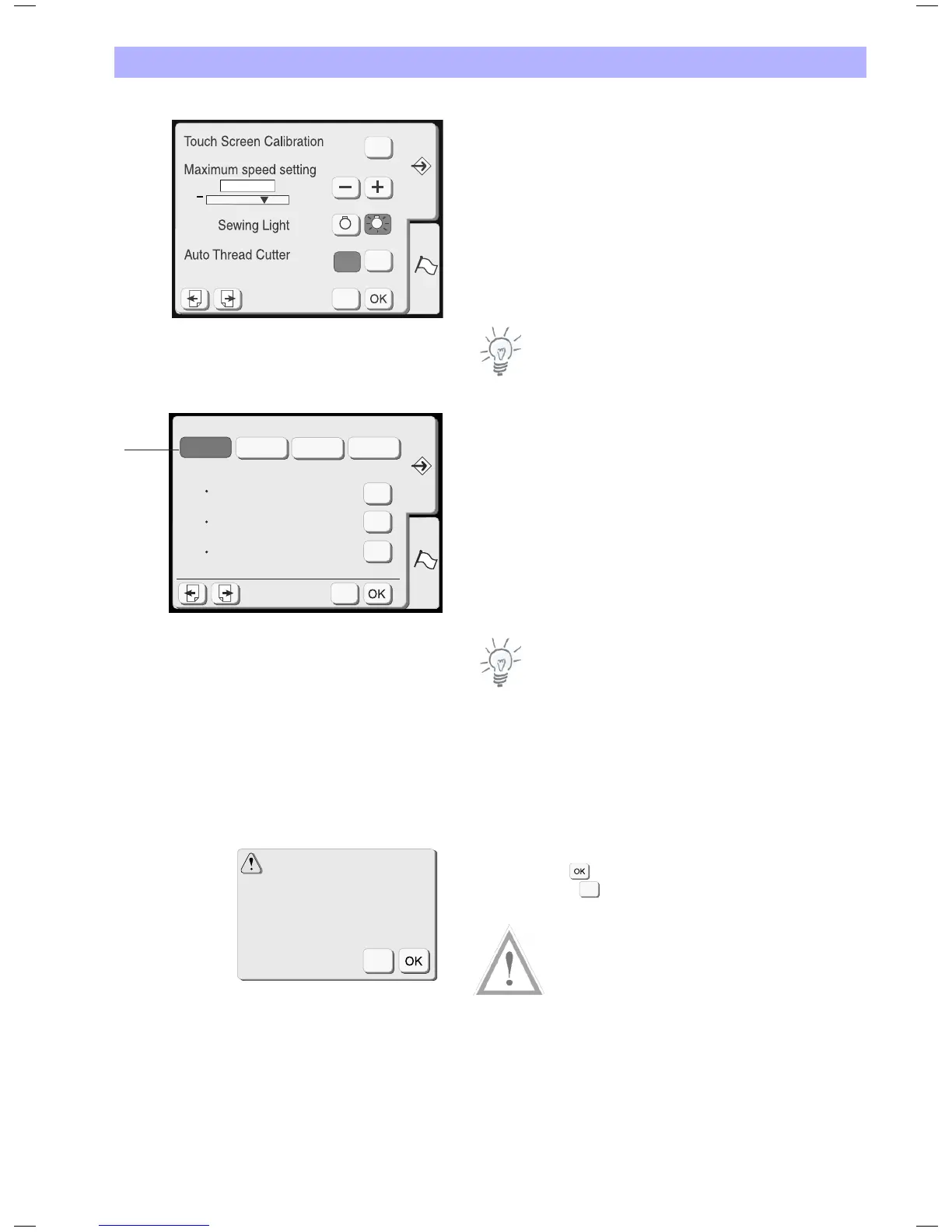
1 Sewing light
You can turn the sewing light on or off by pressing the sewing light
key.
2 Auto Thread Cutter
With this option activated (= ON) the Deco 340 automatically cuts
the thread before a color change is requested. To disable the
automatic function select OFF.
Independent of this setting you may at any time have the thread cut
by pressing the Thread Cutter button located at the head of the
Deco 340 (see page 7 for reference).
Note:
Auto thread cut is not recommended when sewing with metallic or
thick threads, because it drastically reduces the life time of the knife.
3 Thread selection
The preferred thread brand can be chosen by pressing the
corresponding brand key. Every design opened will be recalculated
and the best matching colours of your preferred brand will be
shown when reviewing the design. Four brands with 104 colours
each are preset in the Deco 340. Please refer to the thread colour
overview in the Appendix for more details on these colours.
If you don't work with a standard brand you may press the selected
brand name a second time. With no brand selected the thread
calculation is disabled. Instead the thread descriptions are shown as
stored on the design card. This accommodates the user, to choose
the best fitting colour independent of a brand.
Note:
The newly assigned colours are only displayed, but not stored with
the designs.
Formatting the memory
If the internal memory, the USB Stick or the ATA Design Card does
not function due to damage to the memory bank, you need to
re-enable it by formatting the memory.
The confirmation window will appear when you press the Yes key.
Press the OK key to start formatting.
Press the close key to close the confirmation window without
formatting.
Caution!
Formatting either the internal memory, the USB Stick or the ATA
Design Card will delete all designs in the corresponding memory or
card.
X
Built-in Memory
Thread selection
Format
ATA PC Card
Yes
Yes
Yes
USB Memory Stick
MadeiraIsacord
Sulky Mettler
3
Built-in Memory
Format Built-in Memory ?
All the stored data will be
erased.
X
X
Key Operations
29
1 Sewing light
2 Auto Thread Cutter
Note:
3 Thread selection
Note:
Formatting the memory
Caution!


 To Next Page