Editing and Combining Designs46
Editing Mode
The editing window can be used to combine embroidery designs.
Built-in designs, letters as well as designs from USB Sticks or Design
Cards can be merged on the Deco 340 into one single design.
These new designs are limited to:
• max.50singledesignsthattheyaremadeof
• atotalof64'000stitchesand
• max.104coloursections
Open Editing Window
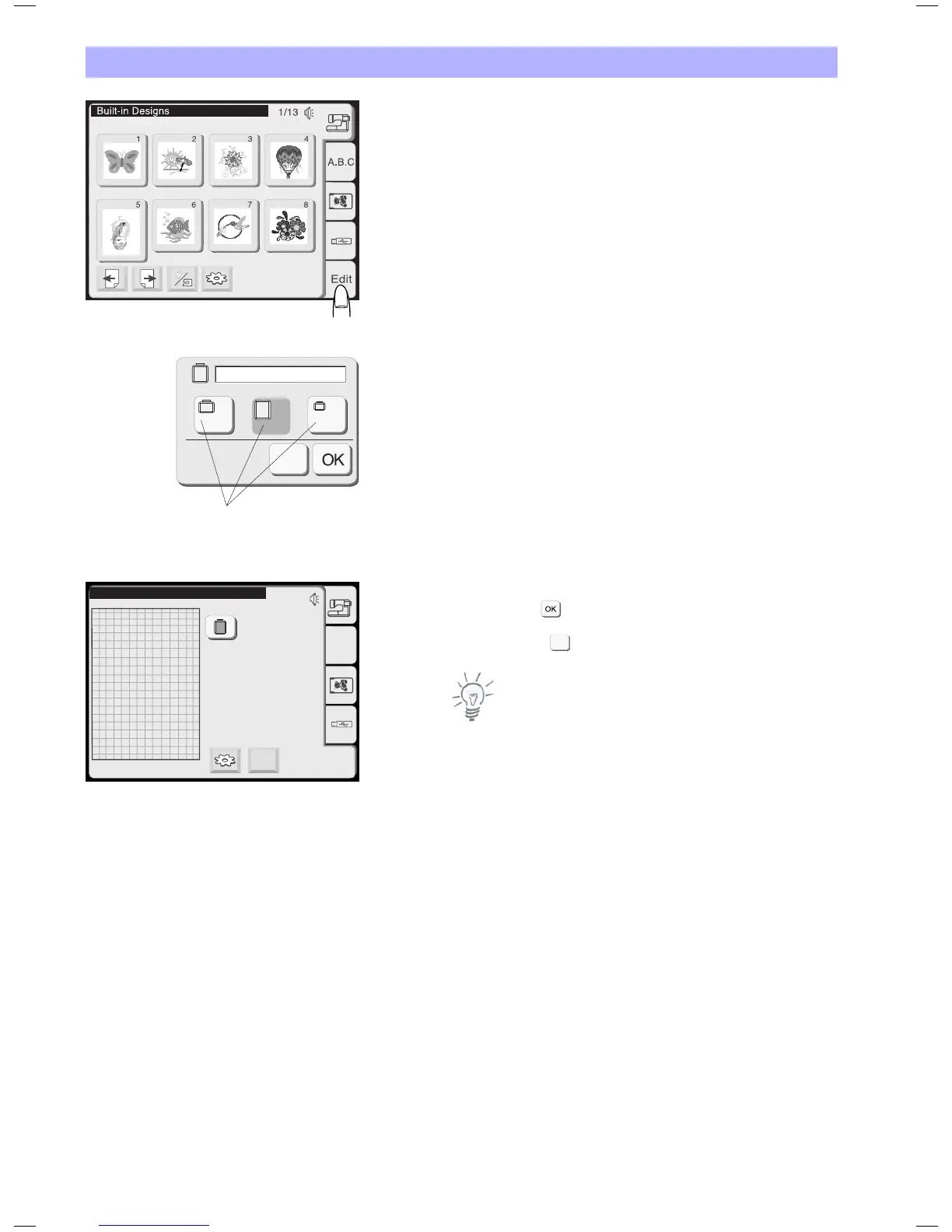
From the Pattern Selection Window press the editing tab to open
the Editing Window.
The Hoop Selection Window will open first to allow you selecting
the hoop size.
You can select one of the following hoops:
Hoop A (Standard): 126 x 110 mm (5.0 x 4.3")
Hoop B (Standard): 140 x 200 mm (5.5 x 7.9")
Hoop C (Option): 50 x 50 mm (2.0 x 2.0") = Free Arm Hoop
Hoop F (Option): 126 x 110 mm (5.0 x 4.3")
Press the OK key and the Editing Window for the selected hoop
will open.
Press the close key to cancel the selection and return to the
Pattern Selection Window.
Note:
Refer to page 48 for hoop selection after selecting the embroidery
pattern.
B
B: 140 x 200 mm
C
X
A(F)
1
B: 140x200mm
Edit
X
A.B.C
Edit
Editing window for the hoop B
X


 To Next Page