Lettering
45
2 / 3 Letters Monogram
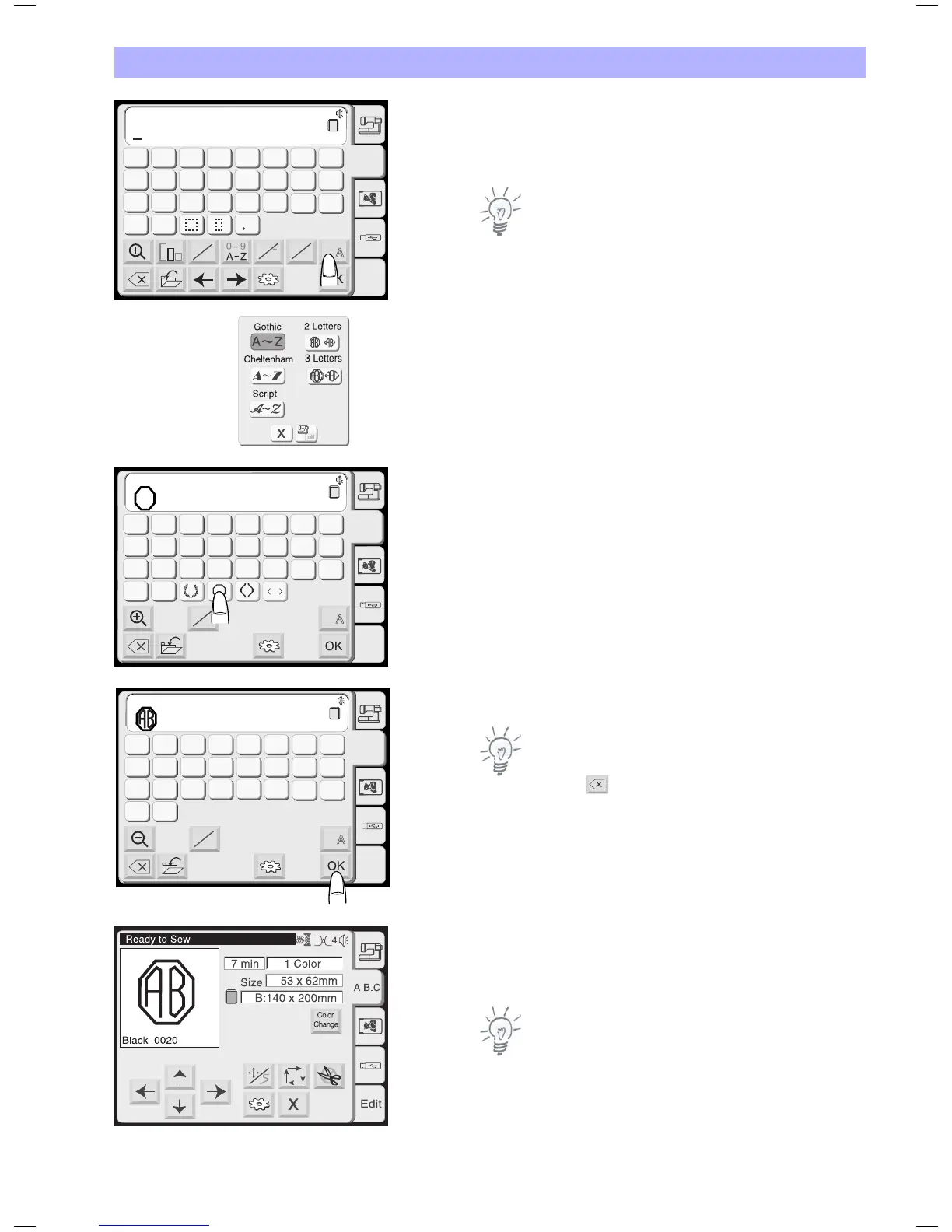
Example: 2 Letters with a crest
Select «2 Letters».
Note:
When the screen language is switched to Russian, there are three
more fonts displayed to choose from.
Select the crest.
Select the letter «A».
Select the letter «B».
Note:
Editing function is not available in 2/3 letters.
Press the delete key and enter a new letters instead of editing.
Press the OK key.
The screen will change to the embroidery window.
Press the start/stop button to start stitching.
Notes:
The 3 Letter monogram can be programmed in the same way as the
2 Letter monogram.
The 2/3 letters monogram will be stitched center aligned.
AB
AB
G
H
IJKL
M
N
OP
Q
RST
U
V
W
X
YZ
A
B
C
DEF
AB
B
Gothic
A.B.C
Edit
A
a
A
A
A A
L M
S
AB
AB
G
H
IJKL
M
N
OP
Q
RST
U
V
W
X
YZ
A
B
C
DEF
AB
B
2 Letters
A.B.C
Edit
A A
AB
AB
G
H
IJKL
M
N
OP
Q
RST
U
V
W
X
YZ
A
B
C
DEF
AB
B
2 Letters
A.B.C
Edit
A A


 To Next Page