Key Operations
35
Deleting Folders from USB Stick
You may delete folders with all its contained files at once from a
USB Stick.
Caution:
All designs will be deleted permanently - careful use of this function
is highly recommended.
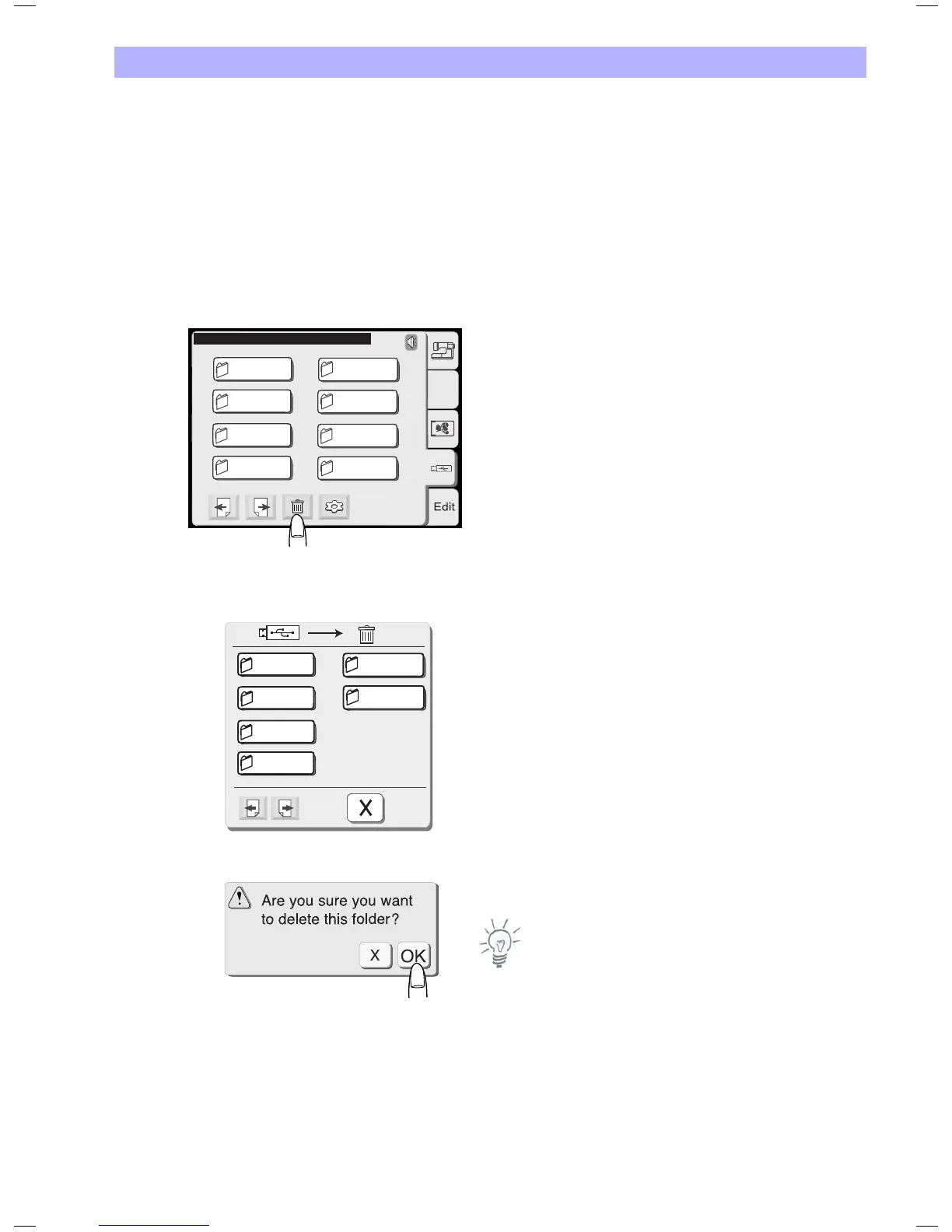
1. In the Pattern Selection Window select the tab for the USB Stick.
2. Press the delete key and a dialog box with all designs on the
USB will open.
3. On the first pages all folders on the USB Stick are displayed.
4. Press the key with the folder you want to delete.
5. A confirmation dialog will open.
Press OK to delete the selected folder.
Note
To cancel your selection without deleting the file press the close key.
USB : \ Embf5
A.B.C
1/4
FOLDR1AB
FOLDR2CD
FOLDR3EF
FOLDR4GH
FOLDR5IJ
FOLDR6KL
FOLDR7MN
FOLDR8OP
1/4
FOLDR1AB
FOLDR2CD
FOLDR3EF
FOLDR4GH
FOLDR5IJ
My Design


 To Next Page